The network for creativity
Join 1.25M professional creatives like you
Connect with clients, get discovered, and run your business 100% commission-free
Creatives on Contra have earned over $150M and we are just getting started
Back to feedPost

Our new favorite workflow: Blender blockout to AI render. Check it out 👇
View the full case study here: https://jzcreates.com/coastal-residence/
For our latest portfolio project, Coastal Residence, we developed a workflow that combines 3D previs in Blender with AI image generation to give us much more control over the final result.
We first built the entire property as a rough 3D block-out in Blender.
The models themselves don’t need to be beautiful.
They’re there to establish the important things: architecture, scale, room layouts, furniture placement, camera position, lens, composition, and perspective.
Once the shots are locked, those rough Blender frames become the foundation for the final AI-generated images.
Blender controls the structure. AI creates the finish.
This gives our team the ability to art direct each shot before generating the final visual, while keeping the property much more consistent from image to image.
And because everything begins with the same 3D environment, that one model can become much more than a set of still images.
For Coastal Residence, we used the workflow to create photoreal renders, floor plans, cinematic video, property walkthroughs, and AI agent-led tours.
We’re attaching a before-and-after video showing the transformation from the original Blender block-outs to the finished visuals.
Stay creative 🎨


The lighting is perfect.
Thanks, it's that California sunshine

Thank you, appreciate it. Yes, AI is a great tool.
The network for creativity
Join 1.25M professional creatives like you
Connect with clients, get discovered, and run your business 100% commission-free
Creatives on Contra have earned over $150M and we are just getting started











Related posts

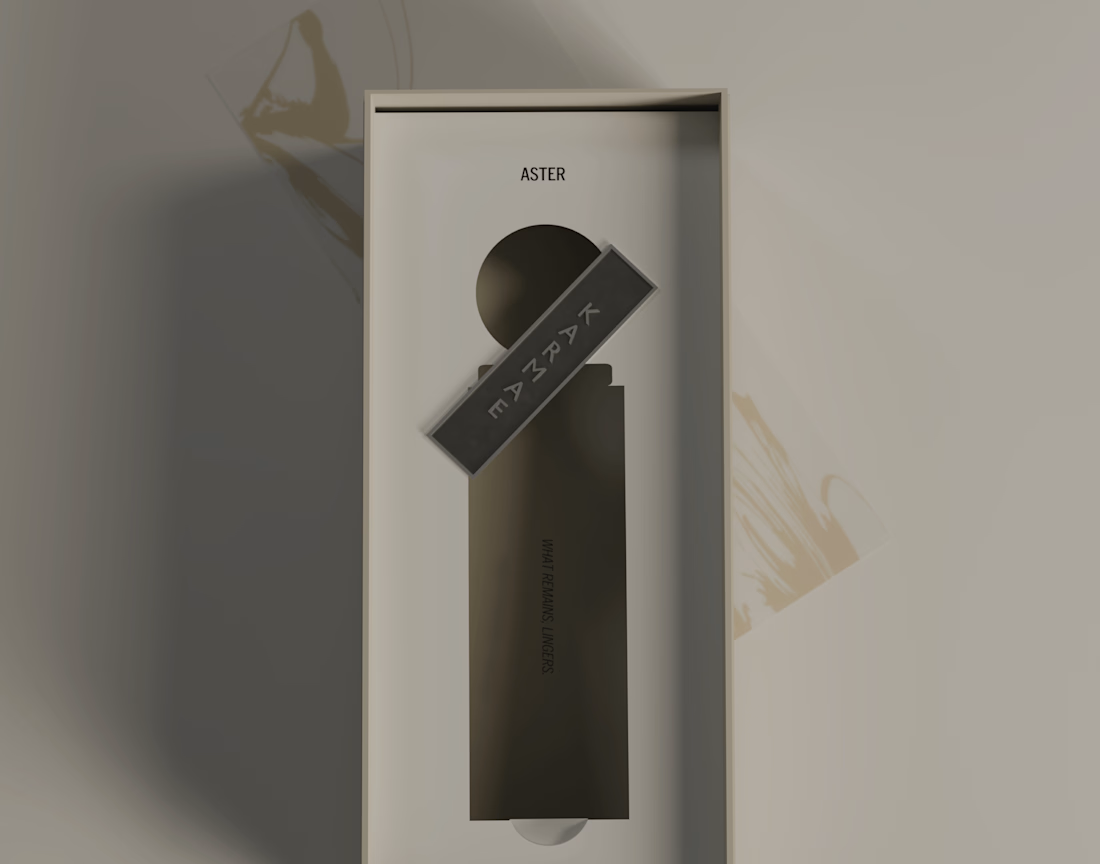
New case study is live.
KARMAE is a contemporary fragrance house exploring the relationship between scientific precision and sensory experience. ASTER was developed as the softer side of the brand, combining a restrained visual identity with tactile materials, frosted glass, muted metallics and considered packaging details.
The goal was to create a cohesive brand experience where the identity, product and packaging feel like natural extensions of one another. Alongside the branding and packaging, I also developed the product visuals and final 3D renders in Blender.
A more in-depth look at the concept, design decisions and final applications can be found in the full case study.
Long story short, I really enjoyed bringing this one to life, especially exploring how material contrasts and subtle details could give ASTER its own character while keeping it connected to the wider KARMAE brand.


Beautiful presentation!! and love the product packaging!




Great job Stizzy 🎉🎉🔥🔥

AI video is not about pressing generate.
It’s about controlling the direction before anything moves.
This short beauty concept was built from:
• one veeeeeeeery detailed prompt
• 8 reference frames
• basic editing and polish in Photoshop and After Effects
The interesting part for me is not that AI can make a video.
It’s that you can start directing it with a clear visual system:
• same color language,
• same model mood,
• same product world,
• same campaign feeling across stills and motion.
That’s where AI gets useful for brands.
Not as a random generator, but as a way to prototype campaign ideas faster, test visual directions earlier and turn static concepts into motion without a full production setup.
Tools:
• Magnific (Nano Banana 2 + Seedance 2.0)
• Adobe (Photoshop + After Effect)
Full case study here: https://designmorphic.com/impossible-species
#AICreative #CreativeDirection #ProductMarketing

Greattt✨