The network for creativity
Join 1.25M professional creatives like you
Connect with clients, get discovered, and run your business 100% commission-free
Creatives on Contra have earned over $150M and we are just getting started
Back to feedPost

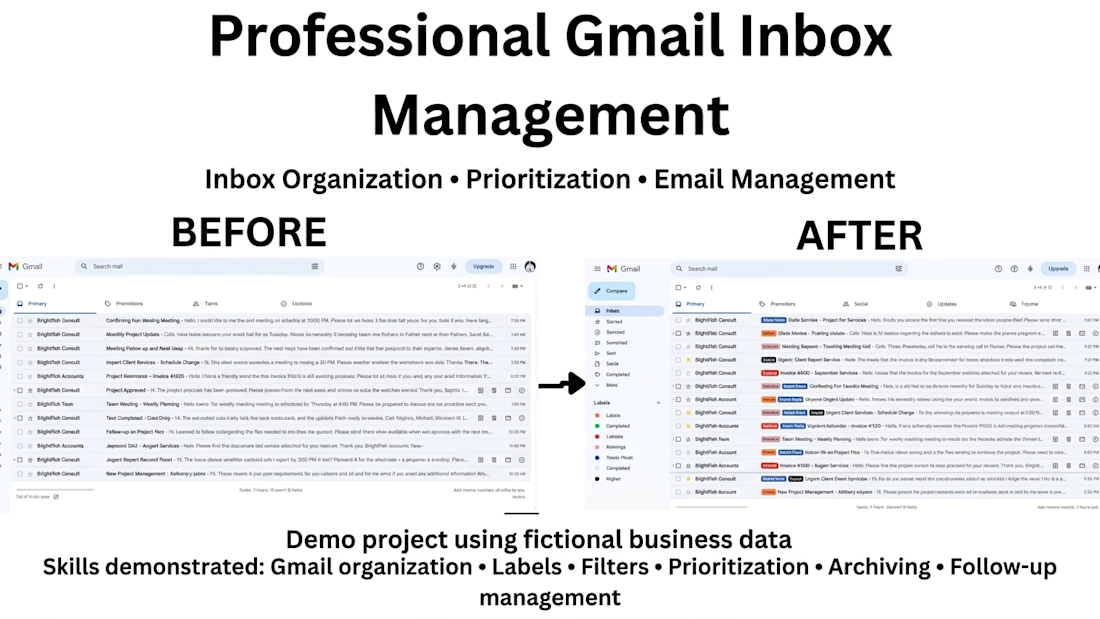
A busy inbox can quickly become difficult to manage without a clear system.
For this practice project, I organized a Gmail inbox using:
• Labels and categories
• Priority and urgent emails
• Follow-up emails
• Completed tasks
• Archived messages
The goal was to make important information easier to find and keep daily communication organized.
Practice project created to demonstrate my administrative support skills.
#VirtualAssistant #EmailManagement #AdministrativeSupport #Gmail #Productivity
The network for creativity
Join 1.25M professional creatives like you
Connect with clients, get discovered, and run your business 100% commission-free
Creatives on Contra have earned over $150M and we are just getting started










Related posts

Picture a consultant who takes 8 sales calls a week.
After each one comes the same routine: replay the recording, write notes, update the pipeline sheet, write the follow-up email. Call it 30 minutes a call. That is 4 hours a week, and on busy days the follow-up slips to tomorrow.
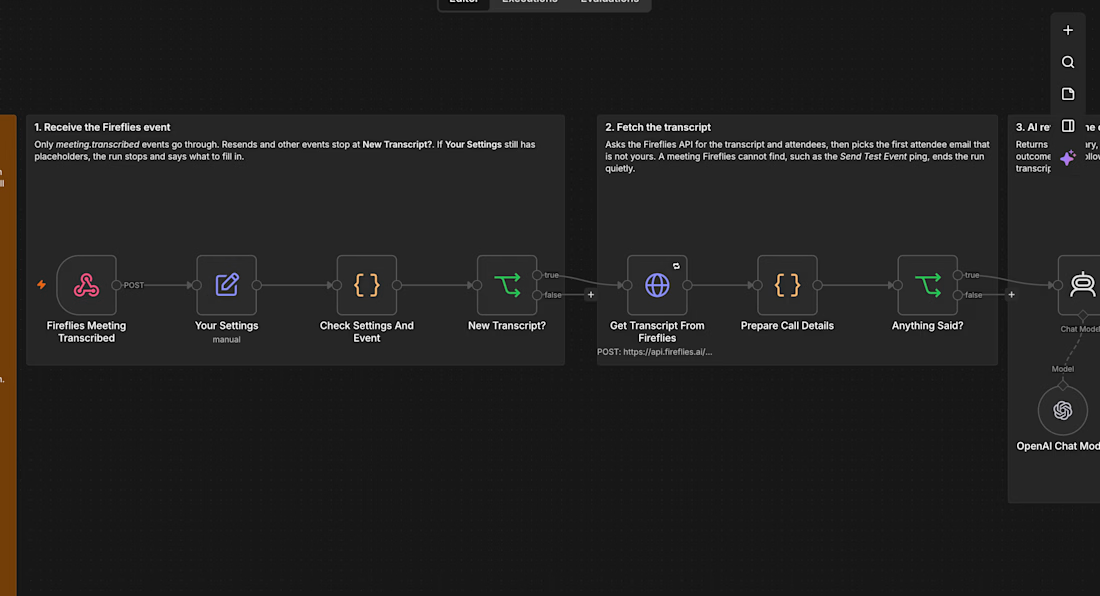
I built an n8n workflow that takes that routine away:
→ Fireflies records and transcribes the call
→ As soon as the transcript is ready, AI writes a summary, the open questions, the next step and whether the prospect is ready to go ahead
→ A follow-up email that fits that outcome is saved in Gmail drafts, addressed to the person on the call
→ The call is logged in Google Sheets and the notes land in your inbox
Nothing is sent automatically. You read the draft, change a line if you want, and press send.
For that consultant, 4 hours of admin a week turns into a few minutes of reading, and every prospect hears back the same day.
I tested it on a real recorded client call and have submitted it to the n8n template library as a free template. If you want it set up for your business, send me a message.



Title: Data Formatting & Cleaning in Excel
Description: I turn messy spreadsheet exports into clean, consistent, analysis-ready data. I remove duplicates and extra spaces, standardize names, dates and currency, and flag missing values for review instead of guessing.
Tags: Data Cleaning, Excel, Data Formatting, Data Entry, Spreadsheets, Virtual Assistant


🚀 Built a Gmail AI-Tagging + Slack Alerts System — Because Important Emails Should Never Get Missed
The problem every B2B team faces:
❌ Client emails sit unanswered for days
❌ Bank or government emails get buried in the inbox
❌ Deadlines are missed because no one flags them
❌ No daily view of what's pending vs overdue
I built a system that fixes all of this:
🎯 WHAT IT DOES:
✅ Watches Gmail inbox every 5 minutes
✅ Uses AI to classify every email into 5 categories:
• URGENT (deadlines, overdue, time-sensitive)
• BANK_GOV (banks, .gov domains, tax authorities)
• CLIENT_ACTION (awaiting response)
• FOLLOW_UP (needs follow-up)
• FYI (informational)
✅ Pushes real-time Slack alerts to the right channel:
• #urgent — for time-sensitive items
• #finance-legal — for bank/gov emails
• Assignee DM — for client action items
✅ Sends a daily 8 AM digest with:
• Overdue items
• Awaiting client action
• Pending tasks
✅ Auto-applies Gmail labels (AI/Urgent, AI/Bank-Gov, etc.)
✅ Hourly overdue scanner with automatic escalation
⚙️ TECH STACK:
n8n | Gmail API | OpenAI GPT-4o-mini | Slack API | Google Sheets
📊 RESULT:
→ Zero missed urgent emails
→ 15+ minutes saved per team member per day
→ Complete audit trail in Google Sheets
→ Full visibility into what's stuck and where
Gmail stays the primary interface. Slack becomes the reminder layer that ensures nothing slips.
Want this deployed for your team? Let's talk.
#AIAutomation #GmailAutomation #SlackIntegration #n8n #B2BSaaS #Productivity #WorkflowAutomation


Splitting BANK_GOV out on its own is smart. Those are the emails that hurt most when they get buried. When GPT-4o-mini tags one wrong, does the corrected label feed back into the prompt, or is it fixed by hand?