The network for creativity
Join 1.25M professional creatives like you
Connect with clients, get discovered, and run your business 100% commission-free
Creatives on Contra have earned over $150M and we are just getting started
Back to feedPost

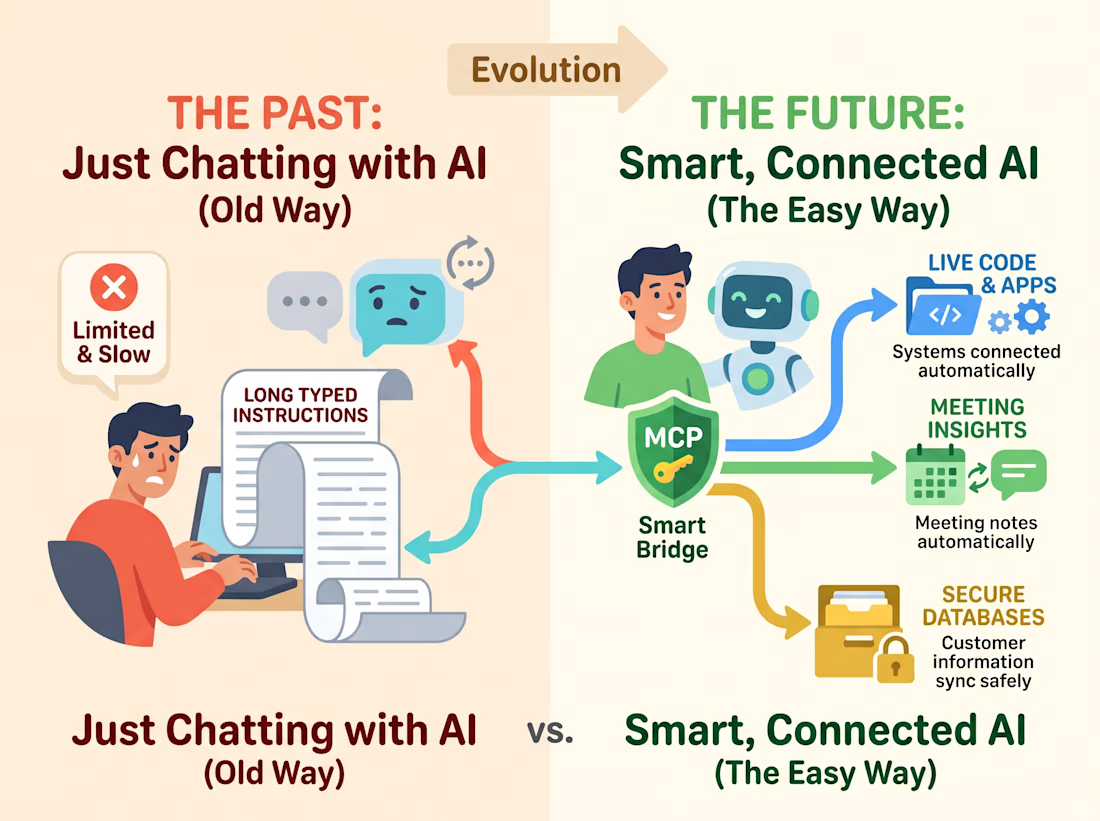
Prompt engineering is dead. Context engineering and Model Context Protocol (MCP) are taking over.
For the past year, everyone tried to fix bad AI outputs by writing longer prompts. Now, the best engineering teams are realizing that an AI agent is only as good as the live tools and context it can access.
By combining custom MCP servers with n8n webhooks and Claude, we can now build systems that:
• Read live API schemas and validate pull requests automatically
• Sync real-time meeting insights directly into CRM pipelines without manual data entry
• Query production databases safely with scoped permissions and full audit logs
When you give an LLM structured, real-time access to your actual stack instead of a static prompt, you go from a toy chatbot to an autonomous backend engineer.
Are you still relying on basic prompt templates, or have you started connecting your LLMs directly to live tool protocols?
The network for creativity
Join 1.25M professional creatives like you
Connect with clients, get discovered, and run your business 100% commission-free
Creatives on Contra have earned over $150M and we are just getting started






Related posts

Just added a new AI SaaS UX & Conversion Copywriting concept to my Contra profile! 🤖✨
Most AI meeting assistants lose users in two spots: landing pages packed with vague "neural intelligence" hype instead of clear time-savings, and in-app setups that trigger instant privacy hesitation or blank-prompt paralysis.
For this self-initiated NotePilot concept, I designed the messaging from first click to automated follow-up:
Outcome-First SEO Copy: Led with tangible value ("Never Take Meeting Notes Again Get Action Items in Seconds") and defused privacy objections upfront ("Never trains AI models on your private calls").
High-Trust Calendar Sync UX: Added clear bot permission toggles and an "Ask Me Before Joining" option so users feel in full control.
One-Click Prompt Chips: Replaced an intimidating empty chat bar with instant action chips ("Draft Follow-Up Email", "Extract Action Items") to speed up first-call activation.
Check out the full case study on my profile. What’s your #1 dealbreaker when trying a new AI tool? 👇

Ai Tamagotchi with Augmented Reality
They've been around for several years now, with built-in AI. And in a couple of years, we may (not all) there will be pocket devices-agents with AI


Cute!

I landed a paid AI partnership.
I didn't pitch. The brand came to me.
An agency that works with AI companies emailed me.
They reviewed my LinkedIn stats and reach.
Then they agreed to pay me in full before I started.
What got me noticed:
1. I build in public.
2. My LinkedIn shows it.
3. My numbers and past work are on one page.
What I learned:
Use AI tools while they are still early.
When they launch a new feature, they have a budget.
Sometimes it is not a lot.
But you are not chasing the money.
The brand wants to spend it.
The video I made for it started with one old photo of my grandma.
The full story is in my newsletter today.
Which AI tool are you using early?