The network for creativity
Join 1.25M professional creatives like you
Connect with clients, get discovered, and run your business 100% commission-free
Creatives on Contra have earned over $150M and we are just getting started
Back to feedPost

GDPR Aware Instagram DM Automation with ManyChat
PROJECT CATEGORY: Automation
ROLE: AI Automation Specialist & ManyChat Automation Developer
PROJECT OVERVIEW:
I optimized and restructured an existing Instagram DM automation system built with ManyChat, focusing on improving the user journey, simplifying the automation logic, and implementing a reliable unsubscribe mechanism.
The project involved reviewing an existing automation flow, understanding the client's business requirements, removing unnecessary follow-based conditions, improving the messaging structure, and creating a dedicated opt-out workflow that allows users to stop receiving automated messages.
The final system provided a cleaner and more user-friendly Instagram automation experience while giving the client greater control over how their audience interacts with the automated messaging system.
THE PROBLEM:
The client already had an Instagram automation flow running in ManyChat, but the existing setup required refinement to better match her intended customer journey.
One of the main issues was that the automation depended on users following the Instagram account before continuing through the flow. The client wanted the "Follow me" message to remain as an optional call to action rather than functioning as a condition that blocked the user from continuing.
Another key requirement was to provide users with a clear way to opt out of future automated messages. The client wanted a simple and reliable unsubscribe mechanism that could be managed directly within ManyChat.
The challenge was therefore to modify the existing automation without unnecessarily rebuilding the entire system, while maintaining a simple and user-friendly experience.
THE SOLUTION:
I reviewed the client's existing ManyChat automation and restructured the relevant parts of the flow based on the updated requirements.
I removed the dependency on the Instagram follow action as a mandatory condition and adjusted the flow so that following the account could remain as an optional engagement prompt.
I then implemented a dedicated unsubscribe workflow using a custom keyword trigger. When users wanted to stop receiving messages, they could use the designated opt-out keyword, triggering an automated response confirming that they had been removed from further messaging.
The solution was designed to be simple to manage, easy for users to understand, and integrated directly into the client's existing ManyChat environment.
HOW I DO IT:
01 — Requirement Analysis
I reviewed the client's existing ManyChat setup and identified the specific parts of the automation that needed to be modified rather than unnecessarily rebuilding the entire system.
02 — Existing Flow Analysis
I examined the existing "3 Ways Automation" flow to understand its structure, triggers, messages, conditions, and user journey.
The client specifically identified the existing automation as "3 Ways Automation."
03 — Flow Optimization
I adjusted the existing automation logic so that following the Instagram account was no longer required as a condition for the user to continue through the experience.
04 — Unsubscribe Automation
I implemented a dedicated unsubscribe workflow using a custom keyword trigger and an automated confirmation message, allowing users to opt out of future automated messages.
The client's requested implementation used a custom keyword concept and a confirmation flow when users wanted to stop receiving messages.
05 — Testing & Validation
I reviewed the automation flow to ensure the unsubscribe trigger and confirmation message were connected correctly and that the workflow was active within the ManyChat environment.
06 — Client Handover
After completing the implementation, I provided the client with a working automation setup and guidance around the updated workflow.
TOOLS AND TECHNOLOGY:
Primary Tool:
ManyChat
Platform:
Instagram
Automation:
Marketing Automation
Workflow Automation
Chatbot Automation
Keyword Triggers
Conditional Logic
THE RESULT:
The result was a cleaner and more streamlined Instagram automation system that better matched the client's intended customer journey.
The follow action was transformed from a mandatory flow condition into an optional engagement prompt, allowing users to continue through the automation without being blocked.
A dedicated unsubscribe workflow was also implemented, giving users a clear way to opt out of future automated messages and providing the client with a simple mechanism for managing user preferences within ManyChat.
The project successfully improved the structure and usability of the client's existing automation without requiring an unnecessary rebuild from scratch.
PROJECT OUTCOME:
Optimized an existing Instagram ManyChat automation by removing unnecessary follow-based restrictions and implementing a dedicated keyword-driven unsubscribe workflow for improved user control and engagement.


The network for creativity
Join 1.25M professional creatives like you
Connect with clients, get discovered, and run your business 100% commission-free
Creatives on Contra have earned over $150M and we are just getting started





Related posts

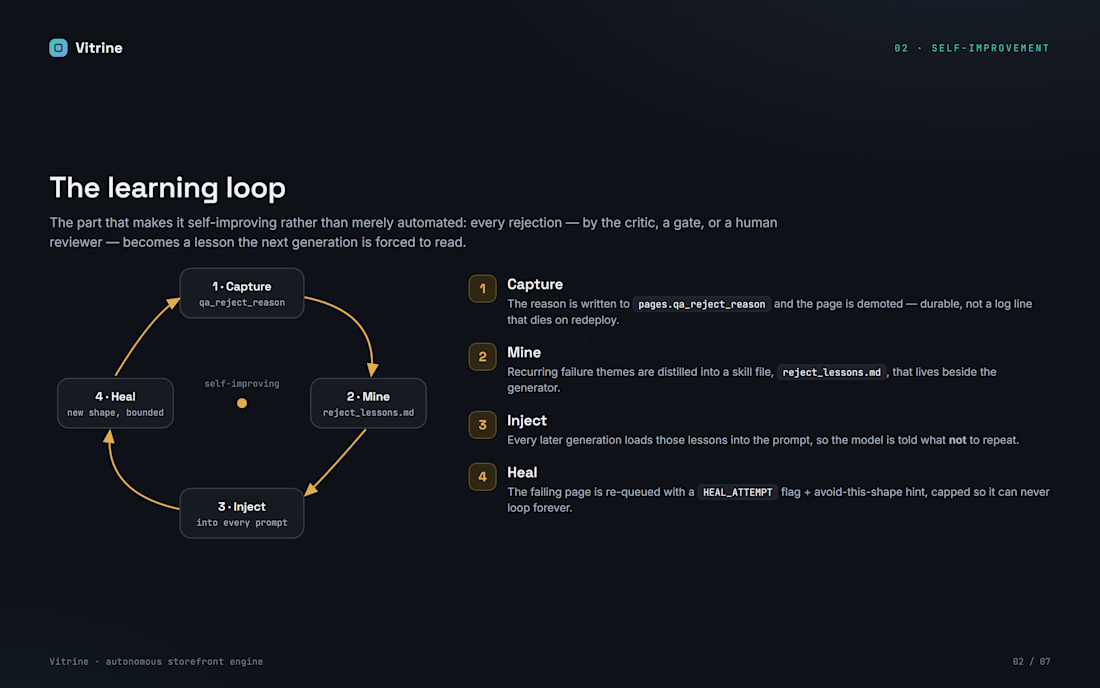
Autonomous backend that turns local merchants into bespoke landing pages with almost no human in the loop. Celery tasks discover businesses, an LLM designs each page, then two independent AI gates - an HTTP health oracle and a 5-axis design critic - validate it. Rejections are mined into lessons and re-injected, so the system self-heals and regenerates a better layout automatically. Qualified pages wait behind a signed preview link and a human approval gate; nothing ships without consent, payment and a global kill switch


Most small businesses lose clients in the gap between "new request" and "someone replies".
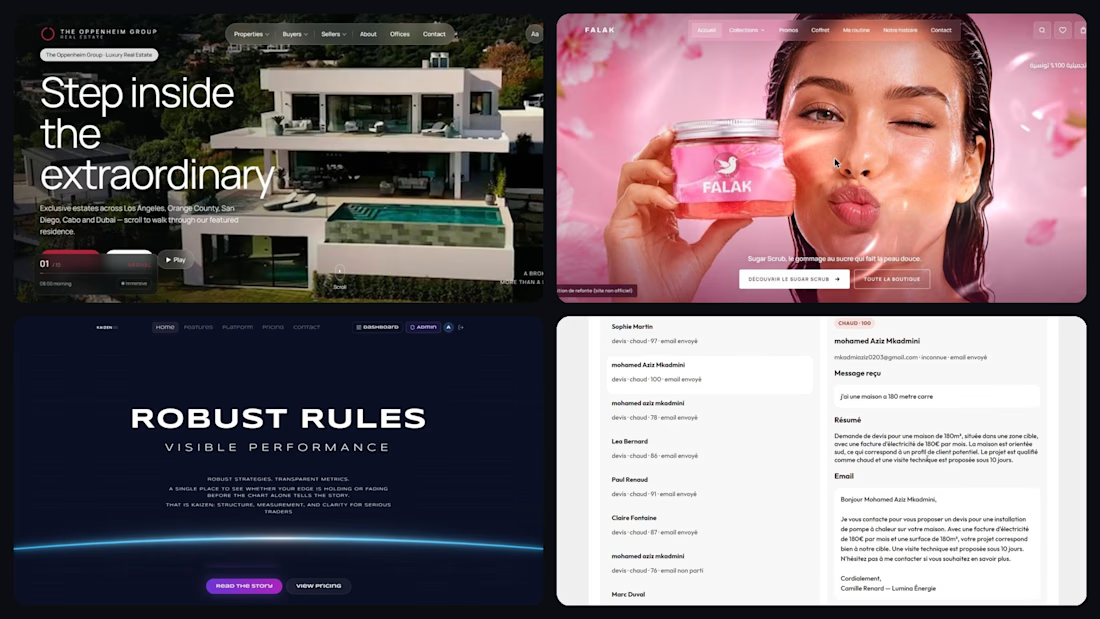
This year I shipped 5 projects that close that gap.
→ n8n AI agents that score every lead and reply with a personalised email in seconds
→ MedAssist AI, a SaaS that lets patients book and get answers 24/7
→ Kaizen Kyoto Capital, a crypto SaaS live with Paddle billing, 2FA and 43 automated tests
→ Two premium redesigns (luxury real estate in 3D, a cosmetics brand) with before/after
I'm a full-stack & AI automation developer, available now for websites, SaaS MVPs and n8n automations. French, English, Arabic. I reply within 24h.
Got a process that eats your team's time? Send me a message and I'll map your first automation for free.

Good work, keep going

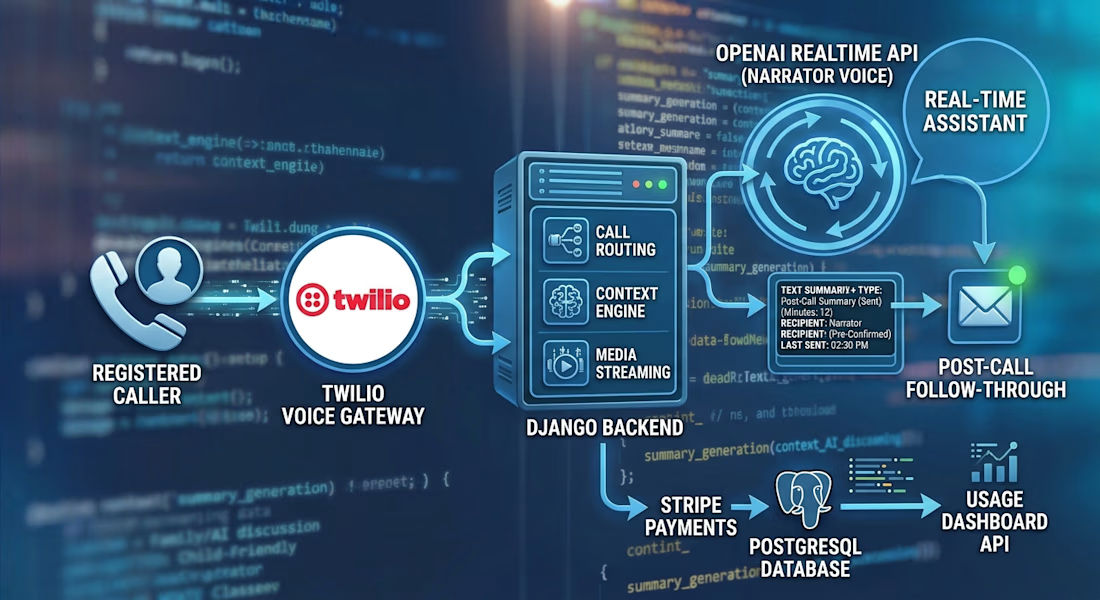
Building a Voice AI Assistant That Turns Phone Calls Into Thoughtful Follow‑Through
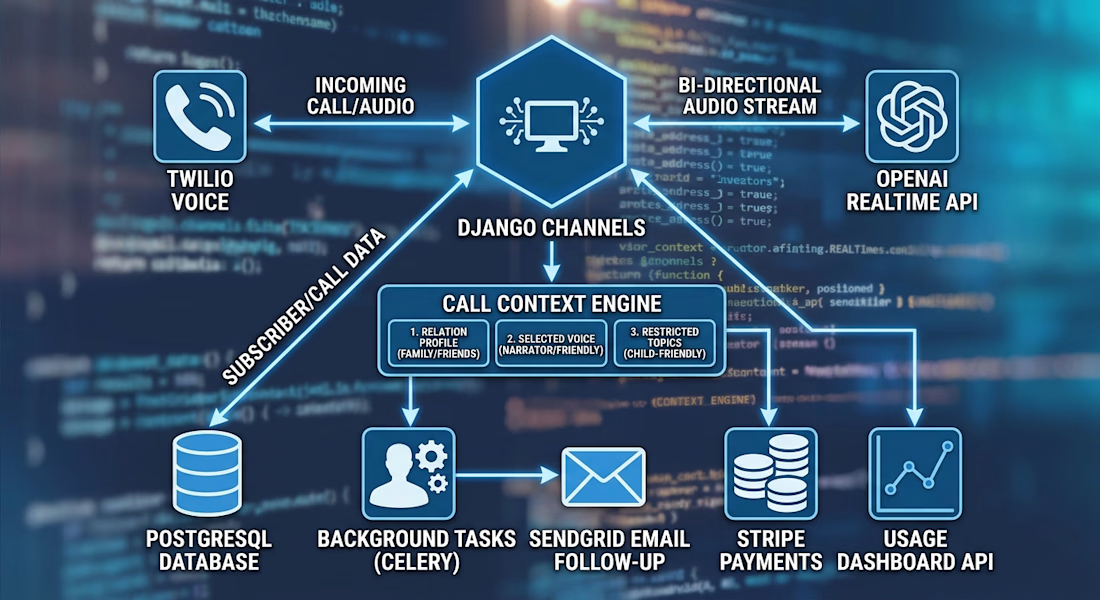
I built a Django backend for a family-focused AI phone assistant. A registered caller connects through Twilio, and Django Channels streams the call to an OpenAI Realtime session for a natural, two-way conversation.
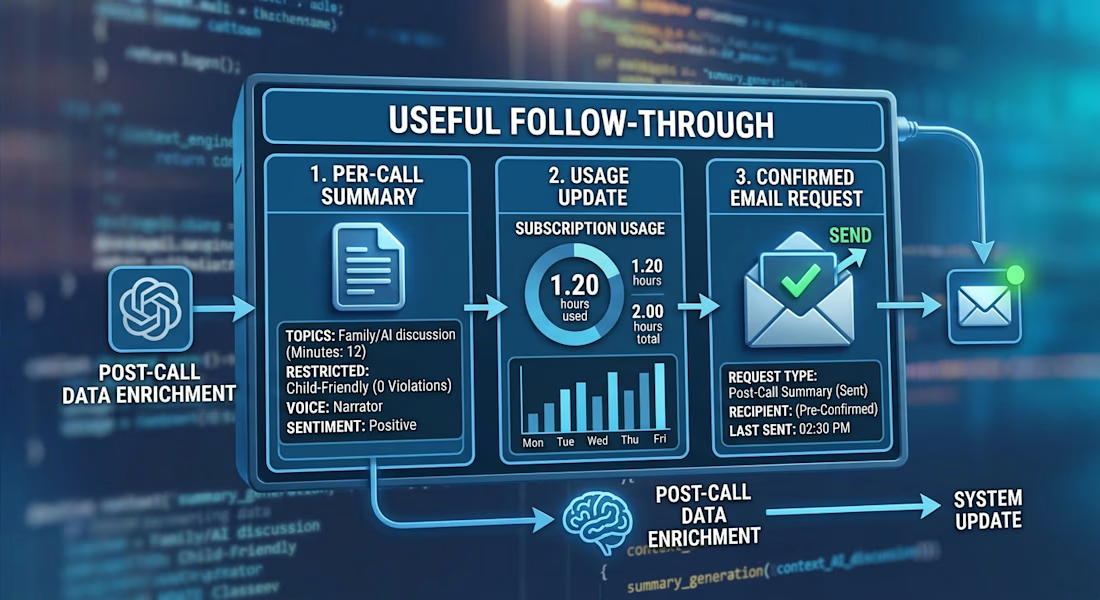
The backend adds caller-specific context, selected voices, subscription minute limits, and interruption handling. After the call, background tasks generate a separate summary. A follow-up email is sent only when requested and the recipient is confirmed.
I also built APIs for managing relations, subscriptions, and dashboard usage data. One of the most interesting parts was connecting the whole lifecycle: incoming call, real-time conversation, usage tracking, and post-call follow-through.
#Django #VoiceAI #RealtimeAI #Twilio #OpenAI #BackendDevelopment