The network for creativity
Join 1.25M professional creatives like you
Connect with clients, get discovered, and run your business 100% commission-free
Creatives on Contra have earned over $150M and we are just getting started
Back to feedPost

Data Cleaning and Sales Analysis
## Project Overview
This project demonstrates an end-to-end data cleaning and exploratory data analysis (EDA) workflow using Python.
The dataset was intentionally generated with multiple data quality issues to simulate real-world business scenarios commonly encountered by Data Analysts and Data Scientists.
---
## Objectives
- Identify data quality issues.
- Handle missing values.
- Remove duplicate records.
- Standardize mixed date formats.
- Perform exploratory data analysis.
- Generate business insights.
- Create visualizations for decision-making.
---
## Dataset Issues
The raw dataset contained several intentional problems:
- Missing values in `Qty`
- Missing values in `Harga`
- Duplicate transactions
- Mixed date formats
- Inconsistent category naming
---
## Data Cleaning Process
The following steps were performed:
1. Loaded and profiled the raw dataset.
2. Identified missing values and duplicate records.
3. Removed duplicate transactions.
4. Filled missing values using median imputation.
5. Investigated mixed date formats.
6. Built a custom date parser to standardize dates.
7. Saved the cleaned dataset.
---
## Results
### Before Cleaning
| Metric | Value |
|----------|---------|
| Total Records | 1009 |
| Missing Qty | 8 |
| Missing Harga | 5 |
| Duplicate Records | 10 |
# After Cleaning
| Metric | Value |
|----------|---------|
| Total Records | 999 |
| Missing Qty | 0 |
| Missing Harga | 0 |
| Duplicate Records | 0 |
| Failed Date Parsing | 0 |
---
## Business Insights
### Best-Selling Products
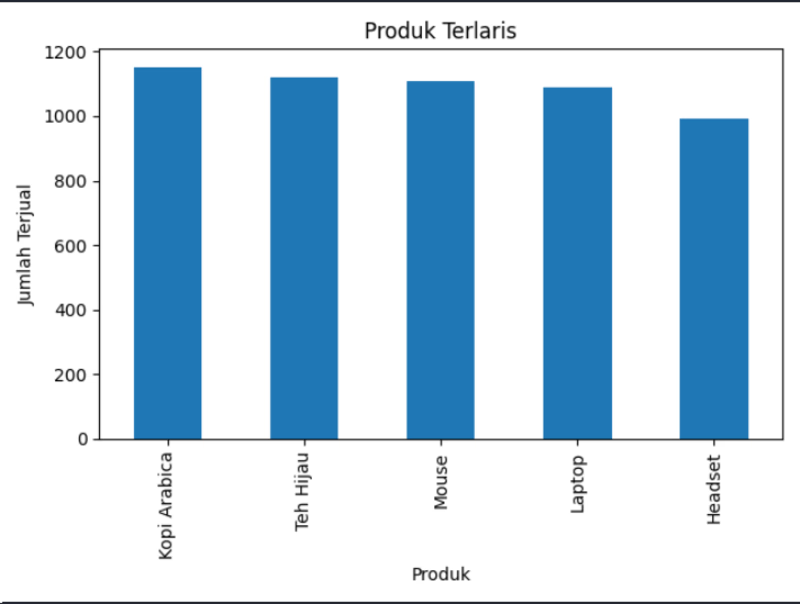
Kopi Arabica was the top-selling product, followed by Teh Hijau and Mouse.
### Sales by City
Bandung generated the highest sales volume, indicating strong market potential compared to Surabaya and Jakarta.
### Category Performance
Electronics dominated sales performance.
An inconsistency between `Makanan` and `makanan` was discovered, highlighting the importance of data standardization before analysis.
### Revenue
The total revenue generated was:
Rp 13,593,130,000
## Technologies Used
- Python
- Pandas
- NumPy
- Matplotlib


The network for creativity
Join 1.25M professional creatives like you
Connect with clients, get discovered, and run your business 100% commission-free
Creatives on Contra have earned over $150M and we are just getting started





Related posts


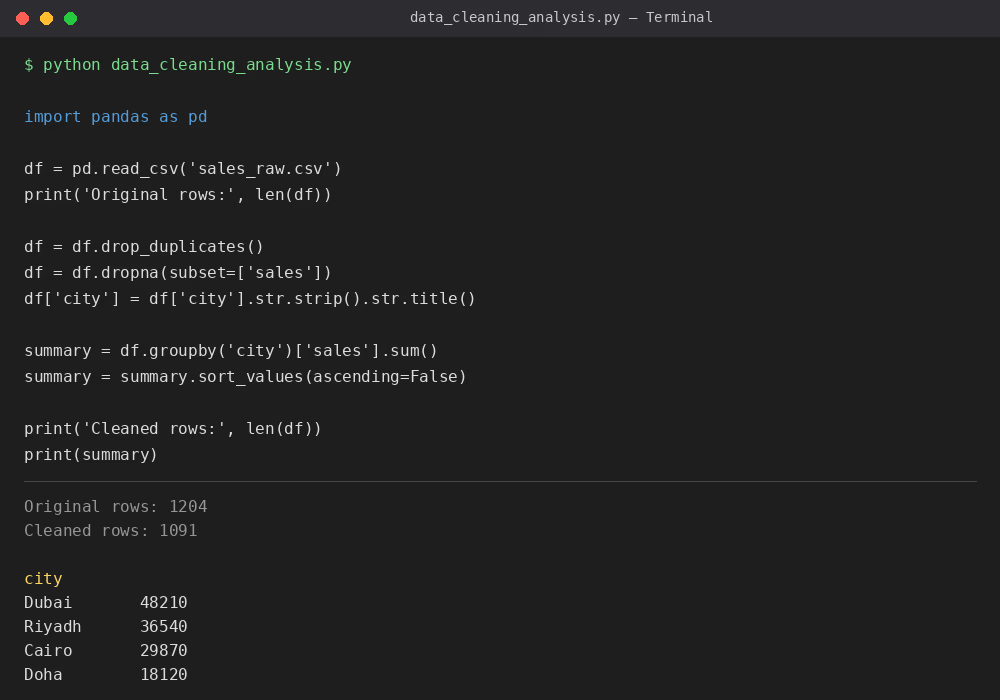
A sample Python project showing my data cleaning workflow — removing duplicates, handling missing values, standardizing text fields, and summarizing sales by city using Pandas. This reflects the kind of cleanup and analysis I do for client datasets.


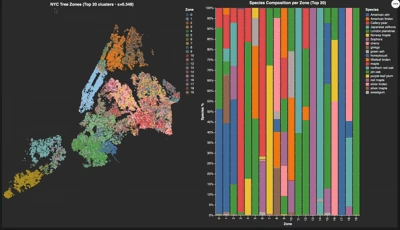
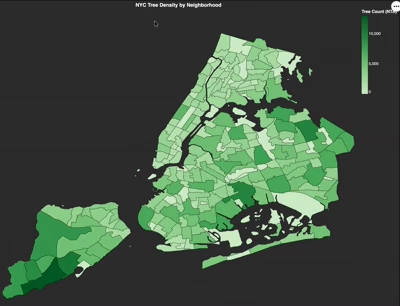
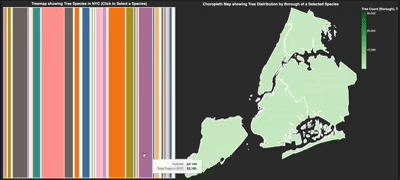
These are the interactive visualizations created based on NYC tree data. These three are interlinked with each other as you can see below. I used UMAp dimensionality reduction, showing spatial choropleth maps

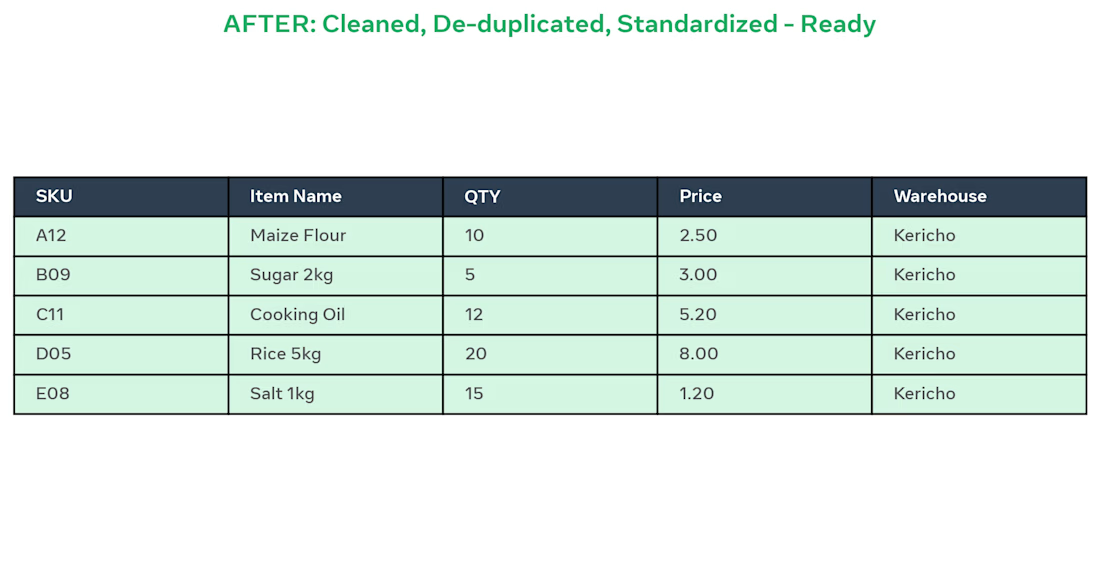
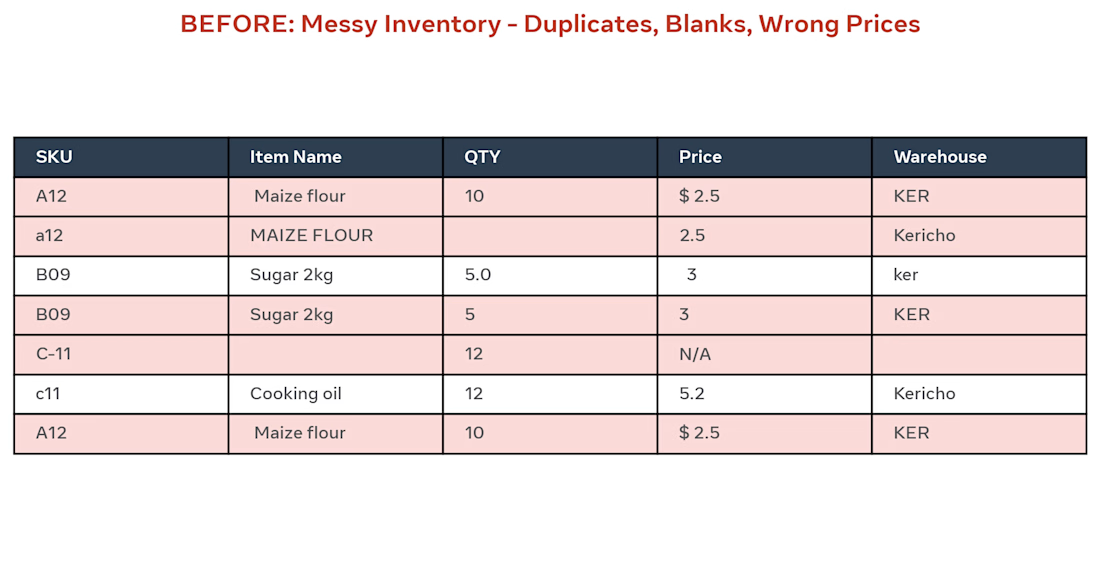
BEFORE: Client had messy Excel inventory with 500 rows, duplicates (A12 / a12), blanks, wrong prices like "$ 2.5" and "N/A", and different warehouse names (KER / ker / Kericho).
AFTER: I did:
Removed 12 duplicate SKUs
Standardized item names to Title Case
Fixed QTY and Prices to 2 decimals
Unified Warehouse to Kericho
Made sheet ready for pivot dashboard
Result: Clean, ready-to-use inventory in 2 days using Excel.
Tools: Excel, Remove Duplicates, Text to Columns, TRIM, PROPER