The network for creativity
Join 1.25M professional creatives like you
Connect with clients, get discovered, and run your business 100% commission-free
Creatives on Contra have earned over $150M and we are just getting started
Back to feedPost

Most people hire a Webflow developer to build the site. The expensive mistakes happen after launch, when nobody's watching.
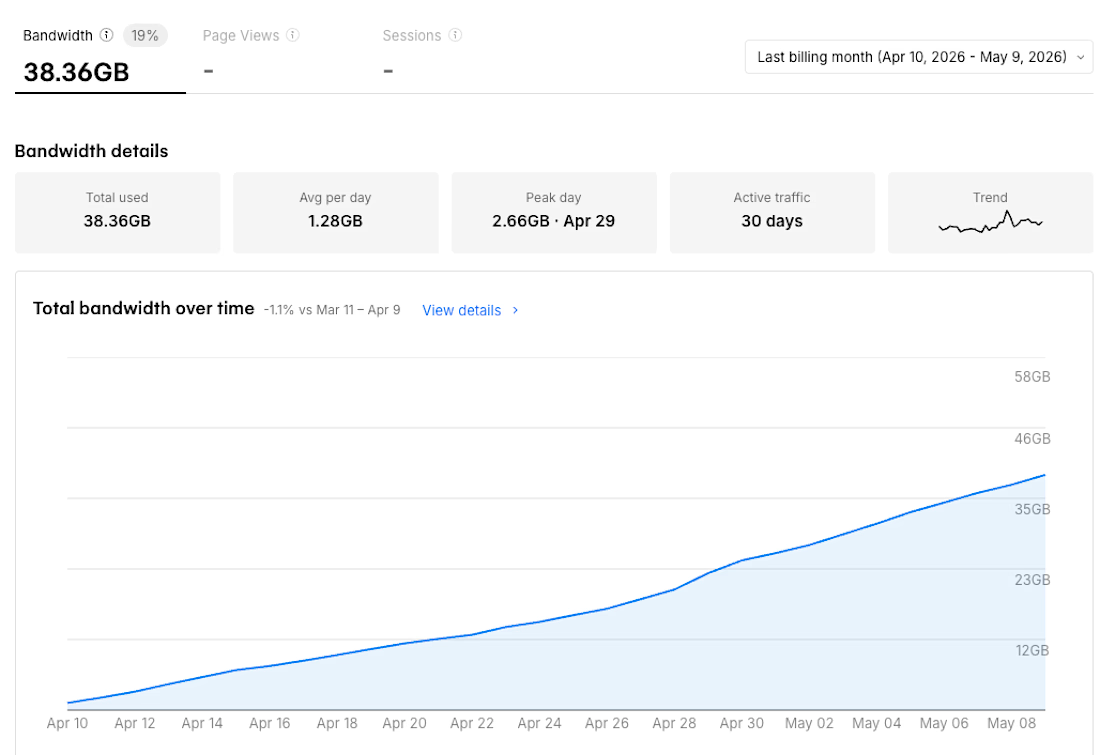
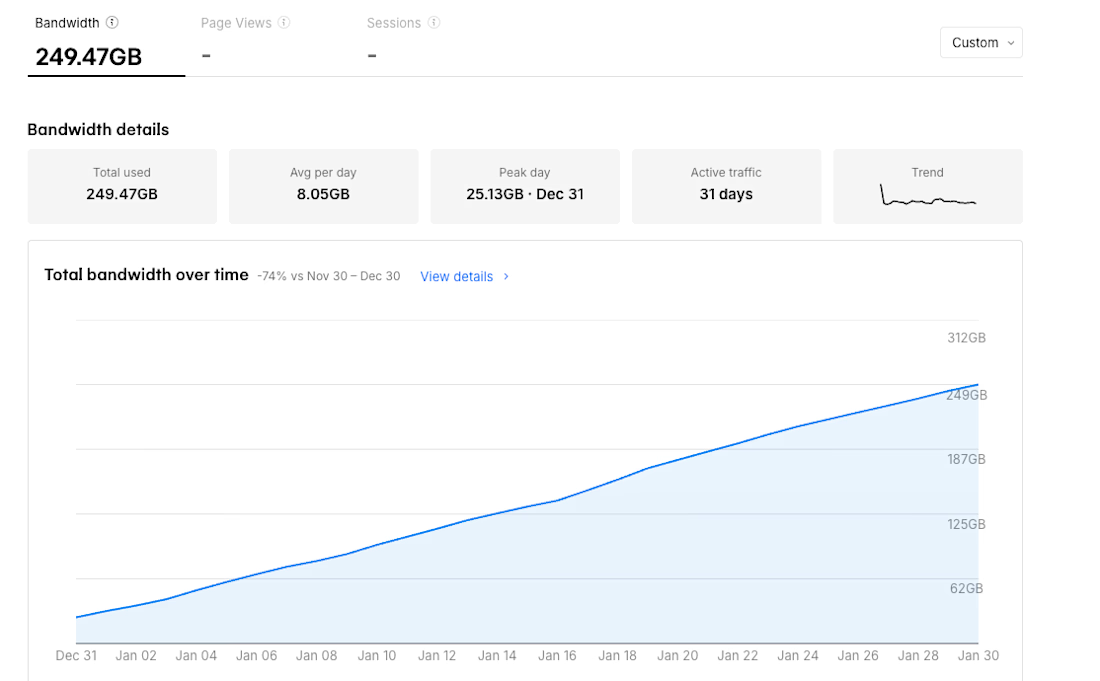
A client's Webflow site was quietly burning 229GB of bandwidth on a 200GB limit. Webflow auto-upgrades your plan if you cross the limit two months running. No warning. The hosting cost just climbs.
The obvious move is to upgrade. More bandwidth, problem gone.
I pulled the usage CSV first.
Webflow keeps a bandwidth breakdown in site settings that almost nobody opens. Every asset, its size, how many times it loaded. Sorted by bandwidth, the story shows up fast.
First find: a variable font file in custom fonts that wasn't even being used on the site. 1.05MB per load, loaded 45,660 times in one month. 48GB gone to a file nobody knew was there. Deleted it.
But that wasn't surviving peak season. This is a resort in Thailand. July brings 2-3x traffic from EU and US travelers. Even after the font fix, the math didn't hold.
The images were already compressed. 200-700KB, WebP, sensible sizes. The problem wasn't the files. It was delivery.
Webflow serves every image from its own servers, and every visitor pulls every image straight from the source. Every time. Same photos, same load, paid for again on every visit.
The fix was a caching layer routed through the client's own domain. First visitor triggers one fetch. Everyone after gets a stored copy served from the nearest location. The source stops getting hit on repeat.
One image eating 15.31GB a month now gets fetched 20-30 times total. The rest is cache.
Cache hit rate reached 95% over the first week. Daily bandwidth dropped from 6-7GB to 3.5GB. Most months it costs nothing to run. Peak season runs about $5.
No auto-upgrade. No climbing bill.
Here's the part worth sitting with if you own a site. Building it is one job. Keeping it from quietly costing you money every month is a different one, and it's the one most people skip after launch. A site that looks finished can still be bleeding in a dashboard nobody opened.
So if your Webflow bill went up this year and your traffic didn't, that gap is your answer. Pull the CSV before you pay for more.
The network for creativity
Join 1.25M professional creatives like you
Connect with clients, get discovered, and run your business 100% commission-free
Creatives on Contra have earned over $150M and we are just getting started





Related posts

Webflow Development Services
Modern, responsive, and easy-to-manage Webflow websites built with a strong focus on UI/UX.
From design to Webflow development, we create websites that are simple, clean, and made for real business needs.
No Code. Design. Webflow.
#Webflow #WebflowDevelopment #NoCode #UIDesign #UXDesign #WebDesign #ContraDesigner




Upgoating this..... Converting complex healthtech Figma components into a seamless, high-trust Webflow build is no easy feat—really smooth execution!

Leaving feedback of Framer & Webflow sites never been this much easier!


