The network for creativity
Join 1.25M professional creatives like you
Connect with clients, get discovered, and run your business 100% commission-free
Creatives on Contra have earned over $150M and we are just getting started
Back to feedPost

This is a well versed and well thought product, really worth a chance.

Rentflow-Multi tenant Multi-Property Management system


The network for creativity
Join 1.25M professional creatives like you
Connect with clients, get discovered, and run your business 100% commission-free
Creatives on Contra have earned over $150M and we are just getting started



Related posts

I built this to see if I could make a point-cloud museum that moves with your mouse and still stays smooth at 60 FPS without any framework. No libraries. No build steps. Just Canvas2D and a bunch of tiny floating lights.
WHAT I WAS TESTING:
I was testing how well I could keep point-cloud rendering alive under constant user motion while keeping the frame rate locked at 60. The system had to handle hundreds of thousands of points updating every frame, and I had to make sure the browser didn’t stutter from garbage collection or event throttling.
THE TECHNICAL SIDE:
Everything runs in the browser with Canvas2D. No WebGL. No Three.js. No external dependencies. I wrote custom shaders with GLSL to color and animate the point clouds. I hand-tuned the event loop to avoid frame drops during mouse moves, and used requestAnimationFrame with manual frame pacing to stay at 60. Memory is allocated per object and recycled on demand. No global state leaks. No third-party tracking.
WHAT I LEARNED:
The key was not making the math too tight or too loose. Too tight and the browser would freeze. Too loose and the frame rate would drop. I learned to profile frame times, adjust point update rates based on user velocity, and use a simple debounced event handler to keep mouse movement from overwhelming the system. It runs at 60 on an old laptop, and feels buttery on a mid-tier machine.
TRY IT YOURSELF:
Open it in your browser, it's hosted live on my JSFiddle. Move the mouse around. Watch how the clouds react. No lag. No freeze. No framework.😊


Professional, nice work👍

Two concepts. Two different first impressions.
Exploring two visual directions for a finance and AI platform.
Option A | Fundely
Warm gradients, soft curves, and a clean layout. Designed to make finance feel simple, approachable, and easy to trust.
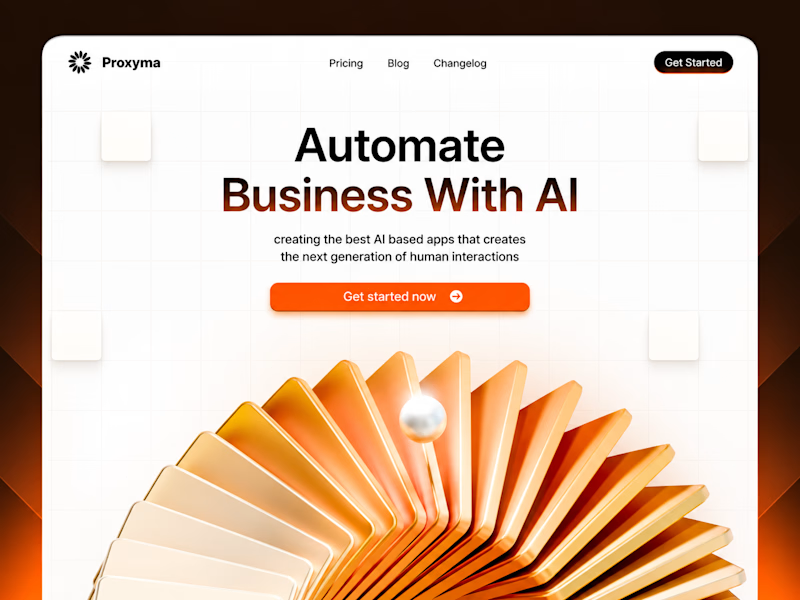
Option B | Proxyma
Bold typography, a structured grid, and a striking 3D visual. Designed to make AI feel confident, modern, and forward-thinking.
Both share the same goal: create a strong first impression through design.
But which direction communicates better?
A or B? I'd love to hear your perspective.
5 voted
50%

5 voted
50%
10 votes
Closed

Adorable
Thumbs up

Your Logistics Team Shouldn't Have to Chase Every Shipment Manually. 🚢
A shipment is delayed. Your customer wants an update. Your operations team is checking carrier portals, copying tracking numbers into spreadsheets, and sending the same status emails repeatedly.
By the time everyone has the right information, the next shipment needs attention.
The problem isn't a lack of effort. It's disconnected logistics operations.
Common challenges:
Shipment updates scattered across multiple carrier systems.
Delayed shipments discovered too late.
Manual customer status emails.
Tracking spreadsheets that quickly become outdated.
Repetitive follow-ups between operations and customer service.
Limited visibility into shipment exceptions.
The solution: An automated logistics operations workflow built with n8n.
I can design an automation that connects carrier tracking APIs, your shipment database, and customer communication channels.
Instead of manually checking every shipment, your team receives structured updates when something actually needs attention.
What the automation handles:
📦 Shipment Tracking — Retrieve updates from supported carrier APIs.
🚨 Exception Detection — Identify delays, customs holds, and missed milestones.
🤖 AI-Assisted Updates — Convert complex tracking events into clear, customer-friendly messages.
📧 Customer Notifications — Send relevant shipment updates automatically.
📊 Operations Visibility — Maintain synchronized shipment records and exception histories.
🔁 Escalation Management — Notify the responsible team when an exception requires action.
The goal: Less repetitive tracking work, faster exception awareness, and more consistent customer communication.
Two ways we can work together:
Option 1: Already have carrier APIs, a TMS, or a defined tracking workflow? Share your requirements, and I'll help design the integration.
Option 2: Not sure which logistics tasks should be automated? We can map your shipment lifecycle and identify the highest-value starting point.
Make your logistics operations easier to manage as shipment volume grows.
Workflow architecture
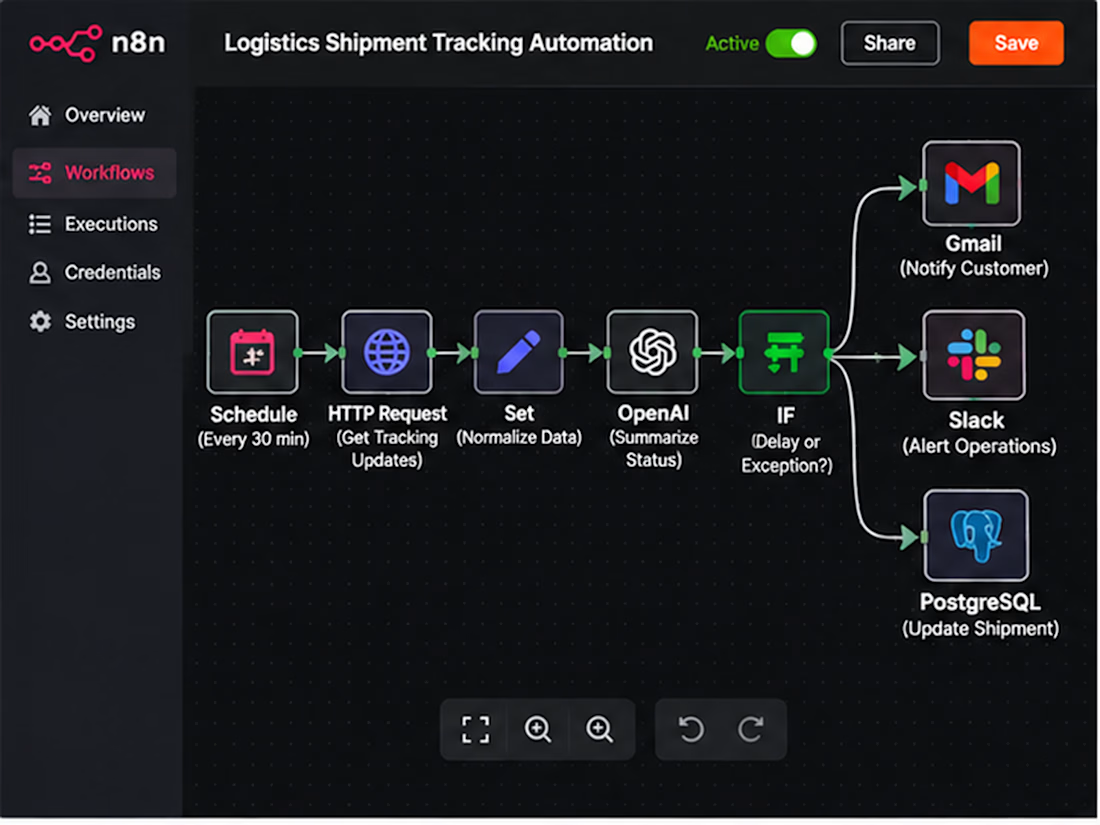
Scheduled Trigger → Carrier API Request → Normalize Tracking Events → Match Shipment Records → Detect Status Changes → Route Exceptions → AI Summary → Customer Email / Operations Alert → Database Update
Implementation: Authenticate carrier integrations, normalize differing event codes, compare timestamps and event IDs, prevent duplicate alerts, route exceptions by severity, and log delivery failures for retry.
Benefits: Reduced manual tracking, clearer exception ownership, more timely customer updates, and an auditable shipment history.
Result: A centralized shipment monitoring workflow that allows operations teams to focus on resolving exceptions instead of repeatedly checking tracking portals.
SEO Keywords
n8n logistics automation • freight forwarding automation • shipment tracking automation • AI logistics workflow • 3PL automation • logistics API integration • freight tracking software • supply chain automation • carrier tracking API • automated shipment notifications • freight forwarder software • logistics operations automation • shipment exception management • customs clearance alerts • AI shipment updates • freight status monitoring • transportation workflow automation • logistics email automation • carrier integration services • shipment delay alerts • freight operations workflow • logistics customer communication • n8n freight automation • logistics data synchronization • TMS integration • transportation management integration • shipment event processing • automated logistics reporting • shipping status API • logistics workflow developer • freight technology consultant • 3PL workflow integration • automated delivery updates • shipment milestone tracking • freight customer portal integration • logistics exception alerts • carrier API developer • logistics process optimization • AI supply chain automation • logistics database automation • freight forwarding API • shipment tracking dashboard • logistics business automation • automated freight communication • shipment lifecycle automation • n8n API workflows • logistics SaaS integration • freight management automation • shipping notification workflow • custom logistics automation • shipment reconciliation • freight exception escalation
Hashtags
#n8n #n8nAutomation #LogisticsAutomation #FreightForwarding #FreightTech #SupplyChainAutomation #ShipmentTracking #3PL #LogisticsTechnology #WorkflowAutomation #AIAutomation #CarrierIntegration #APIAutomation #FreightManagement #ShipmentVisibility #SupplyChainTech #LogisticsSoftware #BusinessAutomation #CustomAutomation #LogisticsOperations #ShipmentAlerts #FreightSoftware #TransportationManagement #SupplyChainVisibility #AIWorkflow #AutomationEngineer #B2BAutomation #SystemIntegration #OperationsAutomation #FreightOperations #ShippingAutomation #CustomSoftware



The customs-hold exception is the one I'd find hardest to route, since it needs a different owner than a plain delay. Do you map each exception type to its own team in the escalation step, or is it one shared alert queue?