The network for creativity
Join 1.25M professional creatives like you
Connect with clients, get discovered, and run your business 100% commission-free
Creatives on Contra have earned over $150M and we are just getting started
Back to feedPost

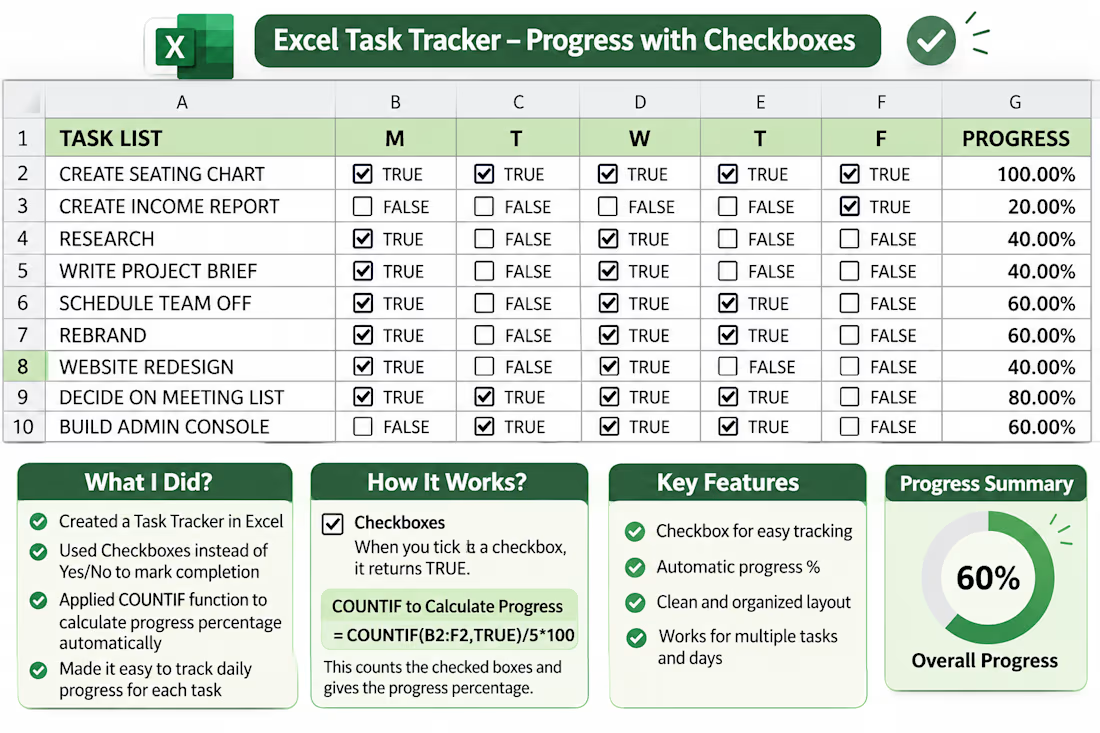
Excel Task Tracker – Automated Progress Tracking Using Checkboxes
In this project, I created a Task Tracker in Microsoft Excel to make daily task management easier, more interactive, and organized.
Here's what I did
1. Created a structured task tracker
2. Used Checkboxes Instead of Yes/No
3. Applied COUNTIF and COUNTA Functions
Formula used:
4. Automated Progress Tracking
5. Created an Overall Progress Summary
6. Focused on a Clean and Organized Design
Key skills demonstrated
Microsoft Excel
Checkbox functionality
COUNTIF and COUNTA formulas
Automated percentage calculation
Data organization
Task and progress tracking
Spreadsheet formatting
Project objective: To create a simple, interactive Excel tracker that reduces manual data entry, automates progress calculations, and makes daily task management more efficient.
The network for creativity
Join 1.25M professional creatives like you
Connect with clients, get discovered, and run your business 100% commission-free
Creatives on Contra have earned over $150M and we are just getting started



Related posts

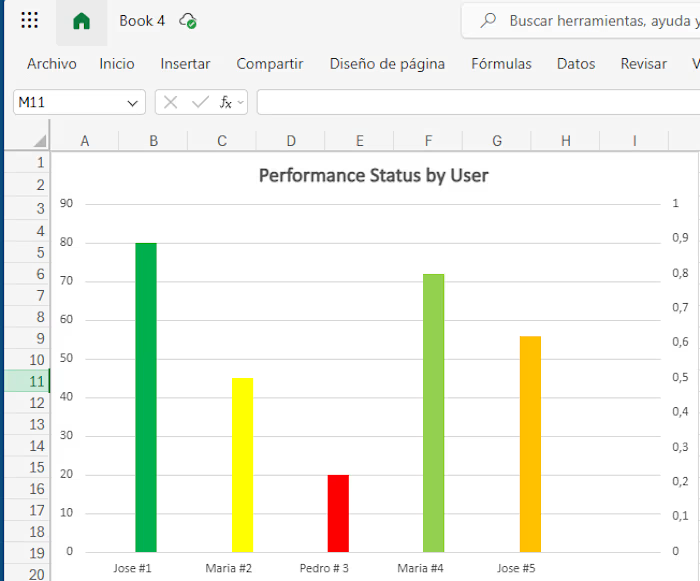
📊 Excel Practice Project: User Status Dashboard
Created a simple dashboard using Excel to organize and visualize user data.
✅ Structured data table ✅ ID and user labels ✅ Status classification (High, Medium, Low) ✅ Conditional formatting ✅ Customized column chart ✅ Color-coded data visualization
This project helped me practice data organization, formatting, and chart customization while improving my Excel skills.
Always learning and building new projects. 🚀
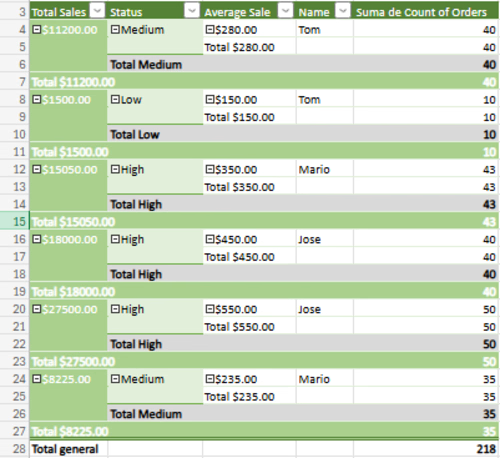
📈 Excel Pivot Table Project
Created a sales analysis report using Excel Pivot Tables to summarize and organize business data.
✅ Total Sales Analysis ✅ Average Sale Tracking ✅ Order Count Summary ✅ Dynamic Reporting

Personal project for tracking to-do's habits, activities and reminders.
Build with Claude, design with Claude and Figma.


