The network for creativity
Join 1.25M professional creatives like you
Connect with clients, get discovered, and run your business 100% commission-free
Creatives on Contra have earned over $150M and we are just getting started
Back to feedPost
Framer builders, this one is for you 👀
Maybe most of you already know this, but I found myself confused (and then feeling stupid 😆) about it.
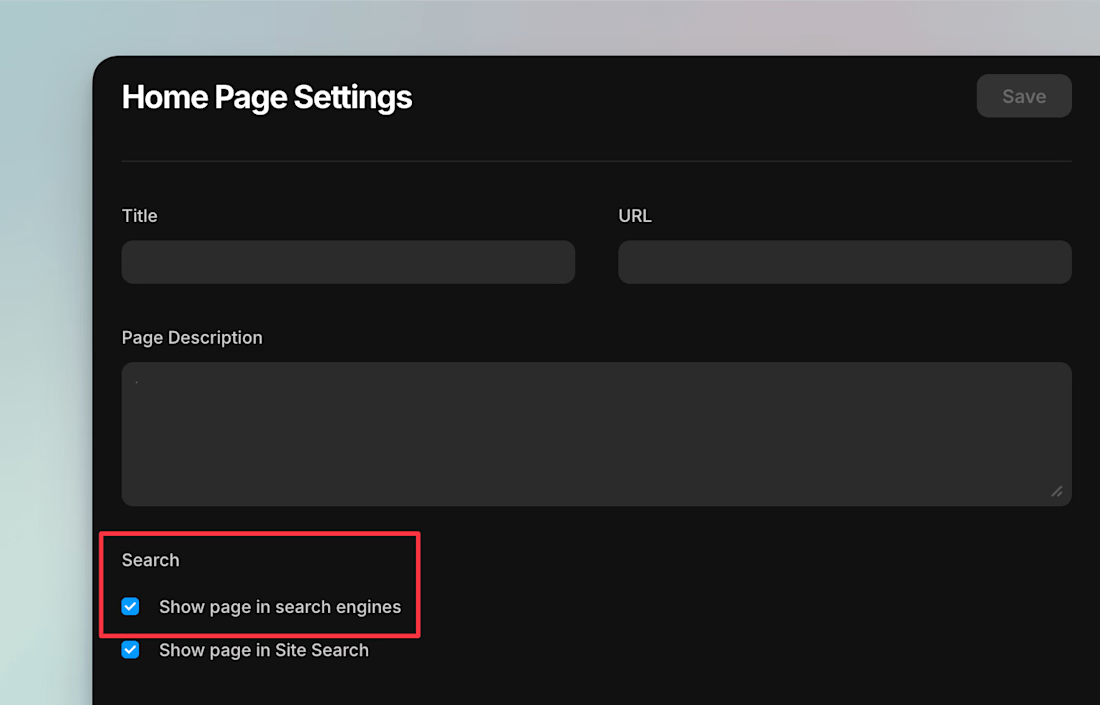
Sometimes, when you hand the project to your client and they respond, "We don't see a sitemap.xml file," this is most likely due to one crucial setting being turned off in your Framer project.
To get a complete sitemap file for your website, you must enable the "Show page in search engines" setting under "Page Settings" of each website page and then re-publish.
This tells Framer that we want to index the pages for SEO and give you a sitemal.xml file at "website. com/sitemap.xml"



@Vaibhav Khulbe great point, and another cool stuff from Framer! :)
To my understanding this setting is turned ON to all projects (and pages) by default, and you can turn it OFF for pages you specifically Don't want to be shown in search engines (included in sitemap.xlm file), like customer login pages or some internal, confidential stuff.

@Kristine Vilnite true!


@Vaibhav Khulbe yeah framer performance is insane lately.
@Ben Huffman yess and each month you get a new performance improvement update ⚡


@Vaibhav Khulbe Cool feature for SEO, for sure!


@Vaibhav Khulbe awesome little reminder for all the Framer user!
The network for creativity
Join 1.25M professional creatives like you
Connect with clients, get discovered, and run your business 100% commission-free
Creatives on Contra have earned over $150M and we are just getting started












Trending


Notion
Notion isn’t just where you work, it’s starting to work for you. What agents are you building?
brandguidelines
Brand guidelines are becoming living systems, not static documents. What are you building for your clients?
aivideo
AI video tools are moving at warp speed. Which ones are you experimenting with?
illustration
Handcrafted illustration is bubbling up across the web. What are you drawing lately?
freelancerlife
Freelancer life is wins, pivots, and everything in between. What’s yours right now?