The network for creativity
Join 1.25M professional creatives like you
Connect with clients, get discovered, and run your business 100% commission-free
Creatives on Contra have earned over $150M and we are just getting started
Back to feedPost

AI usage etiquette / AI courtesy
AI should enhance your thinking, not replace responsibility, judgment, or originality.
AI has made creating easier. It hasn’t made thinking optional.
There’s something we need to learn alongside AI:
AI courtesy.
Using AI responsibly means knowing when to use it, how to use it, and when not to use it.
A few simple rules:
→ Don’t blindly copy.
Read, understand, verify, and improve what AI gives you.
→ Don’t present AI-generated work as expertise.
If you haven’t checked it, you don’t truly know it’s correct.
→ Give AI the right context.
Better input leads to better output. “Make this better” is rarely enough.
→ Protect private information.
Think before putting confidential business, client, or personal data into an AI tool.
→ Keep your own judgment.
AI can suggest. You decide.
→ Use AI to accelerate your skills, not replace them.
Let it help you research, brainstorm, automate, analyze, and create—but keep learning the fundamentals.
→ Take responsibility for the final result.
If AI made the mistake, it’s still your responsibility if you published it.
AI is a tool.
The real skill is knowing how to use the tool well.
Maybe the next generation of digital skills isn’t just prompt engineering.
It’s AI judgment.
The network for creativity
Join 1.25M professional creatives like you
Connect with clients, get discovered, and run your business 100% commission-free
Creatives on Contra have earned over $150M and we are just getting started








Related posts

𝗬𝗼𝘂𝗿 𝗕𝘂𝘀𝗶𝗻𝗲𝘀𝘀 𝗗𝗼𝗲𝘀𝗻'𝘁 𝗡𝗲𝗲𝗱 𝗠𝗼𝗿𝗲 𝗠𝗮𝗻𝘂𝗮𝗹 𝗪𝗼𝗿𝗸. 𝗜𝘁 𝗡𝗲𝗲𝗱𝘀 𝗦𝗺𝗮𝗿𝘁𝗲𝗿 𝗦𝘆𝘀𝘁𝗲𝗺𝘀.
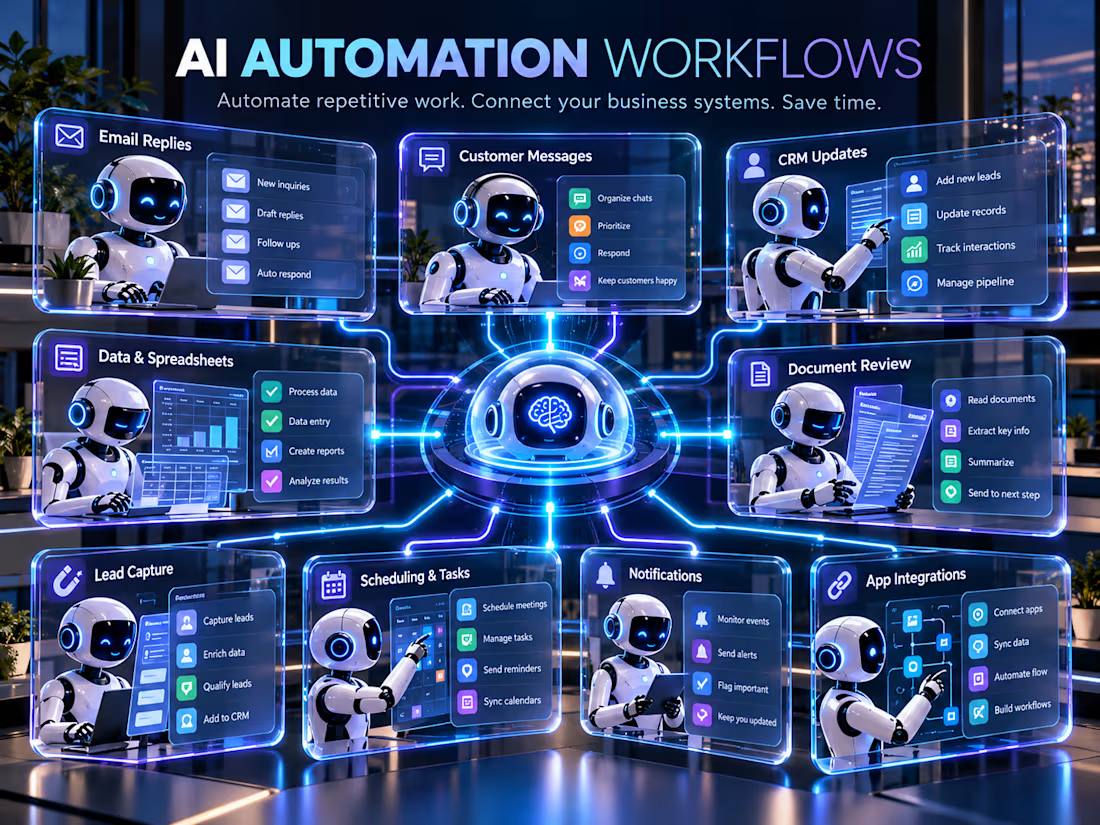
Think about how much time you spend every week doing the same things.
Replying to customer emails.
Following up with potential clients.
Updating spreadsheets.
Managing leads.
Moving information between applications.
Sending reminders and notifications.
Now ask yourself:
𝗛𝗼𝘄 𝗺𝘂𝗰𝗵 𝗼𝗳 𝘁𝗵𝗶𝘀 𝗮𝗰𝘁𝘂𝗮𝗹𝗹𝘆 𝗻𝗲𝗲𝗱𝘀 𝘁𝗼 𝗯𝗲 𝗱𝗼𝗻𝗲 𝗺𝗮𝗻𝘂𝗮𝗹𝗹𝘆?
Many repetitive business tasks can be automated, yet businesses continue spending valuable hours doing them manually.
𝗧𝗵𝗲 𝘁𝗼𝗽 1% 𝗺𝗶𝗻𝗱𝘀𝗲𝘁 𝗶𝘀𝗻'𝘁 𝗮𝗯𝗼𝘂𝘁 𝘄𝗼𝗿𝗸𝗶𝗻𝗴 24 𝗵𝗼𝘂𝗿𝘀 𝗮 𝗱𝗮𝘆. 𝗜𝘁'𝘀 𝗮𝗯𝗼𝘂𝘁 𝗯𝘂𝗶𝗹𝗱𝗶𝗻𝗴 𝘀𝘆𝘀𝘁𝗲𝗺𝘀 𝘁𝗵𝗮𝘁 𝗺𝗮𝗸𝗲 𝘆𝗼𝘂𝗿 𝗯𝘂𝘀𝗶𝗻𝗲𝘀𝘀 𝗺𝗼𝗿𝗲 𝗲𝗳𝗳𝗶𝗰𝗶𝗲𝗻𝘁.
Imagine a workflow where:
• A customer submits an inquiry, and their details are automatically recorded.
• Incoming emails are categorized, and relevant replies are drafted for review.
• New leads are added to your CRM without manual data entry.
• Important tasks trigger notifications and reminders automatically.
• Your business applications exchange information without constant copying and pasting.
• AI helps process documents, organize information, and handle repetitive administrative work.
𝗗𝗶𝗳𝗳𝗲𝗿𝗲𝗻𝘁 𝘁𝗮𝘀𝗸𝘀. 𝗗𝗶𝗳𝗳𝗲𝗿𝗲𝗻𝘁 𝗮𝗽𝗽𝗹𝗶𝗰𝗮𝘁𝗶𝗼𝗻𝘀. 𝗢𝗻𝗲 𝗰𝗼𝗻𝗻𝗲𝗰𝘁𝗲𝗱 𝗮𝘂𝘁𝗼𝗺𝗮𝘁𝗶𝗼𝗻 𝘀𝘆𝘀𝘁𝗲𝗺.
That's what I help businesses build.
I've launched my new service on Contra:
𝗖𝘂𝘀𝘁𝗼𝗺 𝗔𝗜 𝗔𝘂𝘁𝗼𝗺𝗮𝘁𝗶𝗼𝗻 𝗪𝗼𝗿𝗸𝗳𝗹𝗼𝘄𝘀 𝗳𝗼𝗿 𝗬𝗼𝘂𝗿 𝗕𝘂𝘀𝗶𝗻𝗲𝘀𝘀
I build workflows using n8n, Python, and APIs to connect business applications, reduce repetitive work, and simplify daily operations.
My approach is simple:
• Understand your existing business process.
• Identify the repetitive tasks taking up your time.
• Build an automation workflow around your actual needs.
• Test the workflow and make sure it performs as intended.
𝗔𝘂𝘁𝗼𝗺𝗮𝘁𝗶𝗼𝗻 𝘀𝗵𝗼𝘂𝗹𝗱𝗻'𝘁 𝗺𝗮𝗸𝗲 𝘆𝗼𝘂𝗿 𝗯𝘂𝘀𝗶𝗻𝗲𝘀𝘀 𝗺𝗼𝗿𝗲 𝗰𝗼𝗺𝗽𝗹𝗶𝗰𝗮𝘁𝗲𝗱. 𝗜𝘁 𝘀𝗵𝗼𝘂𝗹𝗱 𝗺𝗮𝗸𝗲 𝗿𝘂𝗻𝗻𝗶𝗻𝗴 𝗶𝘁 𝗲𝗮𝘀𝗶𝗲𝗿.
You don't have to automate everything overnight. Sometimes, solving just one repetitive problem is the best place to start.
Your time should go toward growing your business, not repeating tasks that a system could handle.
Explore my service:
Business owners and founders: What's one repetitive task you wish you could automate today?
#AIAutomation #BusinessAutomation #WorkflowAutomation



Well said! 🙌 Automating even one repetitive task can save valuable time and help businesses focus on growth.

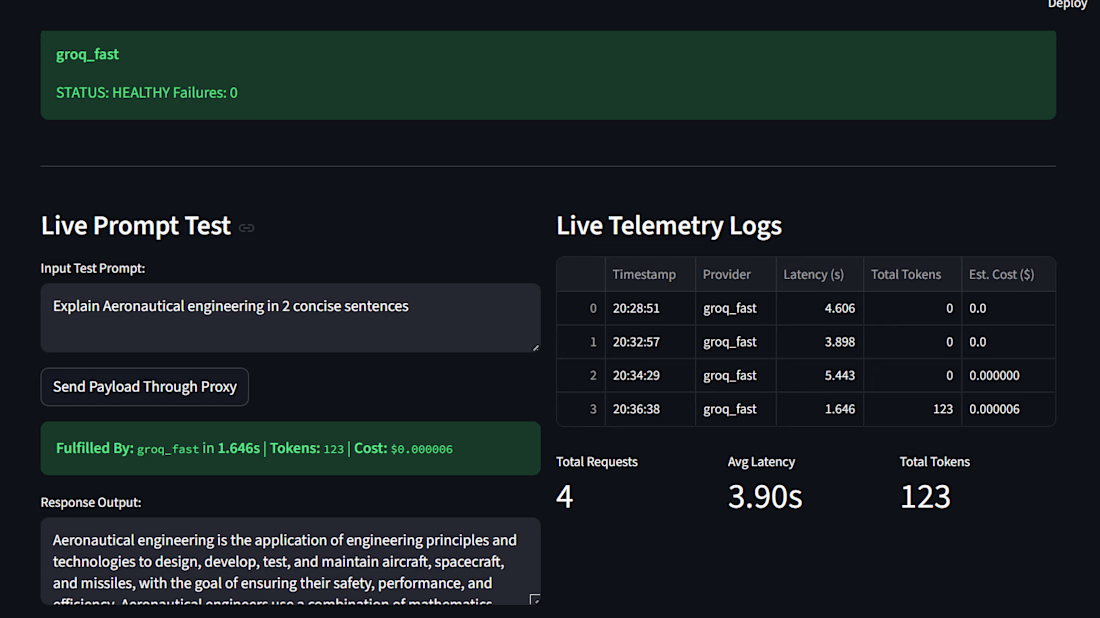
CRAG — Self-Correcting Research Assistant
Overview
A research-assistant project exploring how AI applications can retrieve information and improve the quality of their responses through a self-correction workflow.
Project focus
Python-based AI application development.
Retrieval and research workflow design.
Improving answer reliability through evaluation and correction.
Technologies: Python, AI, retrieval-augmented generation.


Self correction is where RAG gets useful. How do you judge a retrieved chunk as bad enough to trigger a new search?

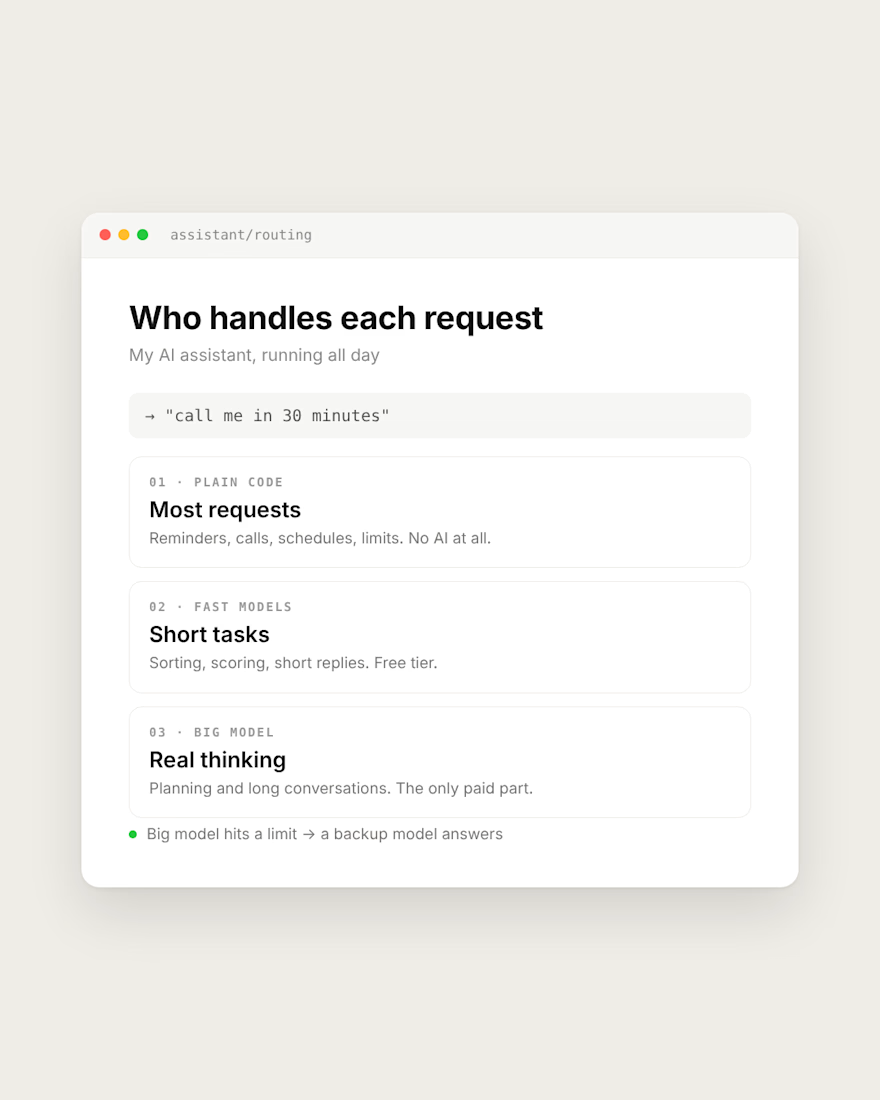
My AI assistant runs all day. The expensive model only does the thinking.
Most requests need no AI at all. "Call me in 30 minutes" is handled by plain code. Reminders, schedules and limits are code too.
Short tasks like sorting and scoring go to fast models on a free tier.
The big model only gets planning and long conversations, where it actually has to think.
If it hits a limit, a backup model answers instead of the app going silent.
If your AI app's bill keeps growing, check what really needs the big model.
What does your app send to the most expensive model?


Same pattern holds in outbound tooling. Filtering, dedupe and enrichment lookups are plain code. The model only writes the first line once the row is already verified. Cuts cost and the weird outputs.