The network for creativity
Join 1.25M professional creatives like you
Connect with clients, get discovered, and run your business 100% commission-free
Creatives on Contra have earned over $150M and we are just getting started
Back to feedPost

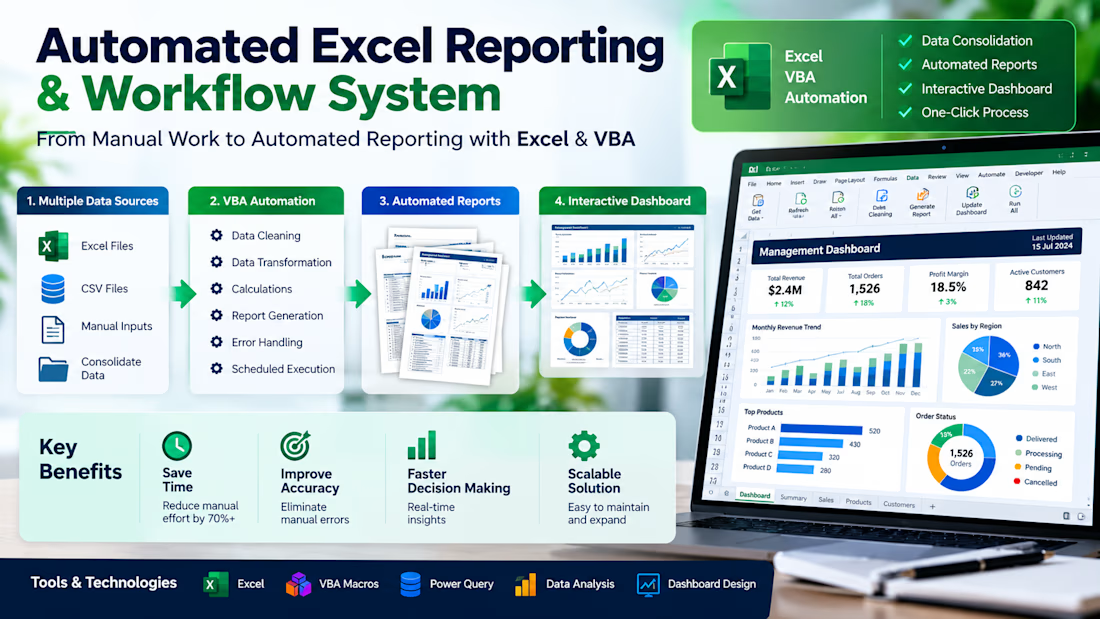
Automated Excel Reporting & Workflow System
A manual reporting process transformed into an automated Excel/VBA workflow—data consolidation, calculations, validation, report generation, and dashboard output.


The network for creativity
Join 1.25M professional creatives like you
Connect with clients, get discovered, and run your business 100% commission-free
Creatives on Contra have earned over $150M and we are just getting started











Related posts

𝟭. 𝗪𝗵𝗮𝘁 𝗜𝘀 𝗮𝗻 𝗔𝘀𝘀𝗲𝗿𝘁𝗶𝗼𝗻?
An assertion is the check you make after something happens. In a manual test you do a step, then you look at the screen and compare it with the expected result. If you click Save and the page still says the invoice is not saved, the test fails. The click is not the result.
Playwright Test writes that check with expect(). You give expect a locator, which is a description of an element, and then a matcher. A matcher is the condition you want to be true. toHaveText checks exact text. toBeVisible checks that an element is shown.
These locator checks are web-first assertions. A web-first assertion retries until the condition is true or time runs out. This project sets that limit to five seconds in playwright.config.ts.
You can reverse a matcher with not. expect(status).not.toHaveText('Invoice failed') fails when that wrong sentence is present. Use not when the result you need is the absence of a message.
𝟮. 𝗪𝗵𝘆 𝗗𝗼 𝗪𝗲 𝗡𝗲𝗲𝗱 𝗜𝘁?
Pressing the button on a coffee machine is an action. Looking in the cup to see that coffee is there is the assertion. If you only press the button, you cannot tell a full cup from an empty one.
Clicking Save invoice asks the page to save. It does not prove the save worked. A test that ends on the click can pass while the status still says "Not saved". The expected result has to be its own check.
𝟯. 𝗜𝗺𝗽𝗹𝗲𝗺𝗲𝗻𝘁𝗮𝘁𝗶𝗼𝗻
Start with the check alone. The matcher requires the words "Invoice saved".
getByRole('status') finds the message a person would read after saving. expect and toHaveText form the web-first check. Playwright keeps looking until the text matches or five seconds pass.
The practical test opens the local demo, confirms the starting message, clicks, and checks the new message. goto('/assertions') uses baseURL from the Playwright config.
goto opens the page. The first toHaveText records the start, "Not saved", so a later pass cannot come from text that was already there. click is only the action. The second toHaveText is the result of that action. The script does not also check that the text is not "Invoice failed". The exact success message already answers that question.
𝟰. 𝗘𝘅𝗽𝗲𝗰𝘁𝗲𝗱 𝗥𝗲𝘀𝘂𝗹𝘁
A passing run starts at "Not saved", clicks Save invoice, and ends with "Invoice saved". A failing run means one of those texts did not match before the five-second assertion timeout.
𝟱. 𝗧𝗮𝗸𝗲𝗮𝘄𝗮𝘆𝘀
• click performs an action. expect() checks the result.
• A matcher such as toHaveText states the expected result.
• Web-first assertions retry until they pass or the timeout ends.
• Use not when the result is the absence of a specific message.
𝗜𝗻𝘁𝗲𝗿𝘃𝗶𝗲𝘄 𝗾𝘂𝗲𝘀𝘁𝗶𝗼𝗻: What is the difference between clicking Save and asserting the status text?
𝗔𝗻𝘀𝘄𝗲𝗿: The click performs the action. The assertion checks the expected result. Without that check, a test can pass when the save changed nothing the user can see.
𝟲. 𝗥𝗲𝗳𝗲𝗿𝗲𝗻𝗰𝗲𝘀



Hey everyone! 👋
Excited to share my latest project: the Local Business Operations Dashboard a custom Google Sheets dashboard designed for home-service businesses, contractors, and local service providers looking to streamline daily workflow automation. 📊
Instead of juggling multiple complex CRM and task management tools, this all-in-one solution helps service businesses:
⚙️ Automate workflow tracking & daily task management
📈 Monitor sales pipelines & track service revenue metrics
🛠️ Optimize operations management directly within Google Sheets
Whether you need a custom Google Sheets tracker or tailored workflow automation to scale your business, let’s connect! Drop a comment or reach out to discuss building a custom operational setup for your business. 🚀
googlesheetsOperations ManagementworkflowautomationGoogle SheetsData AnalysisStreamlitBusiness Workflow AutomationApps Script


Most online stores lose a large share of their shoppers at checkout. They add items to their cart, get distracted, and never come back. This workflow wins some of those sales back automatically, with no manual follow-up.
What it does
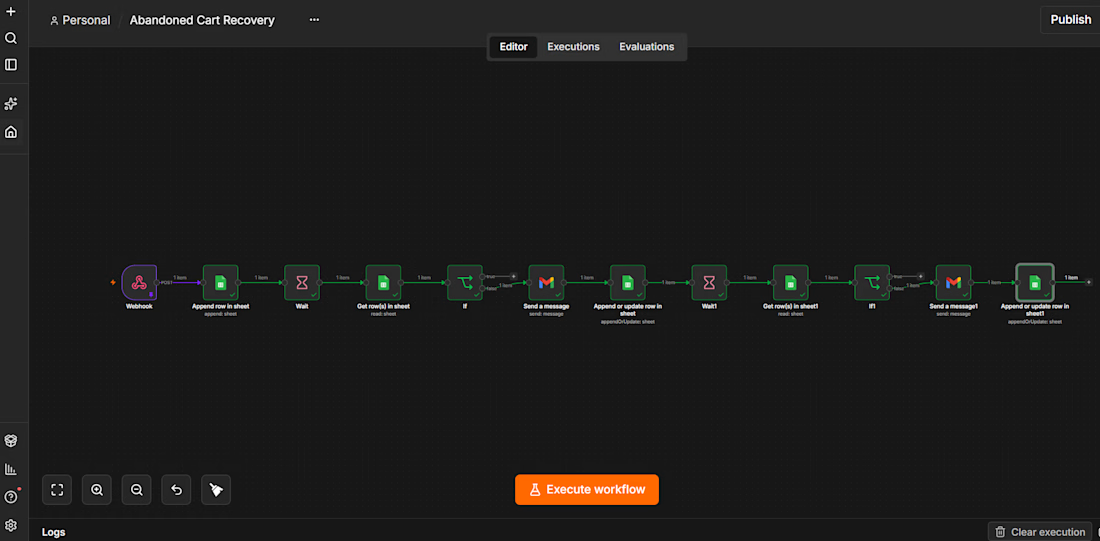
When a customer abandons a cart, the workflow logs it and waits. If the customer hasn’t bought after 1 hour, it sends a friendly reminder email. If they still haven’t bought 24 hours later, it sends a stronger “last chance” email with a discount code. Customers who buy at any point never get another email.
How it works
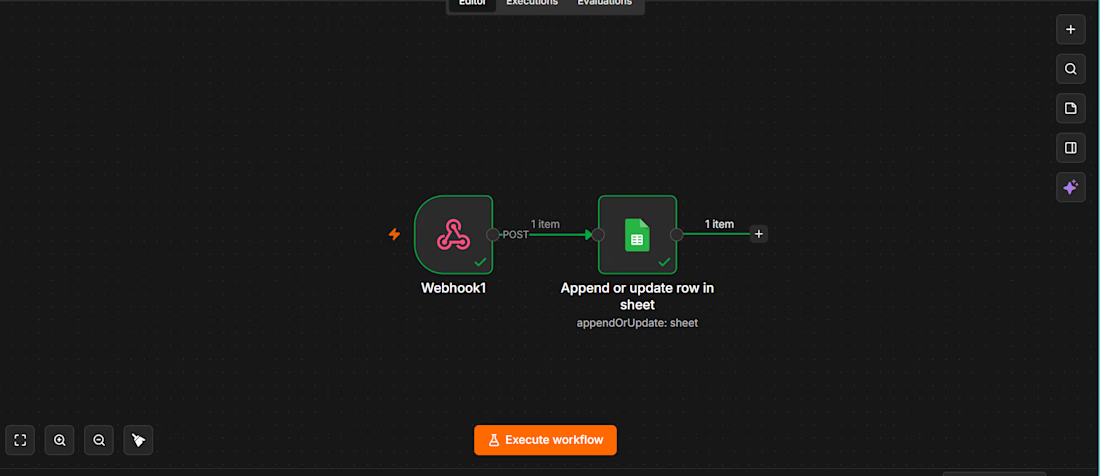
A webhook receives the abandoned-cart event (customer name, email, cart items, Cart ID).
The cart is logged to Google Sheets with the status pending.
The workflow waits 1 hour, then re-reads that cart’s row so it sees the latest status.
If the status isn’t purchased, a personalised reminder goes out through Gmail and the status becomes reminder 1 sent.
After a further 24 hours, the status is checked again. If the customer still hasn’t bought, a final email with a discount code goes out and the status becomes reminder 2 sent.
A separate purchase workflow updates the sheet to purchased as soon as an order completes, which stops the sequence.
Why it’s reliable
Every cart is tracked by its own Cart ID, so simultaneous customers never overwrite each other.
The status is re-checked after every wait, so nobody gets a reminder after they’ve already bought.
The Google Sheet works as a live dashboard of where every cart stands.
Tools used: n8n, Webhooks, Google Sheets, Gmail, Wait and IF logic.



Smart workflow! 🙌 I like how the purchase checks prevent unnecessary follow-ups and keep the customer experience smooth.