The network for creativity
Join 1.25M professional creatives like you
Connect with clients, get discovered, and run your business 100% commission-free
Creatives on Contra have earned over $150M and we are just getting started
Back to feedPost

Title: Automatic Bookkeeping Workbook — Single-Entry Journal to Full Financial Statements
Description:
A lightweight, fully automated Excel bookkeeping template built around one core idea: type a transaction once, and every downstream report updates itself.
Unlike a full client engagement model, this is designed as a clean, reusable template — enter journal entries as balanced debit/credit lines on the one editable sheet, and the workbook handles the rest automatically:
1.One input sheet: Journal Entries is the only tab you type in — pick accounts from a dropdown, enter debit or credit amounts, and a built-in check column flags instantly if a line doesn't balance
2.Automated General Ledger: every account's full transaction history and running balance, generated without a single manual formula
3.Trial Balance with a live balance check
4.Financial statements: Income Statement, Balance Sheet (with automatic balance verification), and a direct-method Cash Flow Statement — all driven off a Cash Flow Category tag on cash transactions
5.Dashboard: auto-generated KPI snapshot (Total Assets, Liabilities, Equity, Net Income, Ending Cash) plus Revenue vs. Expenses and Operating Expense Mix charts
6.Color-coded design: blue for inputs, black for same-sheet formulas, green for cross-sheet links, grey for automated helper columns — so anyone opening the file immediately understands what's safe to edit
Built to show that solid double-entry bookkeeping logic can be made genuinely foolproof for a non-accountant user — no VBA, no macros, just clean formula architecture.
Skills demonstrated: Excel automation · Double-entry bookkeeping · Template design · Data validation · Financial statement preparation · Dashboard & chart design


The network for creativity
Join 1.25M professional creatives like you
Connect with clients, get discovered, and run your business 100% commission-free
Creatives on Contra have earned over $150M and we are just getting started











Related posts

Designed a personal finance app focusing on simplicity and user experience.


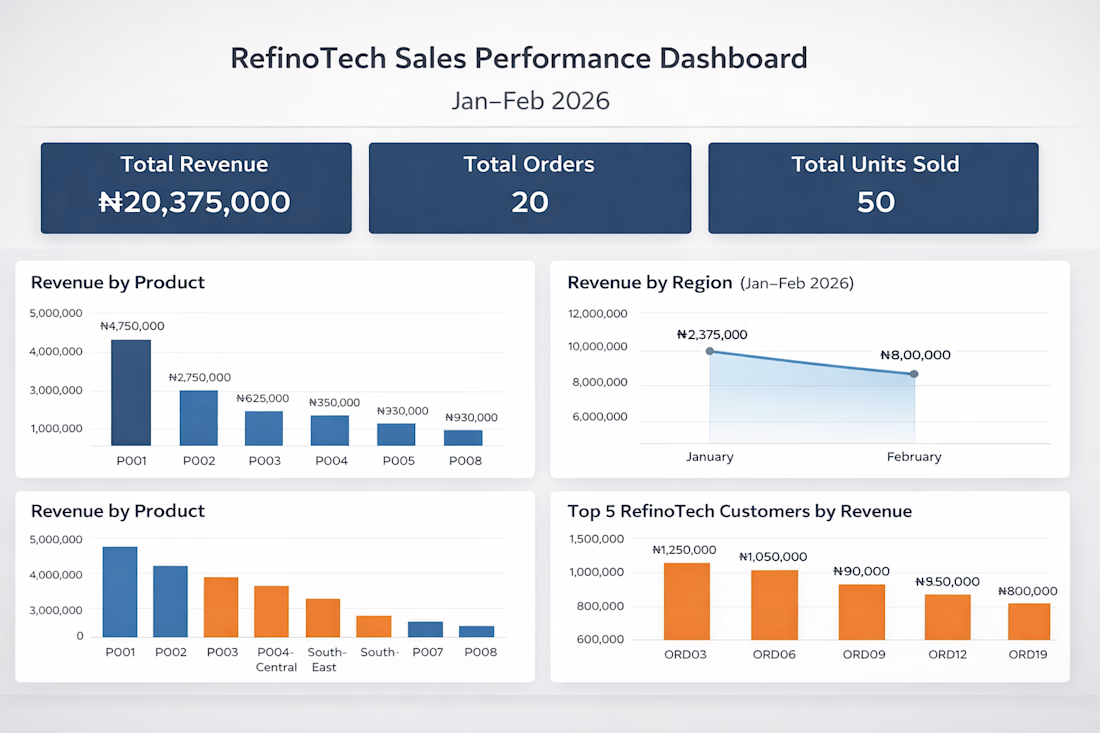
How I Built an End-to-End Sales Analytics Dashboard in Excel for an E-commerce Company
I recently completed an end-to-end sales analytics project using Microsoft Excel, transforming raw e-commerce sales data into an interactive dashboard that provides meaningful business insights.
In this project, I explored the data, performed analysis, identified key sales trends, and built an interactive dashboard to help businesses make data-driven decisions.
I documented the entire process, including the approach, tools, analysis, and dashboard development.
Read the full project walkthrough on Medium: https://medium.com/@Refino/how-i-built-an-end-to-end-sales-analytics-dashboard-in-excel-for-an-e-commerce-company-e8692d81f354



Excellent work! Turning raw data into actionable business insights is a valuable skill.

Project Title:
Dunkin’ Product Web Concept
Project Description:
A playful web design concept created to explore bold product visuals, strong composition, and interactive brand presentation. The goal was to turn a simple product idea into a more engaging digital experience while keeping the layout clean, clear, and visually memorable.
This concept reflects how I approach web design in general — understanding the brand, building a strong visual direction, and creating an experience that works around the product, service, or idea being presented.
Role: Web Designer / Creative Developer
Focus: Visual Direction, Layout, Product Presentation, Web Interaction