The network for creativity
Join 1.25M professional creatives like you
Connect with clients, get discovered, and run your business 100% commission-free
Creatives on Contra have earned over $150M and we are just getting started
Back to feedPost

The brief: give clients one place to track their projects, invoices, and files without digging through email threads or asking “what’s the status?”
What it does:
✅ Role-based dashboards, each client sees only their own projects and data
✅ Live project tracking (In Progress, Todo, Done)
✅ Invoice status at a glance (Paid, Unpaid, Payment Sent)
✅ Centralized file sharing per project
Built entirely with Airtable + Softr, no custom code, fully automated data sync.
This is exactly the kind of system I love building: it replaces scattered spreadsheets and email chains with something clients actually enjoy using.
If your business is still managing client updates manually, I’d love to show you what this could look like for you.
#NoCode #Airtable #Softr #Automation #ClientPortal #SmallBusiness #WorkflowAutomation #FreelanceDeveloper #BusinessAutomation


The network for creativity
Join 1.25M professional creatives like you
Connect with clients, get discovered, and run your business 100% commission-free
Creatives on Contra have earned over $150M and we are just getting started



Related posts


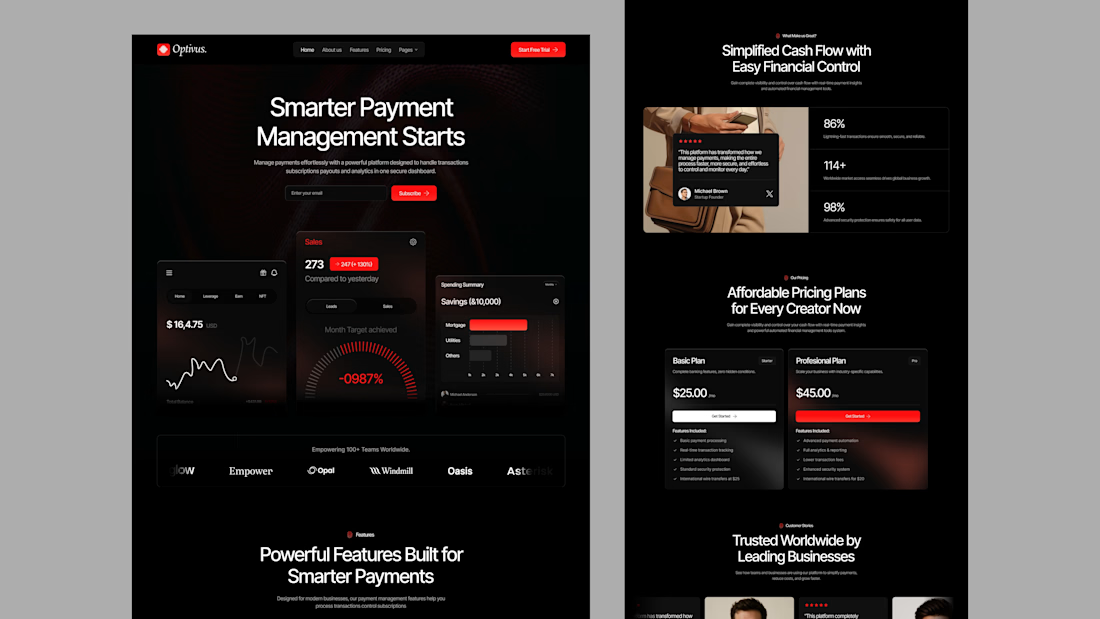
Optivus: a website template for payment and fintech businesses.
A dark theme with one red accent keeps the dashboard mockups the clear focus.


A purchase order lands in your inbox. Everything looks right until one part number doesn’t match your catalog. What should your automation do next?
In TechFoundry IMS, we built that exception into the workflow. The system reads the emailed PO and checks each line against the catalog. When a part doesn’t match, it flags that line so someone on the order desk can inspect it, find the right item, and link it before fulfillment moves forward.
If you’re considering automating a workflow, start with the last order that got stuck. What did someone have to check, and what information did they need to make the call? That’s a good place to decide where automation helps and where your team needs a review step.
What sends your team back to the inbox most often: a part mismatch, a missing approval, or an invoice discrepancy? If you’re trying to fix one of those, message me here on Contra with an example. I’d be happy to talk through where to start.

I built an invoicing app that does not send your invoices for you. That was on purpose.
When I started building Invoping, the obvious feature was automatic sending. The app creates the invoice and fires it off to your client on WhatsApp.
But WhatsApp is where people talk to their clients. It's where they say hello, negotiate, and follow up. A message that arrives without you touching it feels like a bot, not like you.
So Invoping opens a WhatsApp message that's already filled in with the invoice link. You read it, change a word if you want, and press send yourself.
It's one extra tap, and the message still comes from you.
A few other small decisions followed the same idea. Your client can open the invoice without making an account. You can record partial payments, because real clients often pay in parts. And you can see the balance that's still owed at a glance.
The lesson for me: sometimes the best feature is the one you leave out.
If you're building a tool for people who work through conversations, what would you keep manual on purpose?
You can try Invoping here: https://invoping.vercel.app/

invoping.vercel.app
InvoPing
The simplest invoicing and payment-tracking SaaS for freelancers, contractors, agencies, and small businesses that use WhatsApp.


To your question: I'd keep the payment reminder manual too, since chasing money is the message where tone matters most. Prefilling it with the balance still owed after partial payments would take out most of the awkwardness while the client still hears it from you. Do people edit the prefilled text much, or send it as is?