The network for creativity
Join 1.25M professional creatives like you
Connect with clients, get discovered, and run your business 100% commission-free
Creatives on Contra have earned over $150M and we are just getting started
Back to feedPost
Project Title
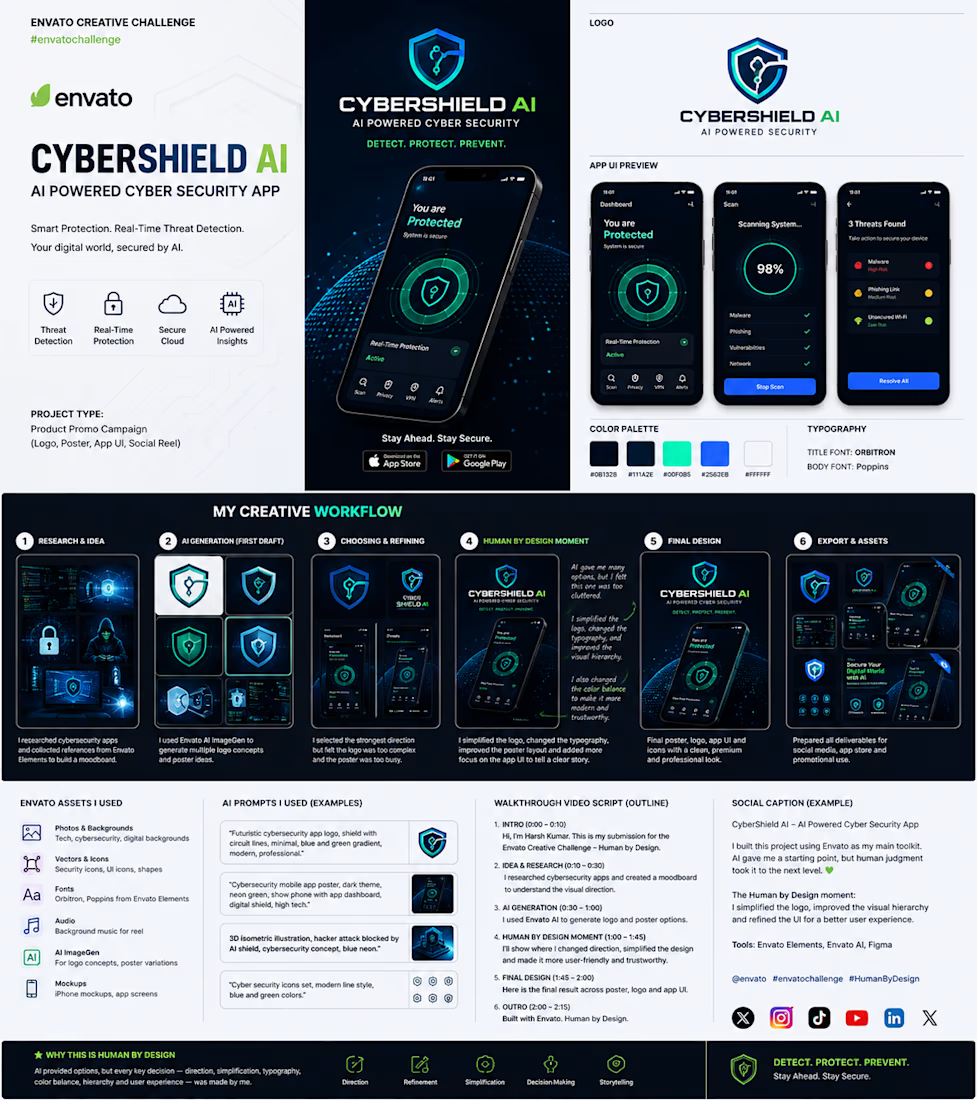
CyberShield AI
AI-Powered Cybersecurity Platform
Envato × Contra – Human by Design Challenge 2026
Tagline
Detect. Protect. Prevent.
Stay Ahead. Stay Secure.
Project Overview
CyberShield AI is a conceptual cybersecurity platform designed to protect individuals and businesses through AI-powered threat detection and real-time monitoring.
The goal was not only to create a visually impressive brand but also to design a product that feels trustworthy, modern, and ready for the real world.
This project includes:
Brand Identity
Logo Design
Mobile App UI
Marketing Poster
Social Media Campaign
Motion Reel Concept
The Challenge
Cybersecurity products often suffer from one of two problems:
They look too technical for everyday users.
They look generic and fail to communicate trust.
My challenge was to design a brand that feels:
Intelligent
Professional
Modern
Secure
Easy to understand
while demonstrating how AI can support creativity without replacing human design decisions.
Research Phase
Before generating any visuals, I researched:
Competitors
Microsoft Defender
Norton
Bitdefender
Kaspersky
Malwarebytes
I analyzed:
Color systems
Typography
Dashboard layouts
Security icons
User experience
Trust signals
Moodboard
The moodboard focused on:
Dark interfaces
Glassmorphism
Neon accents
Blue security colors
Green AI indicators
Digital grids
Circuit patterns
Shield symbolism
Design Goals
The design needed to communicate:
✓ Protection
✓ Intelligence
✓ Speed
✓ Reliability
✓ Premium Quality
✓ Simplicity
AI Generation
Using Envato AI, I generated multiple concepts for:
Logos
Posters
Hero Images
Shield Icons
UI Inspiration
Marketing Concepts
The AI produced many creative directions.
However, not every result was usable.
Some designs had:
cluttered layouts
weak typography
poor visual hierarchy
excessive effects
unrealistic interfaces
AI created possibilities.
It did not create the final design.
Human by Design Moment (Most Important Section)
This is the heart of the project.
Explain exactly what YOU changed.
1. Logo Refinement
AI generated a complicated shield with excessive circuit details.
I redesigned it by:
simplifying the geometry
improving symmetry
removing visual noise
balancing proportions
making it scalable
The result works equally well on:
App icon
Website
Social media
Business cards
Posters
2. Typography
AI suggested inconsistent typography.
I selected:
Orbitron
For headlines because it feels futuristic without sacrificing readability.
Poppins
For body text because it is modern, clean, and highly legible.
This combination improves both usability and brand identity.
3. Color System
Instead of random neon colors, I developed a controlled palette.
Primary
Cyber Blue
Represents technology and trust.
Secondary
Neon Green
Represents AI activity, scanning, and successful protection.
Background
Dark Graphite
Allows interface elements to stand out while reducing eye strain.
4. Visual Hierarchy
The AI poster lacked focus.
I reorganized the layout.
Now users immediately notice:
Logo
Phone mockup
Security status
CTA
Supporting features
This guides the viewer naturally through the design.
5. UI Improvements
Instead of decorative screens, I designed a realistic dashboard.
Features include:
Threat Detection
Real-time Protection
Cloud Security
AI Insights
Scan Progress
Risk Level
Notifications
Security Score
Everything serves a clear user purpose.
6. Poster Layout
The original composition felt crowded.
I improved spacing using grid systems.
Added:
stronger margins
balanced whitespace
aligned content
cleaner information hierarchy
This significantly increased readability.
7. Storytelling
Rather than simply showing an app, I created a narrative.
The message becomes:
Your device is protected.
AI is actively monitoring threats.
You remain safe in real time.
This emotional reassurance is essential for cybersecurity branding.
Final Deliverables
Brand Identity
Logo
Color Palette
Typography
Icon Set
UI Design
Dashboard
Threat Detection
AI Assistant
Alerts
Settings
Analytics
Marketing
Hero Poster
Instagram Post
LinkedIn Banner
App Store Preview
Google Play Preview
Motion
30-second promotional reel
Animated logo reveal
Interface transitions
Threat detection animation
Design System
Colors
Cyber Blue
Neon Green
Dark Graphite
White
Light Gray
Fonts
Orbitron
Poppins
Icons
Minimal Line Icons
Rounded Corners
Consistent Stroke Width
Envato Assets Used
AI Image Generation
Elements Graphics
Device Mockups
Security Icons
Background Textures
Fonts
Audio
Stock Assets
AI Prompts
Example 1
Futuristic cybersecurity logo featuring a modern shield with integrated circuit lines, minimal geometric design, premium branding, blue and green gradient, flat vector style.
Example 2
AI cybersecurity mobile application dashboard, dark UI, glassmorphism, analytics cards, real-time threat monitoring, premium mobile interface.
Example 3
High-tech cybersecurity poster showing smartphone dashboard, glowing shield, digital particles, professional advertising campaign.
Example 4
Modern security icon pack, outline style, futuristic, minimal, blue and green.
Walkthrough Video (2–2.5 Minutes)
Introduction
Hello, I'm Harsh Kumar. This is my submission for the Envato × Contra Human by Design Challenge. CyberShield AI is a conceptual AI-powered cybersecurity platform that demonstrates how artificial intelligence can accelerate creativity while human judgment shapes the final experience.
Research
I explored existing cybersecurity products to understand common visual patterns, user expectations, and opportunities to create a more approachable and trustworthy identity.
AI Exploration
Using Envato AI, I generated multiple concepts for the logo, marketing posters, and interface ideas. AI helped me explore a wide range of creative directions quickly.
Human by Design
This was the most important stage. I simplified the logo, refined the typography, developed a consistent color system, redesigned the layout using grid principles, improved the visual hierarchy, and built a realistic user interface. Every major creative decision—from branding to storytelling—was made by me.
Final Design
The final outcome includes a cohesive brand identity, mobile app UI, promotional poster, social media assets, and a motion concept designed for real-world digital marketing.
Closing
CyberShield AI demonstrates that while AI can generate possibilities, meaningful design comes from human decisions, refinement, and purpose. Thank you for viewing my submission.
Social Caption
CyberShield AI — AI Powered Cyber Security
AI helped generate possibilities, but every meaningful design decision was made through human judgment. From simplifying the logo and refining the typography to improving the UI, layout, color balance, and storytelling, this project reflects the idea that great design is guided by people, not prompts alone.
Built using Envato AI, Envato Elements, and Figma.
#EnvatoChallenge #HumanByDesign #CyberSecurity #BrandIdentity #UIDesign #Figma #AI #GraphicDesign
Why This Embodies "Human by Design"
Direction: I defined the creative vision and product positioning.
Decision Making: I selected the strongest ideas from dozens of AI-generated concepts.
Refinement: I simplified complex visuals into a clean, premium identity.
Storytelling: I designed an experience that communicates trust and confidence.
User Experience: I organized information for clarity, accessibility, and usability.
Craftsmanship: Every detail—from typography and spacing to color and hierarchy—was intentionally refined by a human designer.
A submission presented like this reads less like a collection of designs and more like a professional design case study, which is the kind of presentation that typically stands out in creative competitions. App Folder Structure
CyberShieldAI/
│
├── src/
│ ├── screens/
│ │ ├── HomeScreen.tsx
│ │ ├── ScanScreen.tsx
│ │ ├── ThreatScreen.tsx
│ │ ├── SettingsScreen.tsx
│ │ └── ProfileScreen.tsx
│ │
│ ├── components/
│ │ ├── SecurityCard.tsx
│ │ ├── ScanButton.tsx
│ │ ├── ThreatItem.tsx
│ │ └── ProgressCircle.tsx
│ │
│ ├── services/
│ │ ├── api.ts
│ │ ├── auth.ts
│ │ └── ai.ts
│ │
│ ├── navigation/
│ ├── assets/
│ └── App.tsx
Dashboard Features
Security Score (98%)
Real-Time Protection
Threat Scanner
AI Insights
Secure Cloud Backup
VPN Status
Device Health
Recent Threats
Notification Center
Settings
AI Scanner Flow
Open App
↓
Press Scan
↓
Scanning Files
↓
AI Analysis
↓
Threat Detection
↓
Risk Score
↓
Recommended Fix
↓
User Protected
Example API Endpoints
POST /api/login
POST /api/register
GET /api/dashboard
POST /api/scan
GET /api/threats
POST /api/remove-threat
GET /api/history
POST /api/ai-analysis
Example JSON Response
{
"status": "Protected",
"securityScore": 98,
"threatsFound": 3,
"scanTime": "12 sec",
"recommendation": "Delete suspicious APK"
}
AI Prompt Used
Analyze this device scan and explain the detected security threats in simple language. Assign a risk score, suggest fixes, and provide prevention tips for the user.
UI Screens
Splash Screen
Login
Dashboard
Scan Screen
Threat Details
AI Assistant
Notifications
Cloud Backup
Reports
Settings
GitHub (Concept) README
CyberShield AI
AI-powered cybersecurity mobile application.
Features:
• Real-Time Threat Detection
• AI Security Assistant
• Secure Cloud Backup
• Malware Scanner
• Security Score
• Threat Reports
• Modern UI
Tech Stack:
React Native
TypeScript
Node.js
Express
MongoDB
Firebase
OpenAI API
If you want to impress the judges even more
Add these sections to your presentation:
System Architecture Diagram
User Flow Diagram
Database Schema
API Documentation
Wireframes
Component Library
Design Tokens (Colors, Typography, Spacing)
Light & Dark Mode
Accessibility Considerations
Future Roadmap (VPN, Password Manager, Phishing Detection, Family Protection)
These additions make your project look much closer to a real, production-ready product rather than just a visual concept.
yes
If your goal is to make CyberShield AI look like a real startup product for the Envato challenge, here's a complete product architecture you can showcase.
CyberShield AI
Version: 1.0.0
Platform: Android • iOS • Web
Built With
React Native
TypeScript
Node.js
Express.js
MongoDB
Firebase
OpenAI API
Figma
Envato AI
Envato Elements
Complete App Flow
Splash Screen
│
▼
Login / Sign Up
│
▼
Permission Setup
(Storage, Notifications)
│
▼
Dashboard
│
┌────┼──────────┬───────────┐
▼ ▼ ▼ ▼
Scan Threats AI Assistant Reports Settings
│
▼
Scanning Animation
│
▼
AI Analysis
│
▼
Threat Report
│
▼
Fix Threat
│
▼
Protected ✅
App Screens
Splash Screen Animated shield logo CyberShield AI branding Tagline: Detect. Protect. Prevent.
Login Google Login Apple Login Email Login Face ID Fingerprint Login
Dashboard
Shows:
Security Score
98%
Protected
Last Scan
5 min ago
Threats
3
Real Time Protection
ON
Cloud Backup
Enabled
AI Assistant
Ready
4. Scanner Screen
Large animated scan button
Start Scan
Scanning Files...
Checking Apps...
Scanning Downloads...
Analyzing Permissions...
Checking Network...
AI Processing...
Progress Bar
█████████████ 94%
5. Threat Details
Threat Name
Fake Banking App
Risk
High
Permission Abuse
Camera
Contacts
SMS
Location
AI Explanation
This application requests
unnecessary permissions
commonly used by banking malware.
Button
Remove Threat
6. AI Assistant
Chat Interface
User
Is this app safe?
AI
The application appears safe.
No malware signatures found.
Risk Level
Low
7. Reports
Daily Scan
Weekly Protection
Monthly Report
Threat History
Pie Chart
Threats Removed
Safe Apps
Suspicious Apps
Network Attacks
8. Settings
Dark Mode
Notification
Biometric Login
VPN
Cloud Sync
Language
About
Backend Structure
server/
controllers/
routes/
middleware/
database/
models/
services/
utils/
config/
index.js
Database
Users
id
name
email
password
createdAt
Threats
id
deviceId
appName
risk
severity
status
date
Reports
id
score
scanTime
threats
fixedThreats
createdAt
REST API
POST /login
POST /register
GET /dashboard
POST /scan
GET /reports
GET /history
POST /removeThreat
POST /askAI
POST /logout
AI Workflow
Device Scan
↓
Collect Metadata
↓
AI Model Analysis
↓
Threat Classification
↓
Risk Score
↓
Recommendations
↓
User Alert
Color Palette
Primary
#0A84FF
Cyber Blue
Secondary
#00E676
Neon Green
Background
#0D1117
Cards
#161B22
Text
#FFFFFF
Danger
#FF4D4F
Warning
#FFC107
Typography
Heading
Orbitron Bold
Body
Poppins
Buttons
SemiBold Poppins
Icons
Shield
Cloud
AI Brain
Lock
Bug
Firewall
Network
Warning
Fingerprint
VPN
Security Features
AI Malware Detection
App Permission Scanner
Phishing Detection
Ransomware Alerts
VPN Monitoring
Password Leak Checker
Secure Cloud Backup
Device Health Monitoring
Real-Time Notifications
Wi-Fi Security Scanner
Future Features
Family Protection
Dark Web Monitoring
Smart VPN
Password Manager
Secure Browser
File Encryption
USB Protection
QR Code Scanner
AI Voice Assistant
Wear OS Support
Design System
8px spacing grid
24px rounded cards
Soft shadows
Glassmorphism panels
Consistent icon stroke
Gradient highlights
Responsive layout
WCAG-compliant color contrast
Light & Dark mode support
Why It Fits "Human by Design"
AI accelerated ideation by generating logo concepts, visual directions, and poster variations.
Human judgment defined the brand identity, selected the strongest concepts, simplified the logo, established typography, built a consistent design system, organized the UI, and crafted the overall user experience.
Every major decision—from layout and hierarchy to color balance and storytelling—was intentionally refined by the designer.
This level of detail makes the project feel like a real product case study rather than just a collection of mockups, which aligns well with the spirit of the Human by Design challenge.
andriod
You're giving feedback on a new version of ChatGPT.
Which response do you prefer? Responses may take a moment to load.
ChatGPT
Response 1
If you're positioning CyberShield AI as an Android-first app, you can make the project even more realistic by presenting it like this:
CyberShield AI
AI-Powered Cyber Security for Android
Platform: Android 14+
Built For: Smartphones & Tablets
Tech Stack
Frontend
Kotlin
Jetpack Compose
Material Design 3
Android ViewModel
Coroutines
Navigation Compose
Architecture
MVVM Architecture
Repository Pattern
Clean Architecture
Local Storage
Room Database
DataStore Preferences
Backend
Node.js
Express.js
MongoDB
Firebase
AI
OpenAI API
TensorFlow Lite (optional on-device analysis)
Android Permissions
INTERNET
ACCESS_NETWORK_STATE
POST_NOTIFICATIONS
QUERY_ALL_PACKAGES
PACKAGE_USAGE_STATS
RECEIVE_BOOT_COMPLETED
FOREGROUND_SERVICE
Core Features
✅ Real-Time Threat Detection
✅ App Permission Scanner
✅ AI Security Assistant
✅ Malware Detection
✅ Network Protection
✅ Secure Cloud Backup
✅ Wi-Fi Security Scanner
✅ Security Score
✅ Threat Reports
✅ Dark Mode
App Structure
com.cybershield.ai
├── ui
├── screens
├── navigation
├── components
├── data
├── database
├── repository
├── models
├── services
├── ai
├── security
├── scanner
└── utils
Android Dashboard
CYBERSHIELD AI
Security Score
98%
Protected
Last Scan
5 Minutes Ago
Threats Found
3
Real-Time Protection
ON
Cloud Backup
Enabled
[ Start Scan ]
Scanner Workflow
Installed Apps
↓
Permission Analysis
↓
Suspicious Behavior Detection
↓
AI Risk Analysis
↓
Threat Classification
↓
Recommendation Engine
↓
User Notification
Android Notification Example
⚠️ CyberShield AI
Suspicious application detected.
Risk Level: HIGH
Tap to review threat.
Android Widget
You can also showcase a home screen widget:
CYBERSHIELD AI
🟢 Protected
Security Score: 98%
Last Scan: 5m ago
[ Scan Now ]
Play Store Description
CyberShield AI is an intelligent cybersecurity platform designed to keep your Android device protected with real-time threat monitoring, AI-powered analysis, permission scanning, secure cloud backup, and advanced malware detection.
This makes the concept feel like a genuine Android product rather than just a design mockup, which can strengthen your presentation and case study.
I prefer this response
ChatGPT
Response 2
If CyberShield AI is Android-only, your project can feel even more realistic because Android actually allows many security-related features that iOS restricts.
CyberShield AI (Android)
Platform
Android 10+ (API 29 and above)
Built With
Kotlin
Jetpack Compose
Material Design 3
Room Database
Firebase
Retrofit
WorkManager
Hilt Dependency Injection
TensorFlow Lite (optional AI model)
OpenAI API
Google Play Services
Android Architecture
Presentation Layer
│
├── UI (Jetpack Compose)
├── ViewModels
│
Domain Layer
│
├── Use Cases
├── Business Logic
│
Data Layer
│
├── Repository
├── Local Database
├── API Services
└── AI Engine
This follows MVVM Clean Architecture, which is widely used in professional Android apps.
Android Folder Structure
app/
│
├── ui/
├── navigation/
├── screens/
├── components/
├── viewmodel/
├── repository/
├── database/
├── network/
├── ai/
├── services/
├── models/
├── utils/
└── MainActivity.kt
Android Permissions
Monitors suspicious applications and unusual behavior.
AI Threat Detection
AI analyzes scan results and provides recommendations.
App Permission Scanner
Detects apps requesting dangerous permissions.
Wi-Fi Security Check
Warns users about insecure networks.
Cloud Backup
Stores security reports safely.
Threat History
Shows previous detections and actions.
AI Assistant
Explains security risks in simple language.
Dashboard Example
You Are Protected
Security Score
98%
Threats Found
3
Real-Time Protection
ON
Last Scan
5 Minutes Ago
AI Insights Ready
Scan Workflow
Start Scan
↓
Installed Apps
↓
Permissions Analysis
↓
Network Check
↓
Threat Detection
↓
AI Analysis
↓
Risk Score
↓
Recommendations
↓
Protected
Material Design Components
Top App Bar
Navigation Bar
Cards
Circular Progress Indicator
Floating Action Button
Modal Bottom Sheets
Snackbar Alerts
Material Icons
Security Services
Foreground Service
↓
Background Monitoring
↓
Threat Detection
↓
Push Notification
↓
User Alert
Database Tables
Users
id
name
email
createdAt
Threats
id
appName
severity
riskScore
status
time
Reports
id
scanDate
threatsFound
securityScore
scanDuration
Google Play Store Listing
Title
CyberShield AI
Short Description
AI-powered cybersecurity and real-time threat protection.
Full Description
Protect your Android device with advanced AI security, real-time protection, intelligent threat analysis, secure cloud reports, and permission monitoring.
Tech Stack Badge Section
Android
Kotlin
Jetpack Compose
Firebase
TensorFlow Lite
OpenAI API
Material Design 3
Room Database
MVVM
For a competition submission, using Kotlin + Jetpack Compose + Material Design 3 + MVVM makes the app appear modern and production-ready, similar to how many professional Android apps are built today.


hey! please make sure your submission meets all requirements in the guidelines and then resubmit to be considered for the $50k prize pool :)

Hi Isabel,
Thank you for the feedback. I'm reviewing the submission guidelines now and making the necessary updates to ensure all requirements are met. I'll resubmit my entry as soon as possible. I appreciate the opportunity.
Best regards,
Harsh Kumar

Great project! It's motivating to see the creativity in this community.
Thank you, Guoshuai! I truly appreciate your encouragement. It means a lot to know that my work resonates with fellow creators. Wishing you continued success with your projects as well.
The network for creativity
Join 1.25M professional creatives like you
Connect with clients, get discovered, and run your business 100% commission-free
Creatives on Contra have earned over $150M and we are just getting started
Related posts

We've extended the $50K Envato Challenge!
Submit a video tutorial showing how you generated an asset in Envato and put it to use in your final project.
Submissions are now due by 7/26 at 11:59pm PT
Check out the full guidelines here to get started on your creation ✨


today was my day 3 working on this challenge, and WOW!
that's all I have to say.
I gave Envato AI a task that I seriously did not know if it could perform, I thought I may be asking a little bit too much out of it, and I would have to go back to the drawing board on that one shot I had in mind...
seriously, watch the video below. I was shocked at the results!!
TLDR: I gave it a base video to replace an item in that video with another item that I gave it a photo of, and this thing generated a video so realistic that it even includes my EXACT rings and finger tattoos 🤯 that wasn't even part of the prompt at all!!!

The part where it kept your exact rings and finger tattoos without you asking is wild, that's the kind of unplanned accuracy that makes or breaks trust in a tool like this. Are you planning to use this in real client work now or still stress testing it?

This submission was made with a little bit of pure, mindless vandalism against AI.
I wanted a killer website for my brand, Discern Like a Rebel. So I fed Claude with Envato assets (fonts, textures, illustrations, sound, templates, generations...) and asked it to build. It did. But it was all clean grids and neat boxes.
So, to make it more me, I let the drawings spill over the nav bar and loosened the grid up. Even than, the generator kept sliding back to safe, when it refused to animate a nude Greek statue (only once though). But rebels fight haha.
The big step was to bring it to life with looping animations, paper tears, and hand-drawn lines (all using Envato's library).
A pro designer would have moved the drawing in seconds. I spent my time changing AI's mind instead, since I am not one yet. Funny enough, that friction became the creative process. AI can follow a rule beautifully. It can't feel when breaking one makes something come alive.
I must say, very on par with my brand's philosophy.
P.S. This is a re-upload because the sound quality on the first attempt was awful. Enjoy much better audio this time around!
The idea of using AI while keeping a deliberately rebellious, imperfect brand voice is a fun tension. Which Envato asset pushed the Discern Like a Rebel site in the most unexpected direction?












Trending

Claude
Claude has entered the design space. How are you using Claude Design?

Contra University
Learn from expert creatives how to earn more using next-gen AI tools.
creativeaiflow
Creative AI workflows are evolving. What tools do you use, and what are their strengths and weaknesses?
freelancerlife
Freelancer life is wins, pivots, and everything in between. What’s yours right now?