The network for creativity
Join 1.25M professional creatives like you
Connect with clients, get discovered, and run your business 100% commission-free
Creatives on Contra have earned over $150M and we are just getting started
Back to feedPost

A lead list should make the sales process easier, not create more work for the team. That starts with having the right information about the right prospects.
A useful B2B lead list goes beyond names and company details. It includes relevant decision-makers, accurate business emails, appropriate job titles, and verification status. Every record should serve a clear purpose and align with the business's ideal customer profile.
When prospect data is properly researched and organized, sales teams can spend less time correcting records and more time focusing on relevant opportunities. It also gives businesses a stronger foundation for CRM management and future sales activities.
Quality lead generation isn't about delivering hundreds of random contacts. It's about providing reliable data that businesses can actually use.
#B2BLeadGeneration #LeadListBuilding #DataResearch #SalesDevelopment #CRMManagement

The network for creativity
Join 1.25M professional creatives like you
Connect with clients, get discovered, and run your business 100% commission-free
Creatives on Contra have earned over $150M and we are just getting started






Related posts

Built a lead list workflow in n8n for a US cleaning company targeting dental practices.
Google Maps → smart filters → AI reads each team page to find the owner → verified emails → a buying signal from Google reviews → ranked Google Sheet.
Every list is built fresh. No old databases.
Need verified leads for your ideal customer? Send me a message.


Using Google reviews as the buying signal is a smart touch, since a practice with recent cleanliness complaints is a warmer lead than any firmographic filter. How often does the AI pick the wrong person as owner?

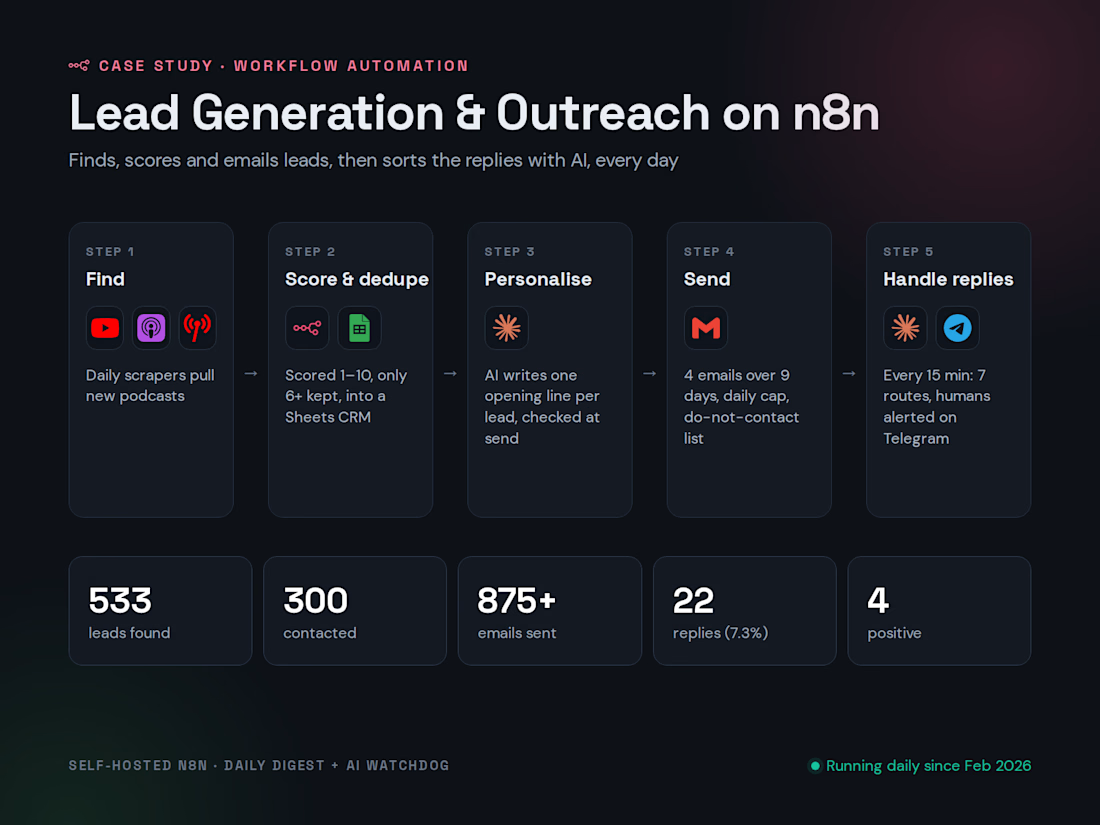
I built a lead-generation system that runs every day without anyone touching it.
It finds new podcasts, scores each one 1–10 and keeps only the good fits. It writes a personal first line for each lead with AI, then sends a short email sequence with a daily cap and a do-not-contact list. Every 15 minutes it checks for replies, sorts them into 7 routes, and alerts a person on Telegram when someone is ready to talk.
So far: 533 leads found, 300 contacted, 875+ emails sent, and a 7.3% reply rate.
The biggest lesson: limit AI to the jobs it's good at. Here it does two things, writing first lines and sorting replies. Everything else is fixed rules, which is why it's been reliable.
Full breakdown in the case study below 👇

A sales pipeline as a grid: every deal with company, rep, stage, close date, value, probability and last contact, plus hide fields, filter, group, sort and colour.

Presenting the pipeline as a grid instead of kanban makes stage, rep and value scannable in one pass, and the colour-coded stage pills — green Closed won, red Closed lost, yellow Negotiation — tell the story instantly. The Hide fields / Filter / Group / Sort toolbar is the cherry on top.