The network for creativity
Join 1.25M professional creatives like you
Connect with clients, get discovered, and run your business 100% commission-free
Creatives on Contra have earned over $150M and we are just getting started
Back to feedPost

Webflow Tip #2: Live Local Time
Want your website to feel more alive? Adding real-time local time is one of those tiny details that instantly makes a site feel modern and thoughtful.
It’s especially useful for:
• Booking pages
• Global audiences
• Event or webinar schedules
• Support / office hours
It helps clients quickly figure out the time difference if you’re in another timezone.
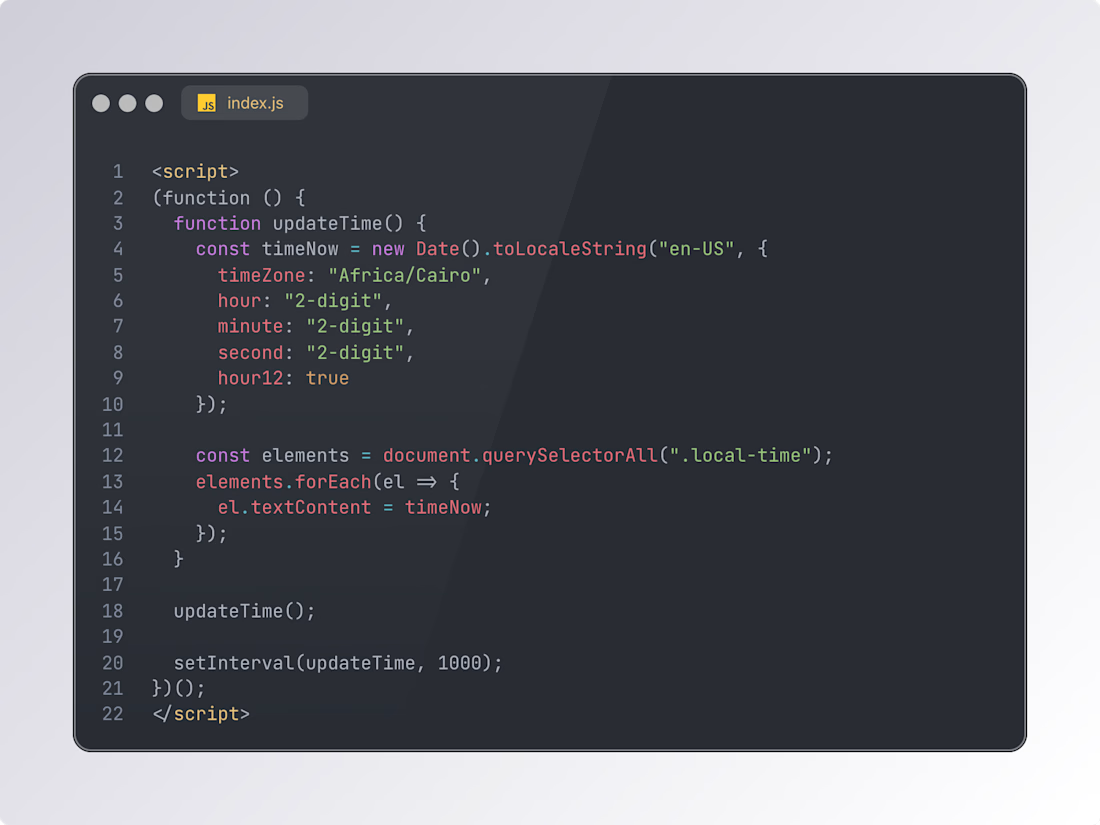
How to set it up in Webflow:
• Add a text element and give it class "local-time"
• Open the Page Settings for the page you’re working on
• Scroll to Before </body> tag
• Paste the script below, and update the timezone to your own
This takes less than a minute but instantly upgrades the experience.
More tips to come… stay tuned.

The network for creativity
Join 1.25M professional creatives like you
Connect with clients, get discovered, and run your business 100% commission-free
Creatives on Contra have earned over $150M and we are just getting started