The network for creativity
Join 1.25M professional creatives like you
Connect with clients, get discovered, and run your business 100% commission-free
Creatives on Contra have earned over $150M and we are just getting started
Back to feedPost
It worked perfectly in the demo.
Then Tuesday happened. 👀
A token expired. A field came in empty. Someone renamed a CRM field.
And nobody noticed for three days.
Here's the truth most people skip:
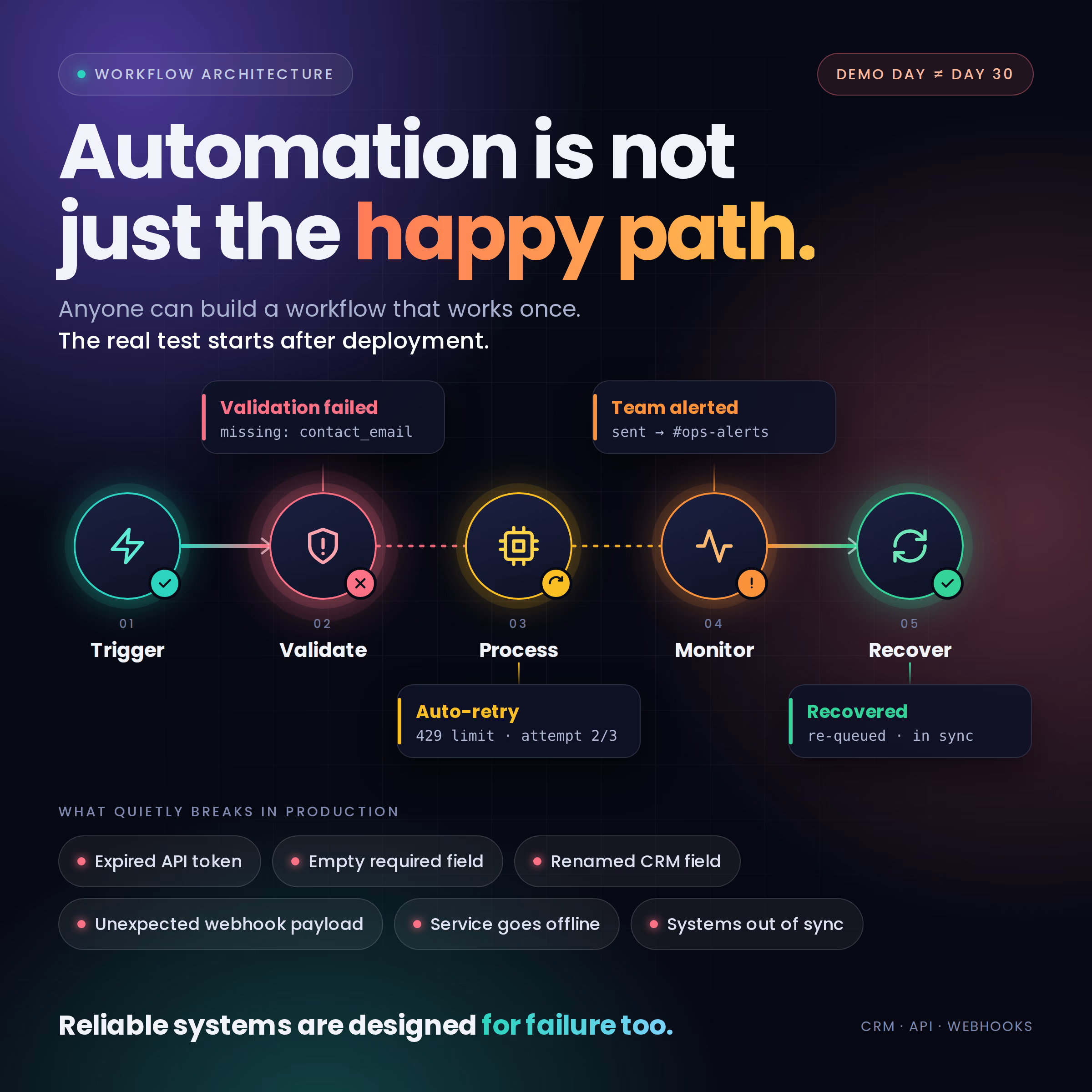
An automation that runs once isn't reliable. The real test starts after deployment.
These are the things that quietly break good workflows:
⚠️ An API token expires
⚠️ A required field arrives empty
⚠️ A CRM field gets renamed
⚠️ A webhook sends a payload nobody planned for
⚠️ A third-party service goes down for 10 minutes
⚠️ One step fails and leaves two systems out of sync
The scary part is that none of these make noise. They fail silently.
So I don't treat the safety net as an add-on. I build it in from day one:
✅ Validation: Is the data complete before we touch it?
✅ Logging: When something breaks, can we see exactly what happened?
✅ Retries: If it's a temporary hiccup, does the system try again on its own?
✅ Error handling: What happens to the record when step 3 of 5 fails?
✅ Monitoring: How does the team find out, before the client does?
Any automation can save time when everything goes right.
The good ones make failures easy to spot, easy to understand, and easy to recover from.
That's the difference between a workflow that looks great in a demo and one a team can trust every single day.
#CRMAutomation #APIIntegrations #Webhooks #ErrorHandling #WorkflowAutomation #WorkflowArchitecture

I'd monitor whether expected records arrived, as well as whether runs failed. A broken webhook can produce no executions at all, so comparing source records with CRM arrivals can catch the silence that an error alert misses.

Exactly. One practical check is comparing source record counts against CRM arrivals. If 50 records were created at the source but only 47 reached the CRM, that should trigger a review even if there were no failed runs. It’s a good way to catch silent webhook failures.
The network for creativity
Join 1.25M professional creatives like you
Connect with clients, get discovered, and run your business 100% commission-free
Creatives on Contra have earned over $150M and we are just getting started





Related posts


Top-notch design.

Challenge Submission – Lovable Challenge
Business Name: Clemxy Dentistory Genius
Business Type: Premium Dental Clinic
Location: Banana Island, Lagos, Nigeria
Business Quirks:
Solo dentist managing a busy practice
Limited administrative support
High volume of appointment inquiries
Frequent patient no-shows
Significant time spent on scheduling, reminders, and follow-ups
Problem Solved (One Line):
I built an AI-powered appointment concierge that automatically converts patient inquiries into confirmed bookings while eliminating the clinic's manual scheduling, reminder, and follow-up workload.
Project Built With Lovable:
https://pixel-perfect-display-2164.lovable.app/
Demo Video:
Attached – Patient journey walkthrough from inquiry to confirmed booking.
Build Process Video:
Attached – Behind-the-scenes walkthrough showing how the solution was designed and built in Lovable.
LinkedIn Post:
https://lnkd.in/p/etn23YDu
Solution Highlights
AI Receptionist
Real-time appointment booking
Automated confirmations
WhatsApp, SMS, and Email reminders
Self-service rescheduling
Lead recovery automation
Clinic performance dashboard
No-show reduction workflow
Built entirely in Lovable to demonstrate how AI can automate appointment-based businesses and help owners spend less time on administration and more time serving customers.
@Lovable #lovablechallenge #AI #Automation #HealthcareTech #DentalTech #NoCode #VibeCoding #BusinessAutomation #BuildInPublic #ClemxyTech


Meet Tendly: a simpler way for small businesses to turn interest into confirmed appointments.
Set up your services, working hours, and deposit requirements, then share one simple booking link. Your customers choose a service, pick an available time, enter their details, and pay their deposit. Once payment is verified, the booking is confirmed and added to your schedule.
No customer account needed. Just a clear journey from discovering your business to securing their next appointment. Tendly brings your bookings together, giving customers convenience and your business more clarity.
Tendly. Booking made beautiful.
Dedicated to the children of Palestine.


