The network for creativity
Join 1.25M professional creatives like you
Connect with clients, get discovered, and run your business 100% commission-free
Creatives on Contra have earned over $150M and we are just getting started
Back to feedPost

🌟 Reveal the Next Section on Scroll - CSS Only!
Ever wanted that smooth full-screen scroll effect where each section reveals the next one underneath as you move down the page? The best part: no JavaScript, no complex animations - just pure CSS.
1. Set each section to full screen
Give every section a height of 100vh so it fills the entire viewport.
2. Make sections relative
3. Control the stacking order
Assign Z-index values from highest (top section) to lowest (bottom section) so sections stack on top of each other.
4. Use contrasting backgrounds - reveal effect becomes obvious as you scroll.
As the page scrolls, the top section moves away and naturally reveals the section underneath.
✨ Perfect for: Portfolio storytelling, Landing pages, Product showcases
#WebDesign #CSS #Webflow #FrontendDevelopment #UIDesign #WebDevelopment
The network for creativity
Join 1.25M professional creatives like you
Connect with clients, get discovered, and run your business 100% commission-free
Creatives on Contra have earned over $150M and we are just getting started



Related posts

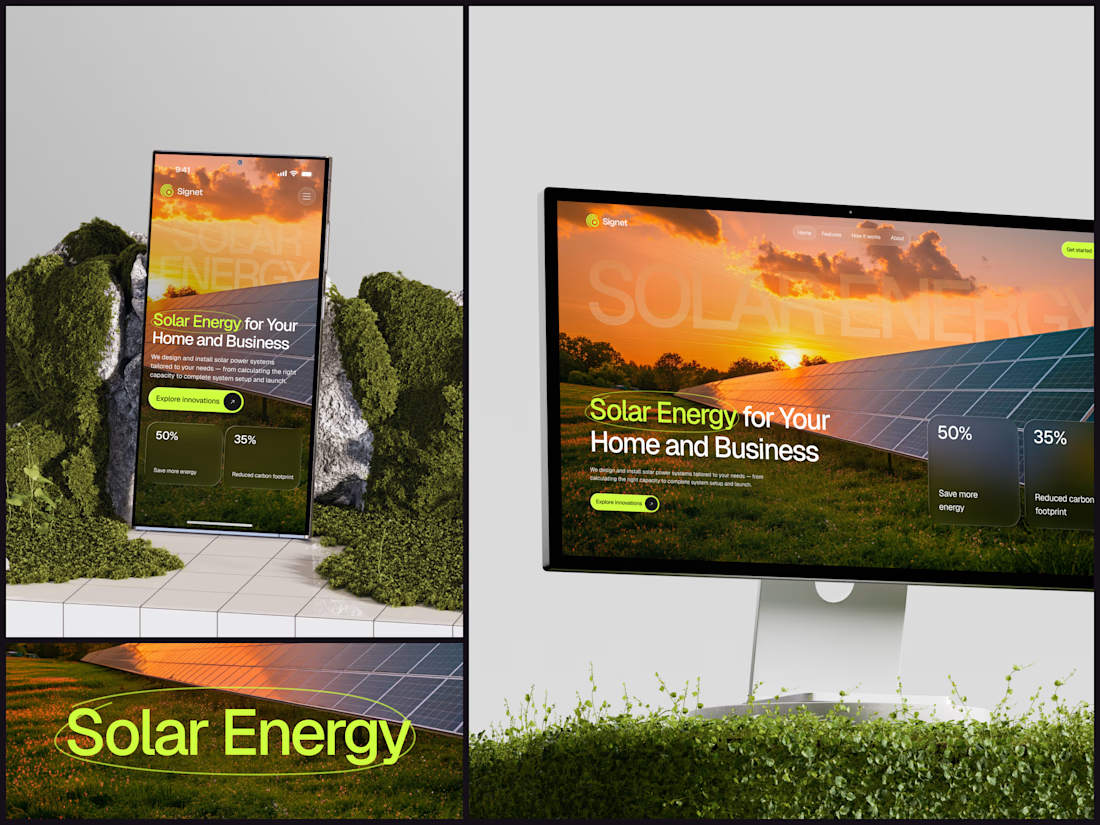
Solar Energy Website
A thin lime circle tells you which two words this page is about.
The headline sits over a sunset photo of a panel field. The "Get started" and "Explore innovations" buttons share the circle's lime, so the eye moves from the circled words straight to the next step.
Large faded capitals repeat those two words across the sky, faint enough to stay inside the photo. On mobile they break onto two lines, and the headline and button stack above two frosted cards.
Only two words of "Solar Energy for Your Home and Business" are lime, and the whole page follows them.
Designed by the Hue & Machine team.
#SolarEnergy #RenewableEnergy #CleanTech #WebDesign #LandingPage #HeroSection #UIDesign #ResponsiveDesign #MobileDesign #FigmaDesign



This is really cool, Nice job Dmytro

For Ranch University, I designed and built a custom Kajabi website and course platform + community around ranch ownership and life on the land.
Earthy colors, ranch photography, and spacious layouts carry through the site, membership pages, and course presentation. I also handled the course structure and offer setup behind the scenes.


A CPU runs four stages in under a nanosecond. Fetch, decode, execute, write back.
Try explaining that in a paragraph.
So I made a 3D exploration where every scroll is one stage. A piece turns from a technical drawing into 3D and locks into place, until the chip is complete.
When people can see what your product does, they don't need a paragraph to believe it.


Nice!