The network for creativity
Join 1.25M professional creatives like you
Connect with clients, get discovered, and run your business 100% commission-free
Creatives on Contra have earned over $150M and we are just getting started
Back to feedPost

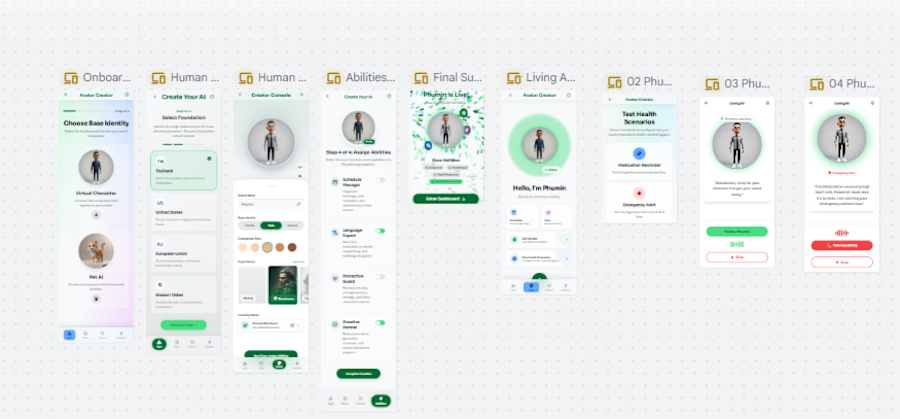
Avatar AI Character Identity:
We are designing the identity of an AI assistant, not the functionality of an AI assistant.
Concept : https://stitch.withgoogle.com/projects/7355420976670372892?node-id=9b6c924751304fc1b13287244d7cc3f3
Screen Design: https://stitch.withgoogle.com/projects/7355420976670372892
Prototype : https://stitch.withgoogle.com/preview/7355420976670372892?node-id=8a9ef6e7-a6e9-4415-9945-ab7d9bfaa1b3
Clip: https://www.loom.com/share/705c4b81948545f19377e6d433c655ec
------------
Issue : UX Navigation – Generated AI components lost on a massive canvas (Unable to locate despite using Command Menu/AI updates)
Description
The Problem
When requesting the AI to generate a new component or screen, the newly created assets are placed at coordinates very far away from the current viewport/focus area. Because the canvas is massive, it becomes completely impossible to locate where the AI put the work.
Despite multiple troubleshooting attempts, I could not find the generated assets:
Command Menu Search: Searching for the component or layer name via the Command Menu returns no results.
AI Coordinate Updates: Asking the AI to provide the location or coordinates of the newly created work results in incorrect or completely inaccurate coordinates.
Manual Search: I spent over 2 hours manually panning and searching around the canvas but still could not find the work.
This completely breaks the workflow as hours of generation effort are lost somewhere on the infinite canvas.
Steps to Reproduce
Open a project with a large canvas.
Use the AI prompt to generate a new screen or complex component.
The AI confirms generation is complete, but the viewport does not center on it, and the component is placed thousands of pixels away.
Try searching for the newly created element via the Command Menu (Fails to find it).
Ask the AI for the exact location or coordinates (AI provides wrong coordinates).
Suggested Solutions / Feature Requests
"Focus on Generated Asset" Action: Automatically center and zoom the viewport onto the newly generated asset as soon as the AI finishes creating it.
Go to Component Shortcut: Add a clickable "Go to component" or "View on canvas" button directly inside the AI chat interface or generation history.
Fix Command Menu Indexing: Ensure that newly generated AI components are immediately indexed and searchable via the Command Menu.
Accurate AI Navigation: Improve the AI's spatial awareness so it can accurately guide users or teleport the screen to the correct coordinates when asked.
-

The network for creativity
Join 1.25M professional creatives like you
Connect with clients, get discovered, and run your business 100% commission-free
Creatives on Contra have earned over $150M and we are just getting started



Related posts

I wanted to see how far I could take an idea using AI, so I built something.
Meet Instant CSV Dashboard 🚀
It's an experiment in making data easier to explore by turning CSV files into interactive dashboards.
I built it using AI tools, moving beyond static designs to create something people can actually try.
I'm sharing a short demo of the experience, and I'd love to hear what you think.
Have a look: https://interactive-csv-dashboards.ai.studio/
If you work with data regularly, what would you want a tool like this to do for you?
#ProductDesign #AI #DataVisualization
@Google USA


Nice one. I'd want it to pick the right chart for each column on its own. That's where most people get stuck.

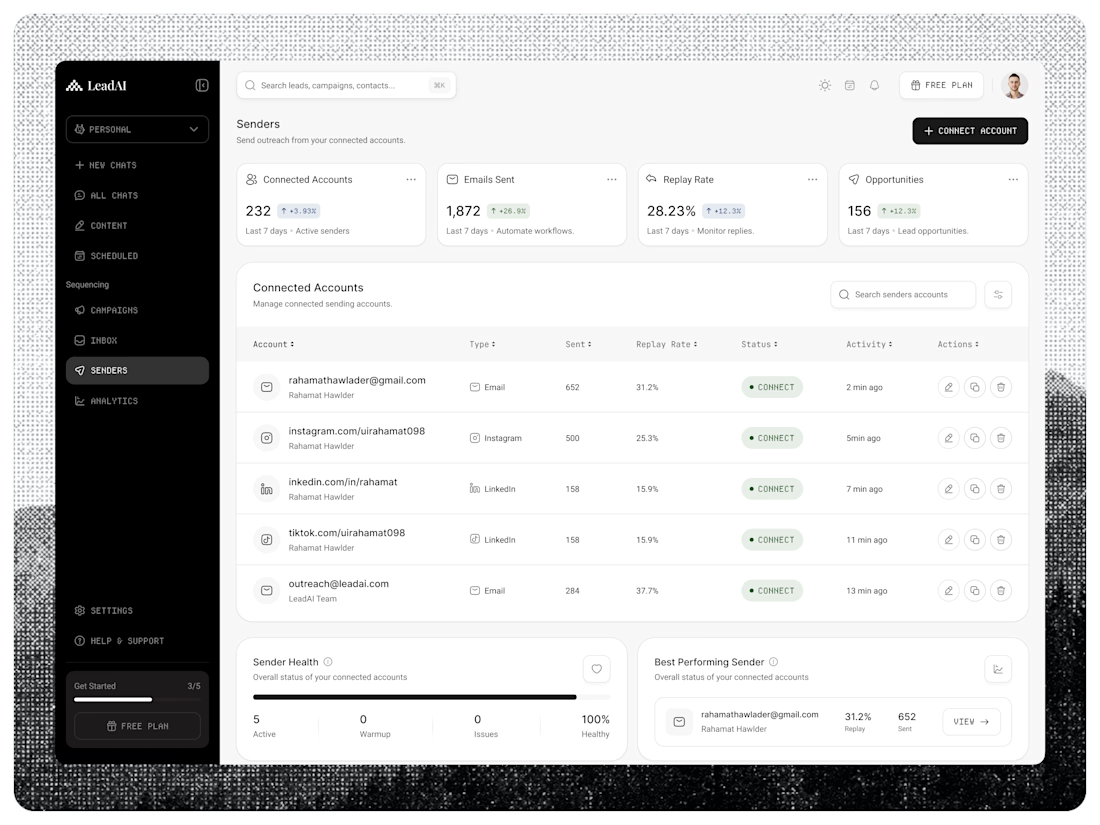
LeadAI — AI Lead Generation SaaS Dashboard
A modern AI-powered lead generation dashboard designed to simplify sales automation, schedule workflows, and help teams manage prospecting activities.
The interface combines a clean SaaS layout, automation analytics, status indicators, and an organized schedule management table.
Project Highlights:
AI Lead Generation Dashboard
Scheduled Automation Management
Sales & Prospecting Analytics
Clean SaaS Dashboard UI
Modern B2B User Experience
Available for UI/UX & AI Product Design projects. 🎯
✅ Full-Time | Contract | Remote



AI is booming nowadays, but so is the creativity of the minds who are behind it.
This one was a big challenge-constructing almost everything through AI generation, just enough to not make it look AI-generated. Hundreds of prompts at work, thousands of hours invested, and don't know how many nights were passed awake, with only one thought in mind...
"Can I make AI keep up with the creative intelligence that I, a human with limitless potential like every other human, possess?"


