The network for creativity
Join 1.25M professional creatives like you
Connect with clients, get discovered, and run your business 100% commission-free
Creatives on Contra have earned over $150M and we are just getting started
Back to feedPost

VoIP PBX Management System with Ozeki SDK
I’m excited to share this VoIP PBX Management System, a desktop application I built to make PBX and telephony administration simpler, more centralized, and easier to manage.
I developed the application using C#, .NET, Windows Forms, and Ozeki SDK, integrating directly with the Ozeki Phone System to give administrators a single interface for managing and monitoring VoIP resources.
What I Built
The system includes:
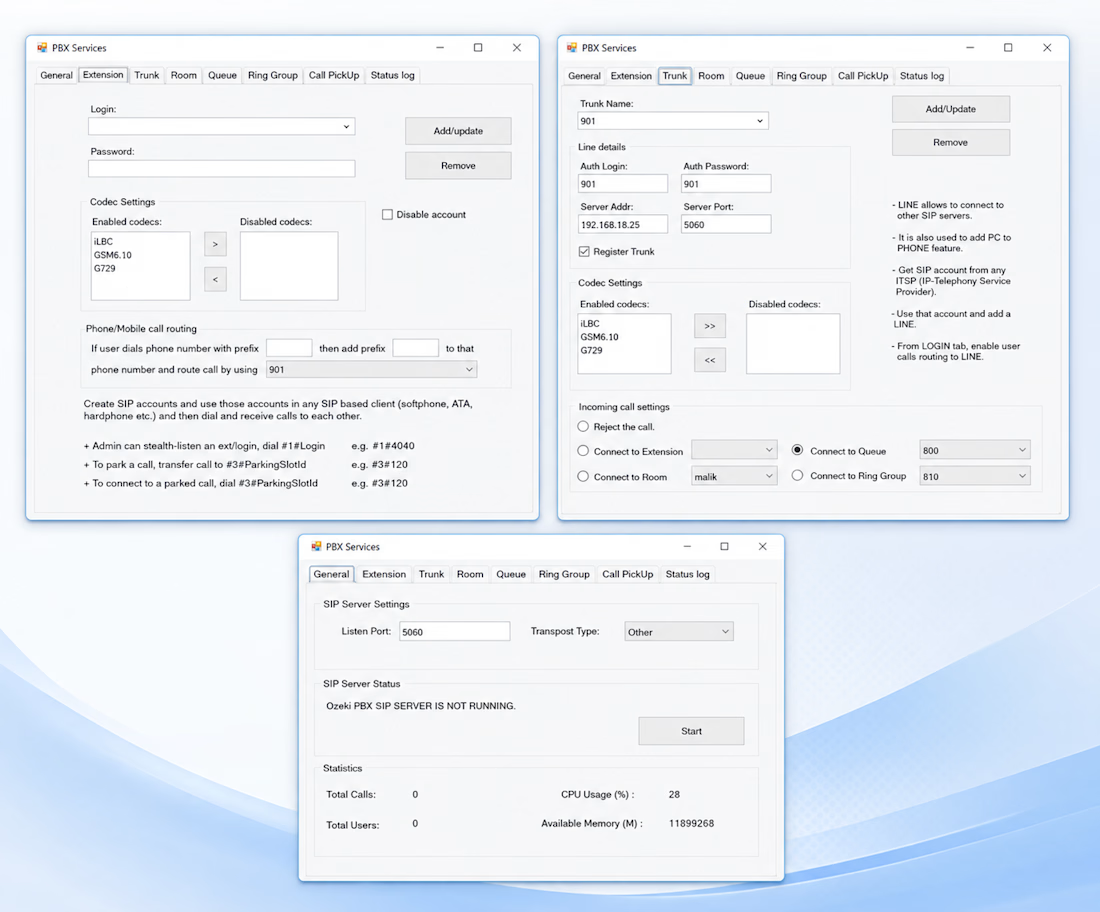
SIP Extension Management — Create, update, delete, and monitor extensions
SIP Trunk Management — Configure inbound/outbound trunks and provider settings
Queue Management — Manage agents, queue members, and call distribution
Ring Groups — Configure departmental call routing and group ringing
Conference Rooms — Create and manage audio conference rooms
Call Logs & Reporting — Track inbound, outbound, and missed calls
Call Routing — Manage inbound and outbound call flows
Real-Time Monitoring — Monitor PBX resources and service status
The Challenge
One of the most interesting parts of this project was keeping the desktop application reliably synchronized with the PBX server while maintaining a responsive user experience.
Working with VoIP, SIP, and PBX services required careful handling of API communication, data synchronization, errors, and real-time status information.
The Solution
I built a structured integration layer around the Ozeki SDK, combined with optimized data processing, error handling, and synchronization logic.
The result is a centralized management application that makes it much easier for administrators to configure PBX resources, manage call flows, and monitor telephony activity from one place.
Why I’m Proud of This Project
This project was a great opportunity to combine desktop application development, API integration, VoIP technology, and real-world business requirements into one solution.
I particularly enjoyed working on the PBX integration and turning complex telephony operations into a straightforward administrative interface.
Technology
C# · .NET Framework · Windows Forms · Ozeki SDK · REST API · SIP · VoIP · PBX
Role: Full-Stack / Desktop Application Developer
AI DevelopmentAI Voice DevelopmentDot Net Backend DevelopmentMicrosoft SQL ServerVisual Studio CodeWinForms


The network for creativity
Join 1.25M professional creatives like you
Connect with clients, get discovered, and run your business 100% commission-free
Creatives on Contra have earned over $150M and we are just getting started



Related posts

Healthcare AI Agent – Reschedule Appointments by Voice
AI Healthcare Assistant — Turn On Sound for the Best Experience.
Movexa AI Assistant helps physiotherapy clinics reschedule patient appointments in seconds, by text or by voice, without leaving the dashboard.
THE PROBLEM
Rescheduling a single session in a busy clinic means checking the therapist's calendar, finding a free slot, updating the booking and remembering to notify the patient. Front desk staff and therapists repeat this many times a day across different tools, and missed reminders lead to no-shows.
THE SOLUTION – THE FLOW
Ask – Open the AI search (⌘K) or tap the mic and say: "Reschedule Tezah's session tomorrow to 4 PM and remind her."
Understand – Voice mode transcribes live and shows exactly what the AI understood.
Check – Movexa checks the therapist's calendar and finds that 4:00 PM is free.
Confirm – The AI never acts silently. It shows a clear action card (patient, old time, new time, therapist, reminder) to confirm, edit or cancel.
Done – The appointment moves, the patient gets an SMS + app reminder, and the change is logged with one-tap Undo.
THE RESULT
A task that took several clicks and calls now takes one sentence, while the clinic team stays in full control of every action.


This is officially my first interface designed not with my hands, but with my voice.
We talk a lot about AI changing our workflows, but experiencing it firsthand shifts your entire perspective. I wanted to see how far I could push a pure AI-to-UI pipeline for a complex digital asset management workspace, prioritizing LLM logic and voice commands over manual pixel manipulation.
Here is how this hybrid process actually played out:
01 / The Logic: Instead of sketching, I started by mapping out the structural architecture and edge cases in Claude, generating a solid low-fidelity blueprint.
02 / The Voice: This was the wild part. Armed with detailed usability specs and moodboards, I used voice prompts in Figma AI to establish the high-fidelity visual foundation. I literally spoke the core UI into existence.
03 / The Human Touch: I processed the raw output through Claude again to adjust specific UI parameters, and then finally stepped in for a strict manual polish. Perfect grid alignment and sharp visual hierarchy still require a designer's eye.
04 / The System: To wrap it up, I reverse-engineered the polished interface back through Claude to automatically construct a fully scalable atomic design system, complete with defined components and local variables.
The role of a product designer is fundamentally shifting. We are spending less time executing and more time directing architectural logic and curating systems.
I would love to hear how you all are integrating these new AI pipelines into your daily sprints. Let's discuss in the comments.
#ProductDesign #Claude

My tribute as a web designer to Bizarrap, a great artist who has 🇦🇷♥️
I designed and built a one-page site to tell his story...
⏱ Timeline: 2 days
Turn on the studio and scroll through it 👇

Hero looks cool🔥