The network for creativity
Join 1.25M professional creatives like you
Connect with clients, get discovered, and run your business 100% commission-free
Creatives on Contra have earned over $150M and we are just getting started
Back to feedPost

The Problem:
Churn happens in the shadows. Disconnected data—failed payments, angry emails, and dropping usage—means Customer Success teams react too late, costing the business thousands in lost MRR.
The Solution:
I engineered an autonomous n8n workflow that acts as a 24/7 AI Retention Agent. It ingests real-time signals (Stripe, IMAP, Usage Scans), enriches them with CRM data, and uses GPT-4o + Pinecone Vector DB to predict churn risk.
Instead of just sending alerts, it autonomously executes the perfect retention strategy:
Critical Risk: Instantly pages the Exec team via PagerDuty & Slack.
🟡 Medium Risk: Drafts a custom discount email, pausing for Human-in-the-Loop approval before sending.
🟢 Expansion: Auto-generates a PDF report and triggers a Slack upsell alert for Sales.
The Business Impact:
📉 Predicts churn days before a customer cancels.
⏱️ Saves 20+ hours/week of manual CS triage and data hunting.
️ Protects MRR with safe, AI-driven, context-aware interventions.
Tech Stack: n8n • GPT-4o • Pinecone (RAG) • HubSpot • Stripe • PagerDuty


The network for creativity
Join 1.25M professional creatives like you
Connect with clients, get discovered, and run your business 100% commission-free
Creatives on Contra have earned over $150M and we are just getting started
Related posts

Most inbound bottlenecks aren't caused by low lead volume—they happen during triage.
When inquiries roll into a Google Sheet or CRM, operations teams often waste 10–15 minutes per submission reading through messy paragraphs, deciphering budget mismatch, and manually deciding who gets an immediate call vs. a standard rate sheet.
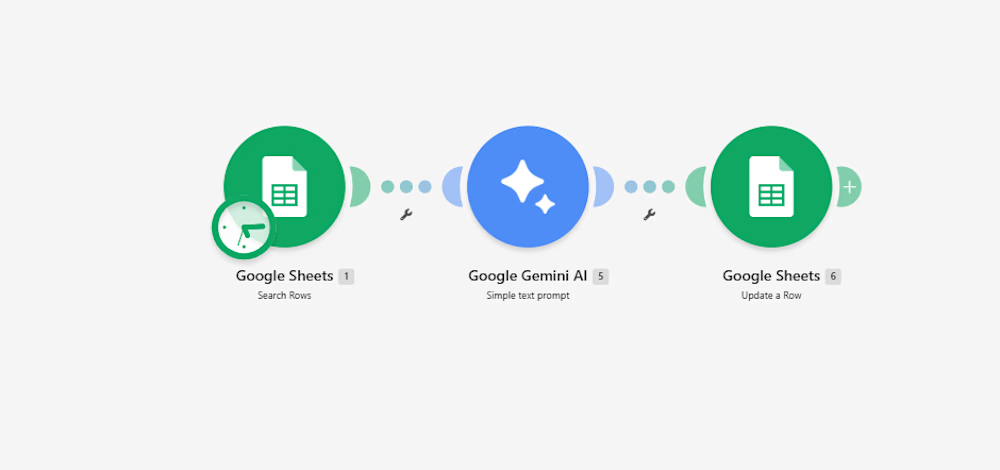
Instead of adding a bulky CRM add-on, I documented a lightweight 3-step automation pipeline built inside Make:
Intake & Extraction: An active listener triggers immediately upon a new submission, extracting core variables: client scope, target deliverables, timeline, and stated budget.
Context-Aware Evaluation (Gemini 2.5 Flash): The payload passes through an AI evaluation node with strict guardrails:
Evaluates budget against minimum agency criteria.
Assigns a triage score: Hot (immediate priority), Warm (nurture), or Cold (disqualified/template reply).
Generates a strict 15-word operational summary—no long paragraphs.
Determines an automated next step (e.g., routing to an account lead or flagging for asynchronous follow-up).
Data Return & Clean Pipeline: Appends the structured classification directly back to the master operational tracker, keeping the sheet filterable and clean.
The outcome: The sales and operations team can filter the entire board by priority status in two clicks, cutting first-touch response time to minutes without manually reading every single submission.
I’ve documented the full scenario map, execution logic, and data schemas below.
Curious how other agency operators and automation leads here handle their lead enrichment layer—are you doing AI scoring at the form level, or later in the CRM pipeline?:


For the budget gate, I'd keep an unstated budget separate from one explicitly below your minimum. Does the Make route ask for clarification when the amount or currency is missing, so a potentially suitable lead doesn't fall into Cold by default?

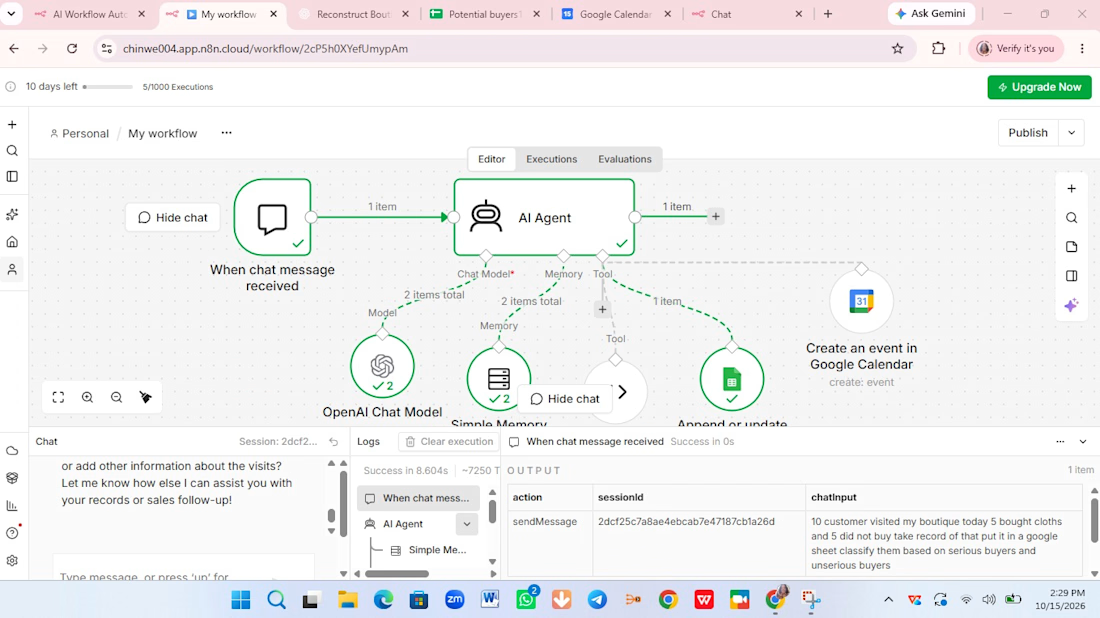
This is a customer support chatbot that help users to sell their products online.
User will chat with on your website.
It collect leads on your behalf gather detail in a google sheet.
It will even create meeting add to your Google calendar. It is useful for you as an individual, an entrepreneur, as somebody delivery services or product.
I use my niece boutique as a reference.
Tools:
Ai Agent, Ai chat model, memory, code tools, Google sheet and Google calendar.
Ai Agent: as Ai agent you it a task, it will use several tools at it's disposal to respond and act based on the system prompt.
Ai chat model: respond to all the chats.
Memory: you give your agent memory so that it can remember everything read understand and interpret it.
Code tool: It return the days of the week.It gather information about people that are chatting even see them as potential buyers or not.
Google sheet: It record every sales.
Google calendar: You use Google calendar to book an appointment with your customers

🚴 What if a bike workshop website felt more like an interactive experience?
I've been exploring how scroll-driven animations, SVG illustrations, and small interactions can make an ordinary business website more engaging.
For this concept, I experimented with:
A bicycle that comes to life as you scroll
Interactive workshop service sections
A simple way for visitors to explore what their bike needs
Built with HTML, CSS, and JavaScript.
Still exploring how to balance creative interactions with usability and performance.
Curious what you think! Does this kind of storytelling add value to a business website, or would you keep things simpler? 👀
AI DevelopmentMotion DesignWeb DevelopmentChatGPTClaudeHTML5creativedevelopmentwebdesigninteractivelandingpage


For a local workshop I'd keep the scroll bike for the hero and make the service sections quick to scan. The "what does my bike need" flow is the part that could actually bring bookings.