The network for creativity
Join 1.25M professional creatives like you
Connect with clients, get discovered, and run your business 100% commission-free
Creatives on Contra have earned over $150M and we are just getting started
Back to feedPost

Kids' supplements have a double sale to make.
You have to convince:
– the parent it's safe
– the parent it works
– the kid it tastes good
All in the first fold.
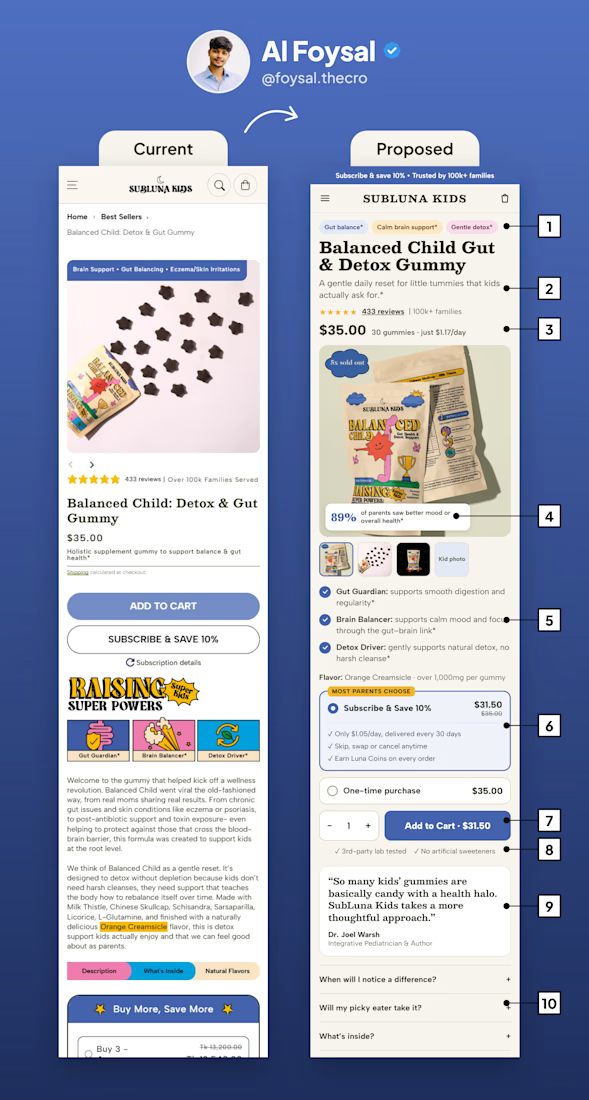
In this post, using SubLuna's example, I'll be sharing 10 changes that make a kids' gummy PDP easier to buy from.
Adding benefit pills above the product name. 3 words each. The parent knows what it does in 1 second.
Adding a 1-line description under the title. Not a paragraph. Tell the outcome, not the ingredient list.
Showing the price per day next to the price. $1.17/day feels very different from $35. And it now shows without scrolling.
Putting proof on the main image. "89% of parents saw better mood" works harder inside the gallery than at the bottom of the page.
Turning long paragraphs into 3 bullets. Benefit first, bold the key words.
Pre-selecting Subscribe & Save. Show why to subscribe, not just the discount. This is your recurring revenue.
Making the add to cart CTA high contrast, with the price inside it. Light buttons with white text get missed.
Adding trust points right below the CTA. Lab tested, no artificial sweeteners. This is where the doubt happens.
Moving the pediatrician quote up next to the buy box. For kids' products, expert trust is everything.
Adding FAQs for the real objections. "Will my picky eater take it?" sells more than another paragraph.
Other changes I made:
– removed the email popup on load
– removed the breadcrumb
– softened claims to "supports" language
– added thumbnails so the gallery is easy to explore
What would you add to this list?
PS: If you sell to parents, remember you're selling to two people. Make it easy for both to say yes.
The network for creativity
Join 1.25M professional creatives like you
Connect with clients, get discovered, and run your business 100% commission-free
Creatives on Contra have earned over $150M and we are just getting started
Related posts

How can teams build practical AI skills without taking employees away from their everyday work?
Skillio makes AI upskilling hands-on through short, role-based simulations. Employees practise real work scenarios, while HR and L&D teams can track progress, identify skill gaps, and guide development.
The landing page brings that value into focus with a bold “AI skills. Real results.” hero, pixel-inspired graphics, realistic imagery, and product visuals. High-contrast blue and dark sections create energy, while soft pink areas balance the page. Clear messaging and strategically placed demo calls to action guide decision-makers through the offer.


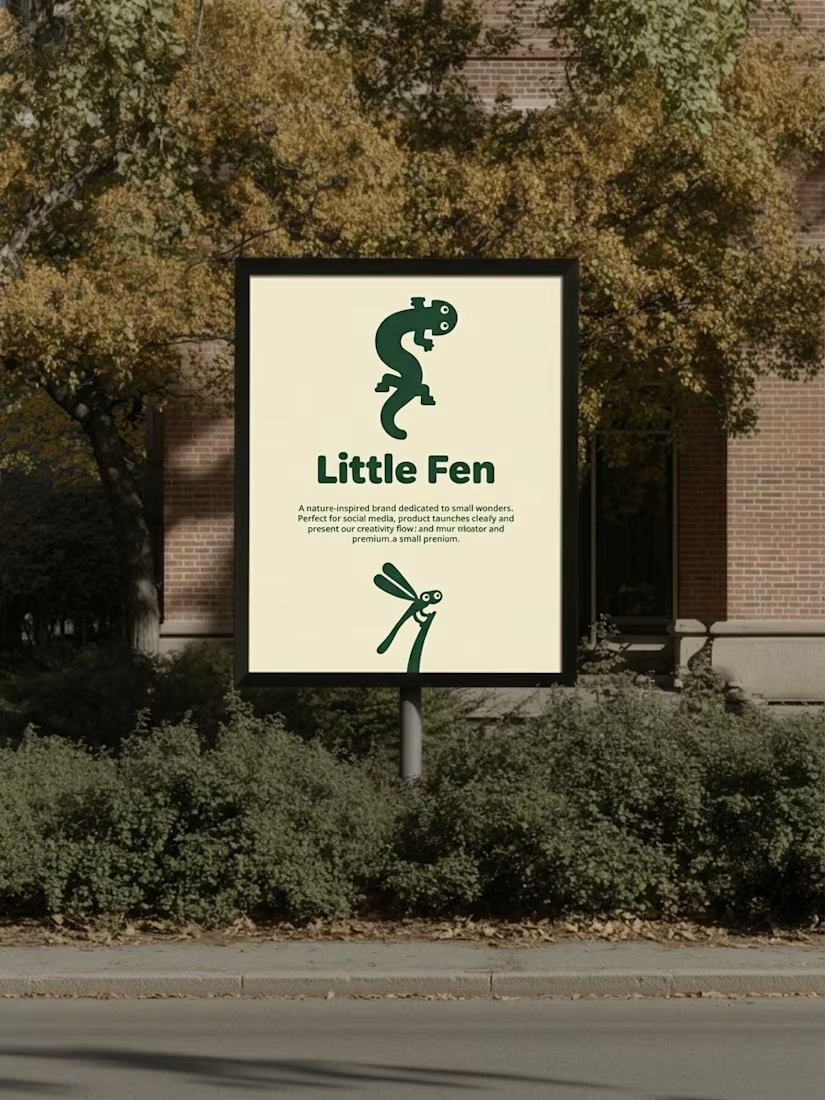
Kids don’t read brand guidelines. They poke things.
So every creature in Little Fen has eyes. On the site, they follow you.
Case study is live.


What happens when one website has to talk to two different people?
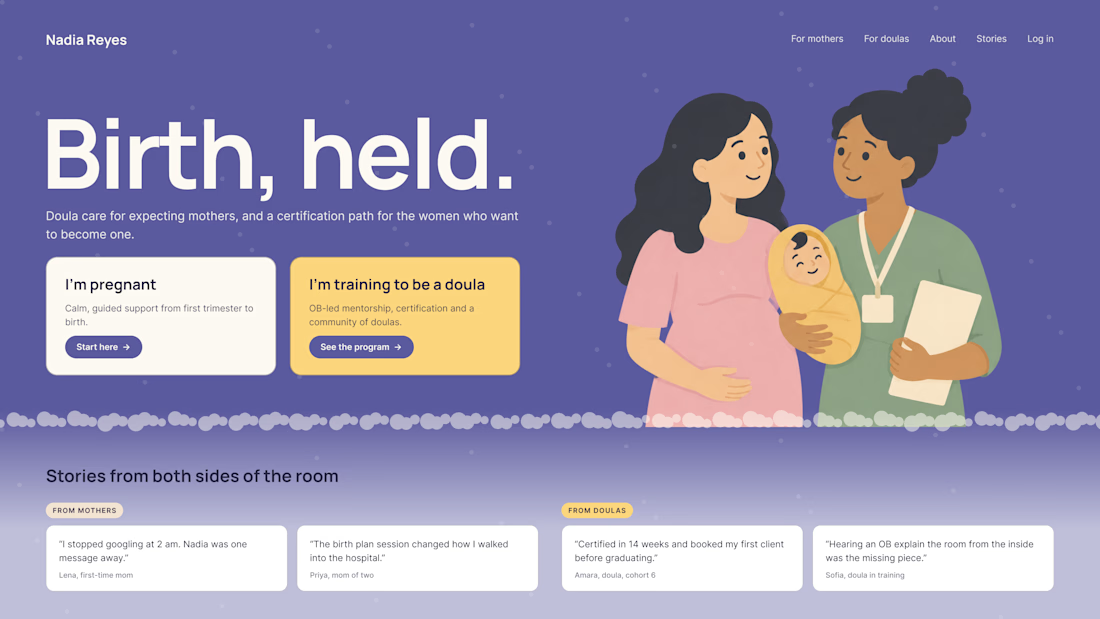
A client of ours teaches two audiences at once: expecting mothers who want a calm pregnancy, and women who want to become doulas. One brand, one site, two very different reasons to visit.
The usual fix is a hero that speaks to "everyone" and lands with no one. We designed it as a fork in the road instead:
1. Two doors in the hero. "I'm pregnant" and "I'm training to be a doula", side by side, equal weight. The visitor picks a path in one click, and the headline above them stays about the shared value.
2. One voice, two tones. The mothers' path is softer: fewer words, more room, gentle photos. The doula path is more structured: modules, certification, dates. Same fonts, same colors, different rhythm.
One proof section, split in two. Testimonials from mothers on the left, from doulas on the right. Each visitor sees people like them before the price.
Writing for everyone is writing for no one. Give each reader a door.
Have you ever designed a page for two audiences at once? How did you split it?


Really great point! Designing for two distinct audiences under one brand is always a challenge. Excited to see your approach to solving it.