The network for creativity
Join 1.25M professional creatives like you
Connect with clients, get discovered, and run your business 100% commission-free
Creatives on Contra have earned over $150M and we are just getting started
Back to feedPost

🚀 Run Your Own AI Locally — No Cloud Required!
Want to run an AI model like ChatGPT directly on your computer? Here's a simple setup using Llamafile and Qwen3 4B Thinking:
Step 1: Download Llamafile
Search for Llamafile GitHub and download the latest release.
Step 2: Download the Model
Get the Qwen3 4B Thinking 2507 GGUF model from Hugging Face.
Step 3: Create a Batch File
Create a .bat file in the same folder and add:
.\llamafile-0.10.3.exe -m qwen3-4b-thinking-2507.Q4_K_M.gguf --server --gpu disable
Step 4: Launch Your AI
Double-click the .bat file to start the server.
Step 5: Open in Browser
Visit:
That's it! 🎉
You now have a private AI assistant running entirely on your own machine—no subscriptions, no API keys, and no internet dependency after setup.
✅ Full local control
✅ Better privacy
✅ Works offline
✅ Easy to set up
Have you tried running LLMs locally yet? Share your experience in the comments.


The network for creativity
Join 1.25M professional creatives like you
Connect with clients, get discovered, and run your business 100% commission-free
Creatives on Contra have earned over $150M and we are just getting started





Related posts

I tested Opus 5.5 and had it build an arcade game in Unity using the CLI and Claude Code.
The game is called Heatwave and is a quick and fun little police chase game.
Of all the games I've made, this is actually the one I enjoy to test the most.
I'm terrible at it, but it's fun.





Wanting another run even when you are bad at it is a pretty good sign. What took more iteration in Heatwave, the driving feel or the police chase behavior?
My kids loves Block Blast, so I decided to try making my own version for them.
It's not perfect but it was a fun experiment. My kids weren't impressed. Tough crowd.


Kids are the harshest QA you can hand a puzzle game to, and they reject on feel long before they reject on difficulty. Most homemade Block Blast clones get the rules right and still feel wrong, because the piece follows the finger instead of the grid and the snap lands late....

Built this AI agent to find, organize, and manage leads through Gmail, helping automate lead handling and outreach.

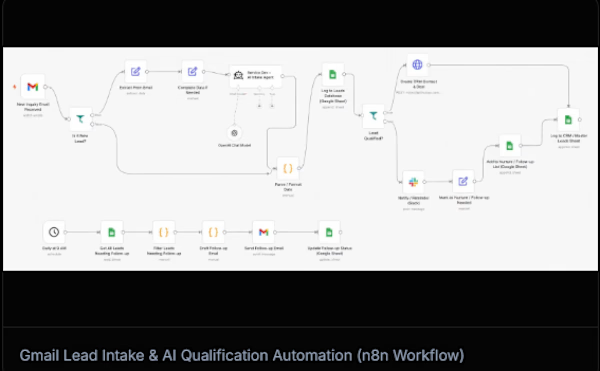

n8n is absolute gold for orchestrating lead pipelines like this! Connecting Gmail parsing with LLM qualification saves teams dozens of hours weekly. As someone who builds custom agentic lead automation workflows, seeing clean visual architectures like this is super satisfying. Top-tier build, Talha!.