The network for creativity
Join 1.25M professional creatives like you
Connect with clients, get discovered, and run your business 100% commission-free
Creatives on Contra have earned over $150M and we are just getting started
Back to feedPost

I recently refused to manually upload 474 images into Webflow for an agency partner.
We were building a massive media gallery for a recent launch project. The raw files were sitting in a shared folder, and each photo was clocking in at 5 to 10MB.
Doing this the normal way meant manually compressing every single photo, uploading them to the Webflow assets panel, building 474 individual containers, and linking them all up one by one.
That process would easily burn an entire day of billable hours. It would probably crash the browser a few times too. It is a massive, hidden drain on project margins.
So I took a different route.
I wrote a quick script to batch compress everything into lightweight web formats in seconds. Then I bypassed the manual upload process entirely and wrote a clean function to automatically generate the gallery structure when the page loads.
What usually takes long hours took 45 minutes.
When you are running a design agency, scope creep often hides in these tedious, repetitive tasks.
My goal as a development partner is to spot those invisible roadblocks early and automate them away.
It protects the project's profitability, and it keeps everyone focused on the creative work that actually matters.

The network for creativity
Join 1.25M professional creatives like you
Connect with clients, get discovered, and run your business 100% commission-free
Creatives on Contra have earned over $150M and we are just getting started
Related posts

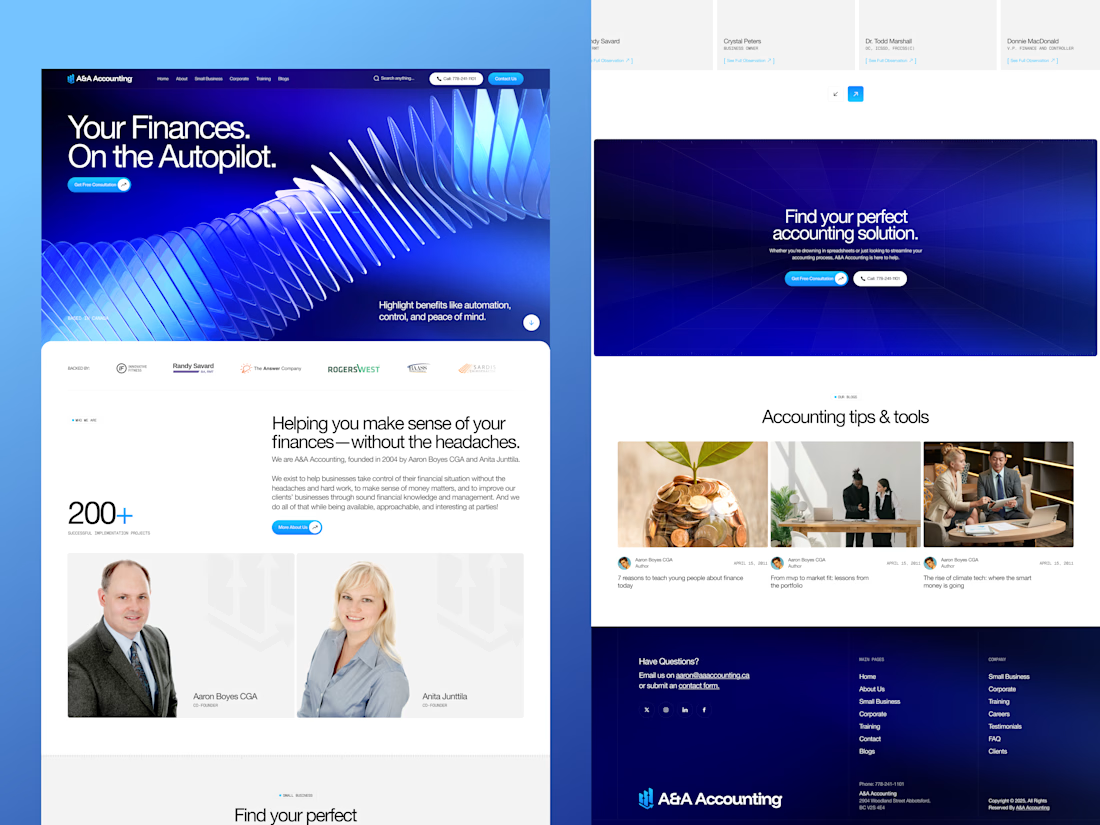
📊 A&A Accounting – Modern Accounting Website Built in Webflow
Excited to showcase this accounting and financial services website that was carefully transformed from Figma into a fully responsive Webflow experience.
Designed to build trust, improve user engagement, and clearly communicate financial services for businesses across Canada, this project combines clean design with seamless functionality. ✨
🔹 Project Features:
✅ Custom Figma UI/UX Design
✅ Pixel-Perfect Webflow Development
✅ Fully Responsive on Mobile, Tablet & Desktop
✅ Dynamic CMS Structure
✅ Smooth Interactions & Animations
✅ SEO-Friendly Architecture
✅ Fast Loading Performance
✅ Conversion-Focused Service Pages
✅ Easy Content Management for Clients
💼 Services Highlighted:
• Small Business Accounting
• Bookkeeping Services
• Financial Reporting
• Tax Planning & Strategy
• CFO Advisory Services
• Financial Software Setup & Training
• Business Growth Consulting
⚙️ Development Process:
1️⃣ Client Discovery & Requirement Analysis
2️⃣ Wireframing & UI/UX Design in Figma
3️⃣ Design Approval & Refinement
4️⃣ Manual Figma to Webflow Development
5️⃣ CMS Setup & Dynamic Content Integration
6️⃣ Responsive Optimization Across Devices
7️⃣ Animation & Interaction Implementation
8️⃣ Performance & SEO Optimization
9️⃣ Testing, QA & Launch
🚀 Every section was manually developed in Webflow to ensure accuracy, flexibility, and a premium user experience without relying on automated conversion tools.
👨💻 Designed & Developed by Eyasin Sheikh Rony
🏆 Certified Premium Webflow Partner
🏆 Webflow Template Developer Expert
Live View: A&A Accounting
Webflow Premium Certified Partner: Eyasin Sheikh Rony
My Agency Website: Codermoon
Templates Profile: Ninetyflow
Hire Upwork: Eyasin Sheikh Rony
Follow Me on LinkedIn: Eyasin Sheikh Rony
Follow Me on Instagram: Eyasin Sheikh Rony
📞 WhatsApp or Call: +8801306333764
#Webflow #FigmaToWebflow #WebflowDeveloper #CertifiedWebflowPartner #WebDesign #WebDevelopment #AccountingWebsite #CMS #ResponsiveDesign #SEO #Codermoon #Ninetyflow



Amazing design 😍, very outstanding and professional

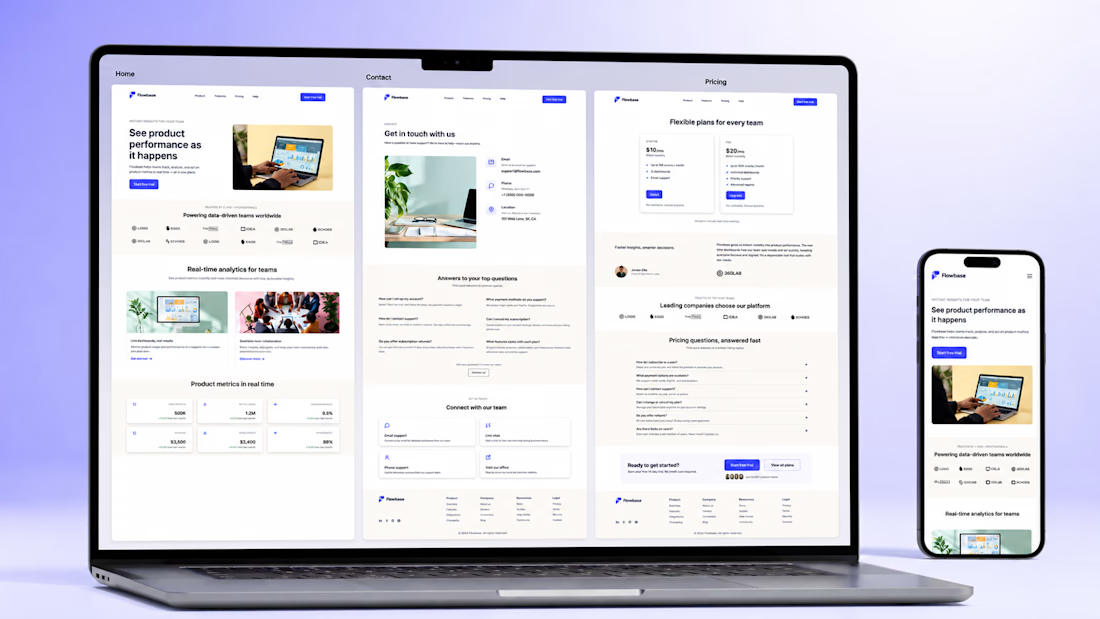
Concept B2B SaaS landing page for "Flowbase", a fictional product-analytics
platform — designed and built in Webflow to showcase a clean, conversion-focused
SaaS layout. It includes a hero with product mockup, trusted-by logos, a feature
grid, a real-time metrics section, customer testimonials, a 3-tier pricing table,
an FAQ, and a contact form. Fully responsive across desktop, tablet and mobile,
with smooth scroll-reveal animations, subtle hover micro-interactions, and clean,
reusable classes that keep the content easy to edit and hand off.


Monday is here, and so are the things to do:
- Design and build a case studies page and setup localization for the client
- Go over the latest updates for Lumos webflow framework
- Watch SEO masterclass recording
-Plan projects for July and August
- Have fun in Figma with some design explorations
How is your week shaping up?

Trending

Claude
Claude has entered the design space. How are you using Claude Design?

Contra University
Learn from expert creatives how to earn more using next-gen AI tools.

MagicPath
The canvas is infinite, and exploration is becoming the workflow. How are you using MagicPath?
creativeaiflow
Creative AI workflows are evolving. What tools do you use, and what are their strengths and weaknesses?
freelancerlife
Freelancer life is wins, pivots, and everything in between. What’s yours right now?