The network for creativity
Join 1.25M professional creatives like you
Connect with clients, get discovered, and run your business 100% commission-free
Creatives on Contra have earned over $150M and we are just getting started
Back to feedPost

A client recently asked me a really good question:
“Is there any AI method that can help us manage or update our Webflow website faster?”
Most clients don’t want to depend on a developer every time they need to update a CMS item, improve a meta title, publish a blog post or make small content changes.
They don’t want to rebuild the website.
They just want a faster way to manage it.
That is where Webflow and Claude MCP become interesting.
With the right setup, AI can help non-technical teams work with Webflow content faster, especially when it comes to CMS updates, content editing and SEO improvements.
Of course, this does not mean giving AI full control without checking anything.
But it can make the content workflow much smoother.
I shared more about this topic here:
https://atado.studio/blog/webflow-claude-mcp-content-updates


The network for creativity
Join 1.25M professional creatives like you
Connect with clients, get discovered, and run your business 100% commission-free
Creatives on Contra have earned over $150M and we are just getting started
Related posts

𝗗𝗮𝘆 𝟮𝟲𝘁𝗵 𝗼𝗳 𝟯𝟬𝗱𝗮𝘆𝘀, 𝟰 𝗗𝗮𝘆𝘀 𝘁𝗼 𝗴𝗼
𝗙𝗿𝗮𝗺𝗲𝗿 𝘃𝘀 𝗪𝗲𝗯𝗳𝗹𝗼𝘄 𝗶𝗻 𝟮𝟬𝟮𝟲: 𝗦𝗽𝗲𝗲𝗱 𝘃𝘀 𝗖𝗼𝗺𝗽𝗹𝗲𝘅 𝗖𝗠𝗦 𝗔𝗿𝗰𝗵𝗶𝘁𝗲𝗰𝘁𝘂𝗿𝗲
Both platforms excel at visual development, but their modern use cases are distinct:
• 𝗙𝗿𝗮𝗺𝗲𝗿: Best for rapid AI layout iteration, SaaS conversion pages, and Figma-native auto-layout fidelity.
• 𝗪𝗲𝗯𝗳𝗹𝗼𝘄: Unmatched for complex relational database logic, multi-locale localization, and enterprise governance. Here is how to choose between them in 2026.
𝗪𝗵𝗶𝗰𝗵 𝗽𝗹𝗮𝘁𝗳𝗼𝗿𝗺 𝗶𝘀 𝗰𝘂𝗿𝗿𝗲𝗻𝘁𝗹𝘆 𝗶𝗻 𝘆𝗼𝘂𝗿 𝗺𝗮𝗶𝗻 𝗰𝗹𝗶𝗲𝗻𝘁 𝗽𝗿𝗼𝗱𝘂𝗰𝘁𝗶𝗼𝗻 𝘀𝘁𝗮𝗰𝗸❓❓❓
𝗟𝗲𝘁 𝘂𝘀 𝗸𝗻𝗼𝘄 𝗯𝗲𝗹𝗼𝘄!


Amazing

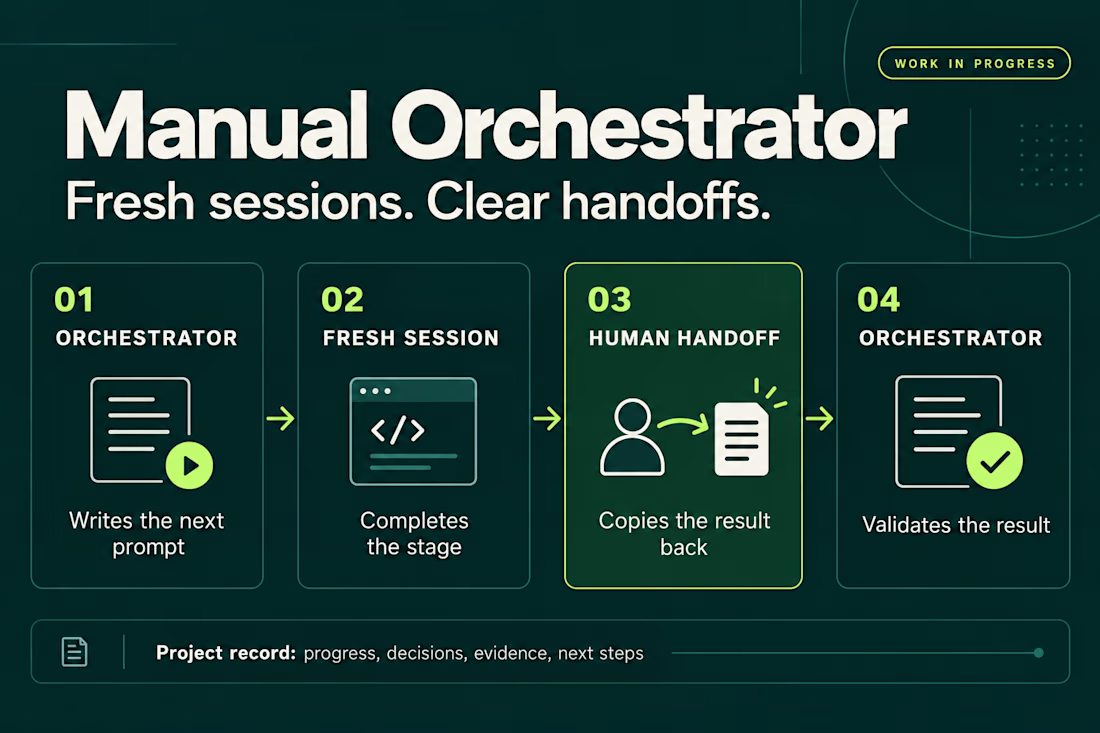
I’ve been working on a small skill called Manual Orchestrator to make longer projects with AI agents easier to manage.
The problem started with a familiar situation: one chat would accumulate plans, implementation details, corrections, and test results. By the time I was ready for the next phase, I wanted a fresh conversation without losing the decisions we’d already made.
Manual Orchestrator gives that process some structure. One chat acts as the orchestrator: it breaks the work into stages and writes a prompt for the next one. I run that prompt in a new session, then bring the result back. The orchestrator reviews it against the stage’s criteria before preparing the next prompt. If something needs fixing, I go back to the same worker session.
The skill also keeps a record in the project with the current stage, decisions, evidence, and next steps. That makes it easier to pause, resume, or hand the work to another session.
The handoff is manual. I choose when to open a session and carry the result back. The orchestrator and worker sessions can also use different agent CLIs, with the prompt adapted to the capabilities available.
It’s open source and still a work in progress. I’m using it to learn what helps in practice and where the workflow needs to improve. Installation has been checked for Codex, Claude Code, and Gemini CLI, but the full workflow hasn’t been tested across every CLI or version.
If you try it, I’d be interested in hearing what works and where it gets in your way.


Amazing work. looks clean and modern. Balance work