The network for creativity
Join 1.25M professional creatives like you
Connect with clients, get discovered, and run your business 100% commission-free
Creatives on Contra have earned over $150M and we are just getting started
Back to feedPost

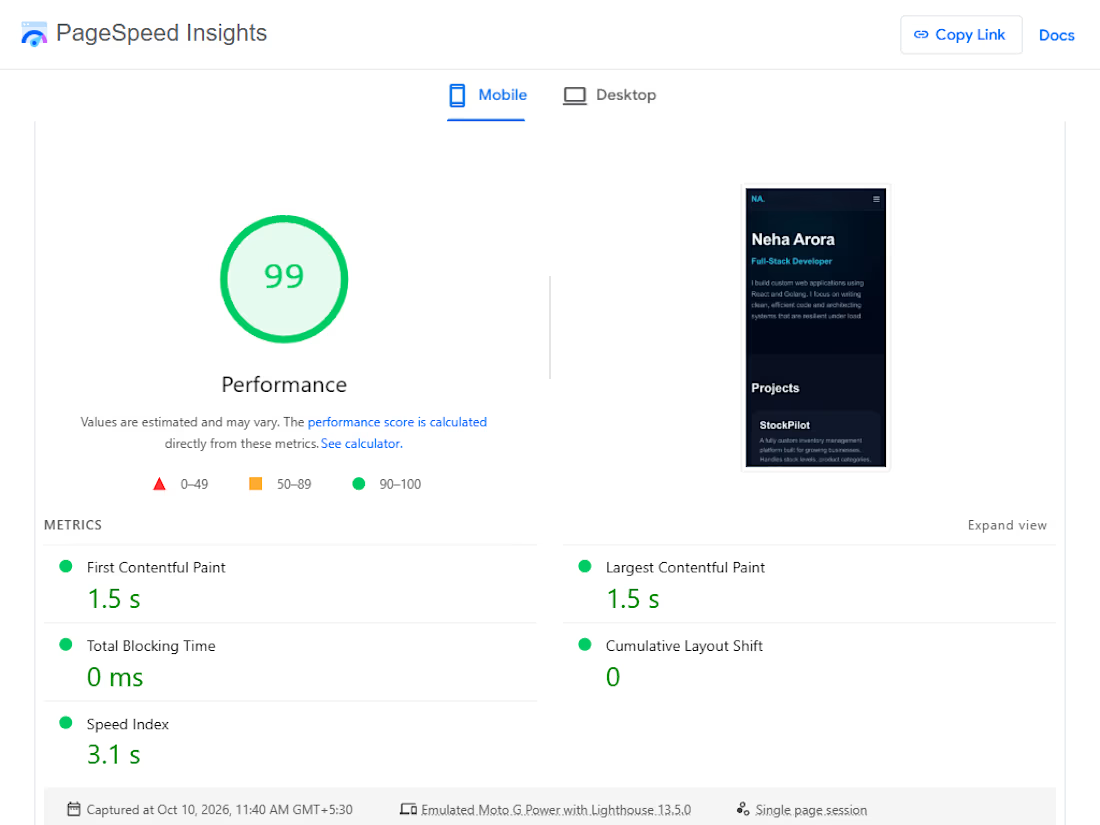
Optimized my portfolio's First Contentful Paint from 2.6s to 0.2s today.
Two things were blocking render:
The Tailwind CDN, which loads a ~400KB script and generates CSS at runtime.
Google Fonts, which adds a DNS lookup and TLS handshake to a third-party domain on the critical path.
Fix one: compiled Tailwind locally into a 4.4 KiB static stylesheet. Only the classes actually used, no runtime.
Fix two: self-hosted Inter via @fontsource-variable/inter so the font loads from my own domain.
Also deferred the interactivity script so it downloads in parallel with HTML parsing instead of blocking paint.
Result: 0.2s FCP on desktop, 1.5s on emulated slow 4G. Both inside Google's "good" threshold.
The network for creativity
Join 1.25M professional creatives like you
Connect with clients, get discovered, and run your business 100% commission-free
Creatives on Contra have earned over $150M and we are just getting started



Related posts


Fix your images first
On a slow site, images are often the heaviest files on the page.
Fix them in this order:
→ Resize them to the size they're shown at (no 4000px photo in a 600px box)
→ Convert to WebP or AVIF
→ Lazy-load anything below the first screen
→ Give every image a width and height, so the page doesn't jump
→ Preload the hero image instead of lazy-loading it
How heavy is your hero image? Check it in your browser's DevTools and tell me the size below.
#WebsiteSpeed #PageSpeed #CoreWebVitals #WebPerformance #WordPress


Your website is slow — and it's costing you customers before they even see your offer.
Google's own data says 53% of mobile visitors leave if a page takes more than 3 seconds to load. Portent found sites loading in 0–2 seconds convert far better than anything slower, and Akamai's research puts a 1-second delay at roughly 7% fewer conversions. For a small business website, that's not a technical detail — that's lost enquiries every single week.
The good news: most slow sites aren't slow because of hosting. They're slow because of five fixable things.
1. Images that were never resized. A 4MB photo uploaded straight from a camera becomes the whole page weight. Resize to the display size, compress it, and serve WebP — this alone often cuts load time in half.
2. Too many plugins doing the same job. I've opened WordPress sites running 40+ plugins — three slider plugins, two form plugins, four SEO tools. Audit ruthlessly: if a plugin isn't earning its place, remove it. One tool per job.
3. No caching or CDN. Without page caching, every visitor makes your server rebuild the page from scratch. A free Cloudflare setup plus a caching plugin is a 20-minute job that changes everything.
4. Fonts loading like it's 2015. Five font weights from Google Fonts, render-blocking. Use two weights max, font-display: swap, and host locally where you can.
5. JavaScript blocking the page. Chat widgets, tracking scripts, popups — all loading before your content. Defer what's below the fold and load scripts after the page renders.
Check your site against Google's Core Web Vitals: LCP under 2.5 seconds, interaction under 200ms, layout shift under 0.1. If LCP is over 4 seconds, start with images — that's the culprit in most sites I audit.
We've rebuilt and optimised 300+ WordPress and Shopify sites for small businesses in the UK, US and UAE, and the pattern is always the same: the slow sites aren't the cheap-hosting ones, they're the ones nobody ever audited.
Which of these five is slowing your site down right now? Drop a comment — or message me and I'll take a quick look.



Slow websites silently lose leads, so start with a technical SEO audit to identify speed bottlenecks, broken resources, and performance issues before they hurt conversions. Tools like SerpSpur can help uncover website issues and prioritize fixes before visitors leave.

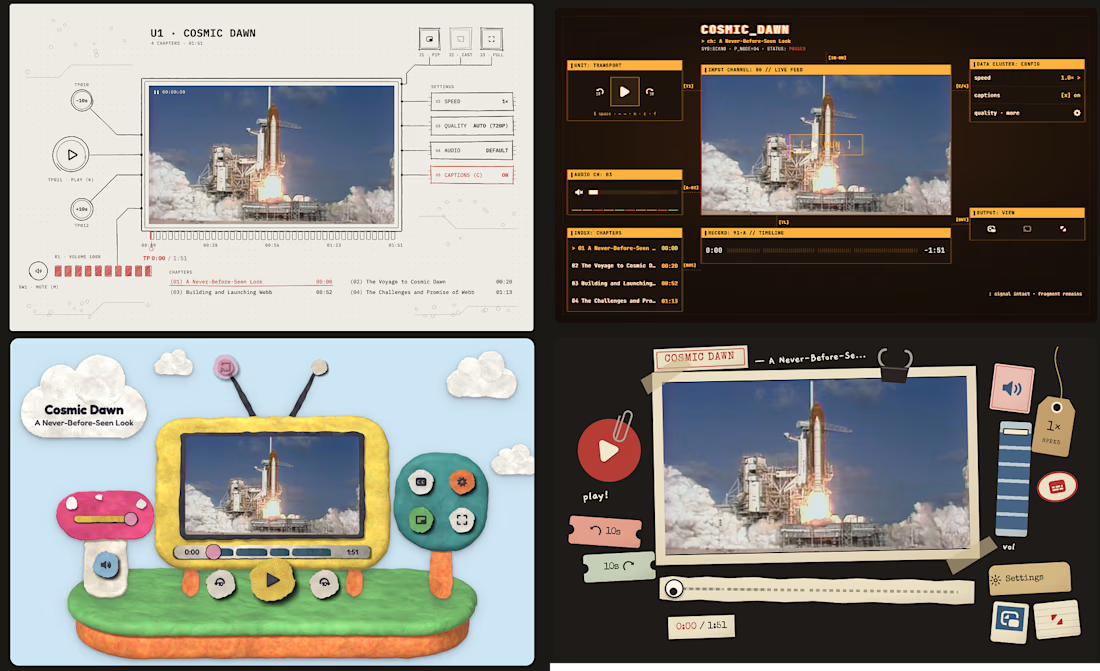
🎬 Four custom Video.js skins — built to work for everyone, everywhere.
🖇️ Papercut — a construction-paper collage look perfect for kids’ content and educational platforms, fully keyboard-navigable with clear focus outlines for classroom and library use.
🎨 Clay — a modelling-clay diorama style suited to children’s shows and playful brand sites, built to resize cleanly whether it’s embedded full-width or in a small widget.
📟 ASCII Glitch — a terminal/broadcast aesthetic that fits music stations, zines, and indie media sites, with reduced-motion support and high-contrast text for late-night, low-light viewing.
✏️ Sketch — a hand-drawn notebook style great for maker spaces, courses, and DIY tutorials, keeping full keyboard access and accessible labels so learners of any ability can follow along.
Built responsive, accessible, and true to their look at every size — from phones to desktops. 👉 See them all in action: https://skins-showcase.vercel.app/#/