The network for creativity
Join 1.25M professional creatives like you
Connect with clients, get discovered, and run your business 100% commission-free
Creatives on Contra have earned over $150M and we are just getting started
Back to feedPost

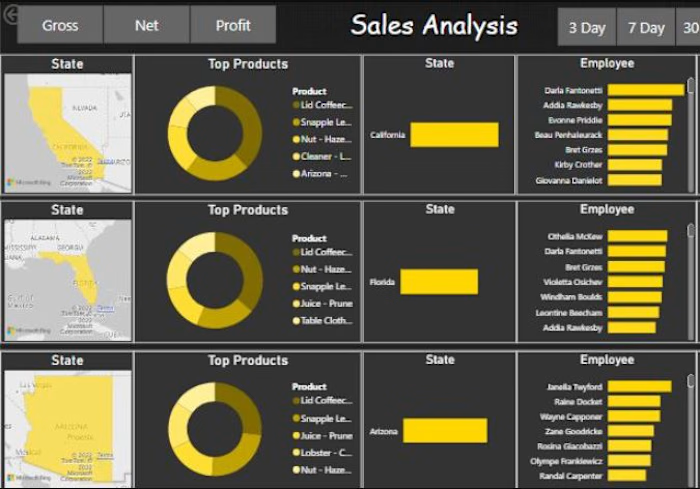
Sales Analysis Dashboard on Power BI


The network for creativity
Join 1.25M professional creatives like you
Connect with clients, get discovered, and run your business 100% commission-free
Creatives on Contra have earned over $150M and we are just getting started



Related posts



Your SaaS product might be solving the wrong problem. And most designers don't realize it.
Before jumping into Figma, designing dashboards, or creating beautiful interfaces, there's something much more important to understand.
The difference between a Business Problem and a User Problem.
In Part 01 of my SaaS Product Design Masterclass, I'm breaking down:
🔹 1.1 — Start with the Business Problem
🔹 1.2 — Understand the Business Impact
🔹 1.3 — Identify the User Problem
🔹 1.4 — How Business Problems and User Problems are connected, but different.
Here's an important thought:
A business wants to achieve a goal.
A user wants to solve a problem.
Great digital products understand both.
This is where meaningful product differentiation begins — not with UI, but with problem understanding.
🎯 This is Part 01 of my 10-hour practical SaaS Product Design series, where I'll walk through the complete process of understanding and designing a SaaS product.
If you're a UX/UI Designer, Product Designer, aspiring designer, or SaaS founder, this series is for you.
One question: Do you start your design process with business problems or user problems?
Share your thoughts below!
#SaaSProductDesign #UXDesign #ProductDesign #UXResearch #DigitalProduct


Useful way to explain it.

I'm testing a $79 report for Shopify merchants who want to see exactly what changed between their original product CSV and a proposed price-update file. It separates intended price changes from changes to other fields, so you can review both before deciding what to do next.
Here's a simple synthetic example: a mug's price changes from $20 to $22 as intended, but the proposed CSV also blanks its Vendor and changes its Status from active to draft. The report lists those differences separately from the price change. This is an invented demonstration, not client work or a customer result.
The proposed $79 report covers up to 1,000 matching products, with one row and one default variant per product, using supported columns only. It uses deterministic comparison with AI-assisted explanations.
This is a read-only comparison. It does not access your store, execute an import, correct files or certify that an import is safe.
Have both CSV files ready for an upcoming price update? Message me on Contra with your product count and intended change, and let me know whether you would request the report at $79 if scope, availability and terms can be confirmed. Start with a description only; don't send confidential files or store access. An inquiry does not place an order or request payment.


Catching accidental changes outside the price column is the part a plain spreadsheet compare never shows clearly. How are you testing the $79 price, DMs to merchants or a landing page?