The network for creativity
Join 1.25M professional creatives like you
Connect with clients, get discovered, and run your business 100% commission-free
Creatives on Contra have earned over $150M and we are just getting started
Back to feedPost

30 second shot, generated in one go from a single prompt using 4 reference images (location, two character portraits, and a prop sheet).


Love how cohesive everything feels!
The network for creativity
Join 1.25M professional creatives like you
Connect with clients, get discovered, and run your business 100% commission-free
Creatives on Contra have earned over $150M and we are just getting started
Related posts

Every designer has a folder of screenshots they swear they’ll use someday.
I turned mine into prompts.
This 40-second piece shows the workflow: upload a photo, drop in a prompt, get a whole new art direction. Kodak Gold neon portraits. Stylized 3D fashion renders. Bold vector street art. Soft hand-painted anime.
Same input. Completely different visual languages.
What I’m sharing (free):
→ 5 new design inspirations every day: posters, shaders, visual styles
→ Every image comes with the exact prompt that made it
→ Prompts written like art direction briefs: lighting, lens, texture, palette, composition
On the craft side: the motion piece is built entirely in code. Every UI state, cursor move and transition is animated frame by frame, and the sound design and music are original.
Use them for moodboards, client pitches, style exploration, or just to break out of your default aesthetic.
🔗 Join the Inspo AI community on WhatsApp (free):
https://whatsapp.com/channel/0029VbDpro3H5JLwH050qS0y
Which style should I break down next? Drop it in the comments 👇


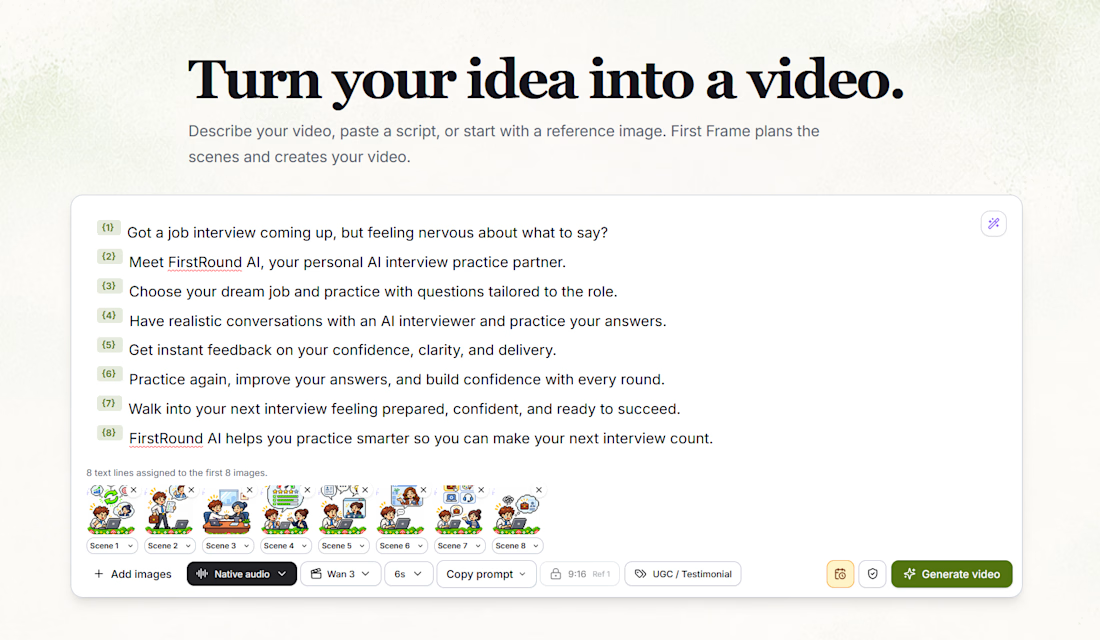
Instead of spending hours editing, stitching clips together, and figuring out production workflows, you can describe your idea, paste a script, or upload reference images.
First Frame helps turn that into a structured, multi-scene video.
Here's what I've been building into it:
AI Scene Planning — Turn a script into individual scenes with matching reference images.
Multiple AI Video Models — Generate scenes using models like Wan 3.
Visual Continuity — Keep characters, scenes, and storytelling consistent.
Audio Integration — Support for narration and audio generation.
Automated Video Assembly — Bring individual scenes together into one finished video.
Creative Controls — Adjust scene duration, video formats, prompts, and generation settings.
The screenshot shows an eight-scene promotional video I'm creating for FirstRound AI, with each script line connected to its own visual reference.
My goal is to make AI video creation more accessible, without needing a complicated editing suite or a production team.
It's still evolving, and I'm continuing to improve the generation pipeline, transitions, audio synchronization, and final exports.
From an idea to a storyboard to a finished video — all in one place.


Great work 👏🏻

Created with 100% generative AI, this Toyota SW4 project delivers a versatile library of cinematic imagery for the client to use across campaigns, social media and brand communications.

