The network for creativity
Join 1.25M professional creatives like you
Connect with clients, get discovered, and run your business 100% commission-free
Creatives on Contra have earned over $150M and we are just getting started
Back to feedPost

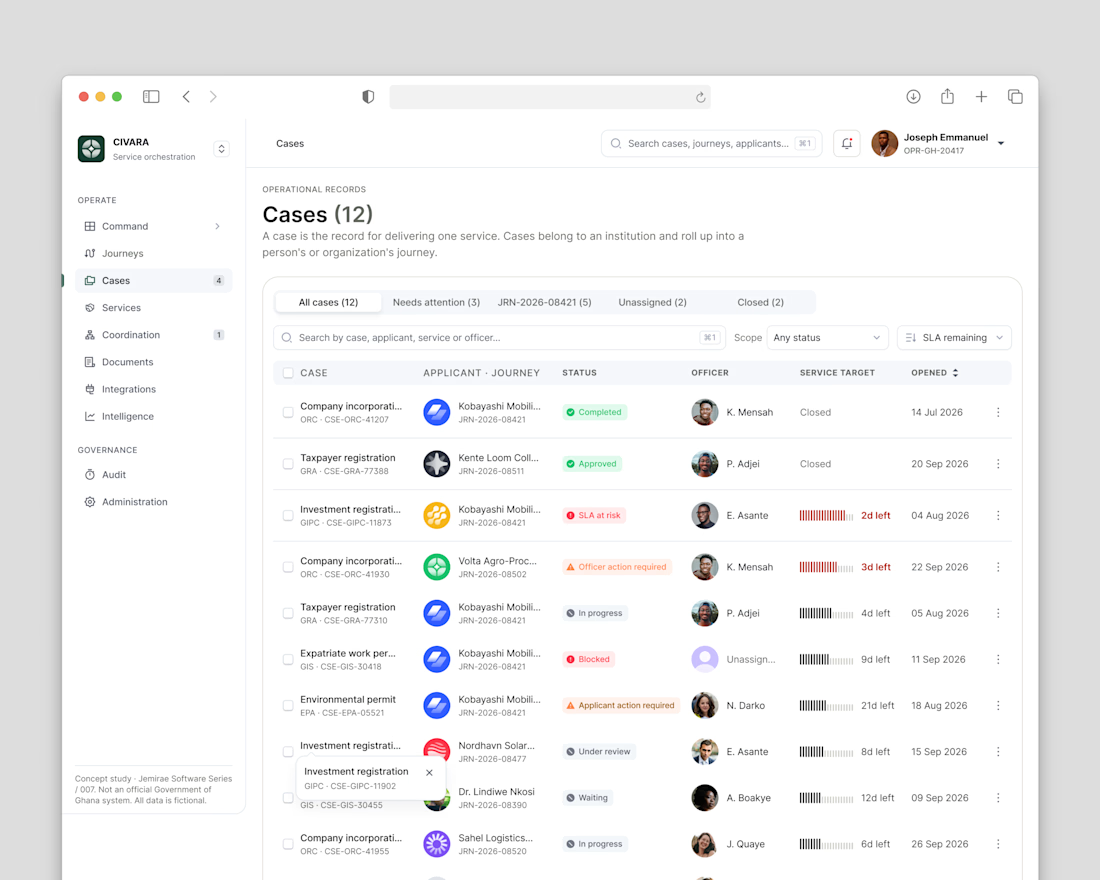
A poorly designed system can make even the most experienced professional struggle to do their job.
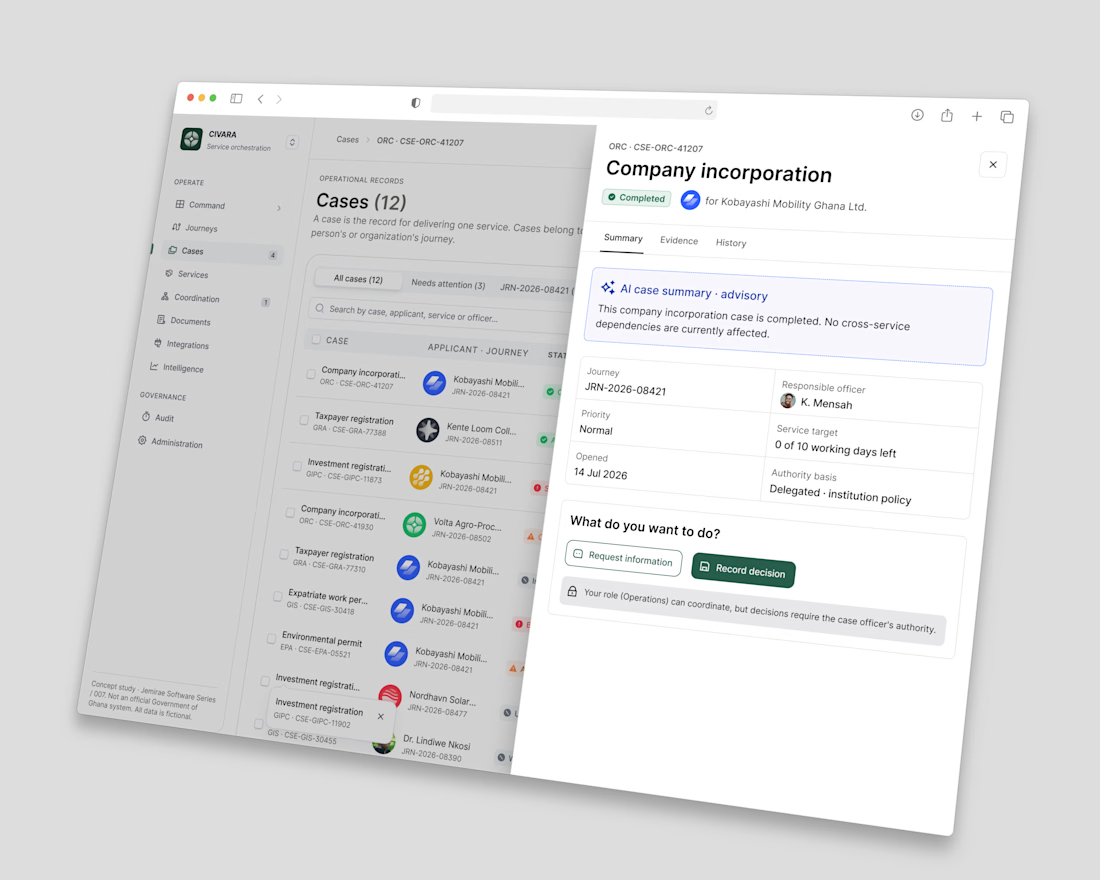
One thing I’ve learned from designing complex enterprise systems is that better decisions don’t always require more information. They require better access to the right information.
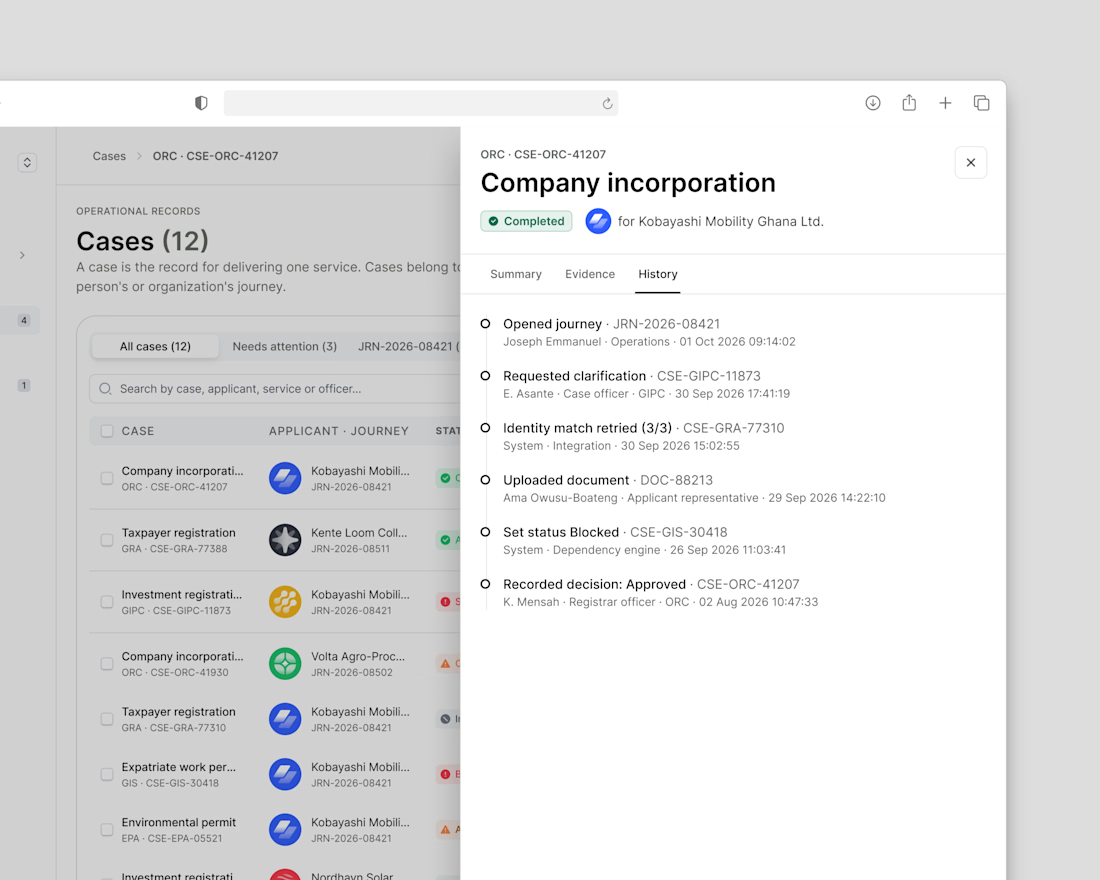
With CIVARA’s Officer Case Workspace, we’re exploring how thoughtful design can reduce operational friction, bring clarity to complex workflows, and help people make more informed decisions.
Technology should support human judgment, not complicate it.

The network for creativity
Join 1.25M professional creatives like you
Connect with clients, get discovered, and run your business 100% commission-free
Creatives on Contra have earned over $150M and we are just getting started











Related posts


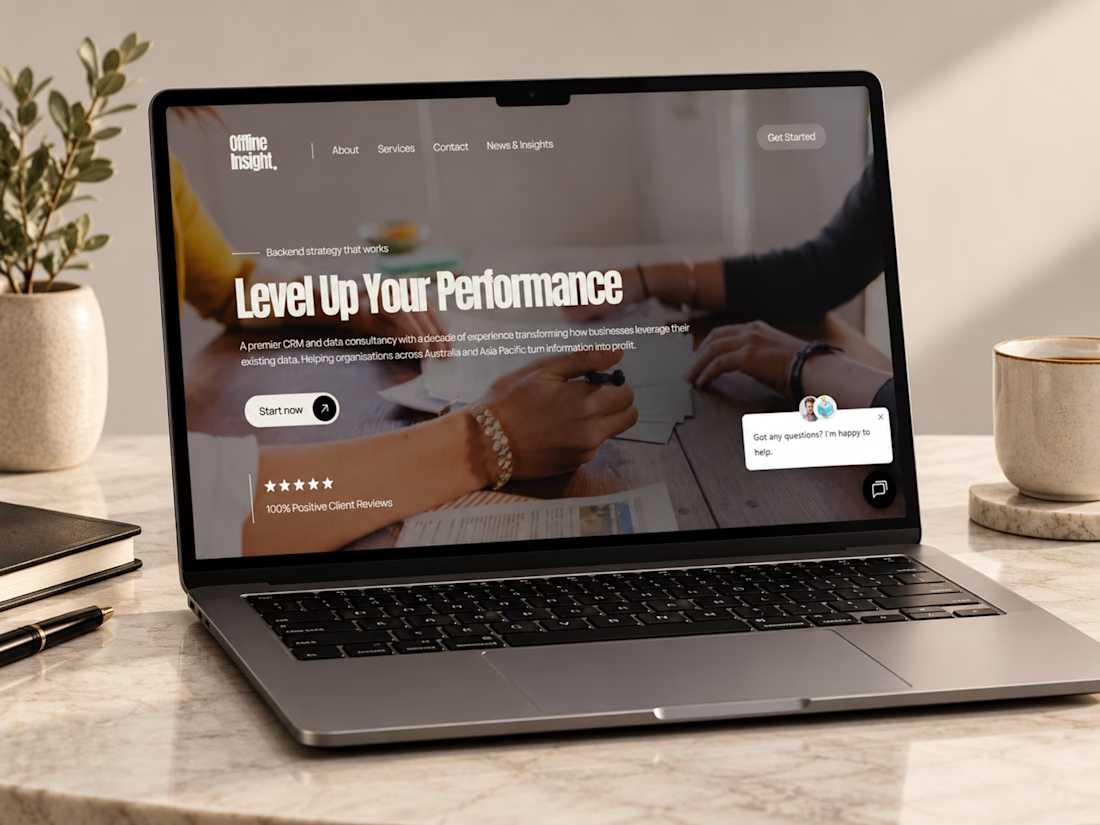
Just wrapped up this Webflow website project for Offline Insight, a CRM and data consultancy helping businesses simplify disconnected systems and make better use of their customer data.
For this one, I focused on making a technical service feel clear and approachable, cleaner messaging, stronger service structure, responsive layouts, and a smoother path from understanding the problem to booking a consultation.
I really like how the final experience balances technology, strategy, and simplicity.
Curious to hear your thoughts, does the website make a complex service feel easy to understand?
#Webflow #WebDesign #UIDesign #UXDesign #WebDevelopment #B2BWebsite #SaaSDesign #CRM #ResponsiveDesign #PortfolioProject #Contra



Ye le Jani Victor wali post ke liye copy-ready:
This looks genuinely polished, Victor! Making a CRM & data consultancy feel clear and approachable is not easy but you nailed it. Offline Insight website looks super clean and professional in Webflow + Figma. "Level Up Your Performance" hero is strong!

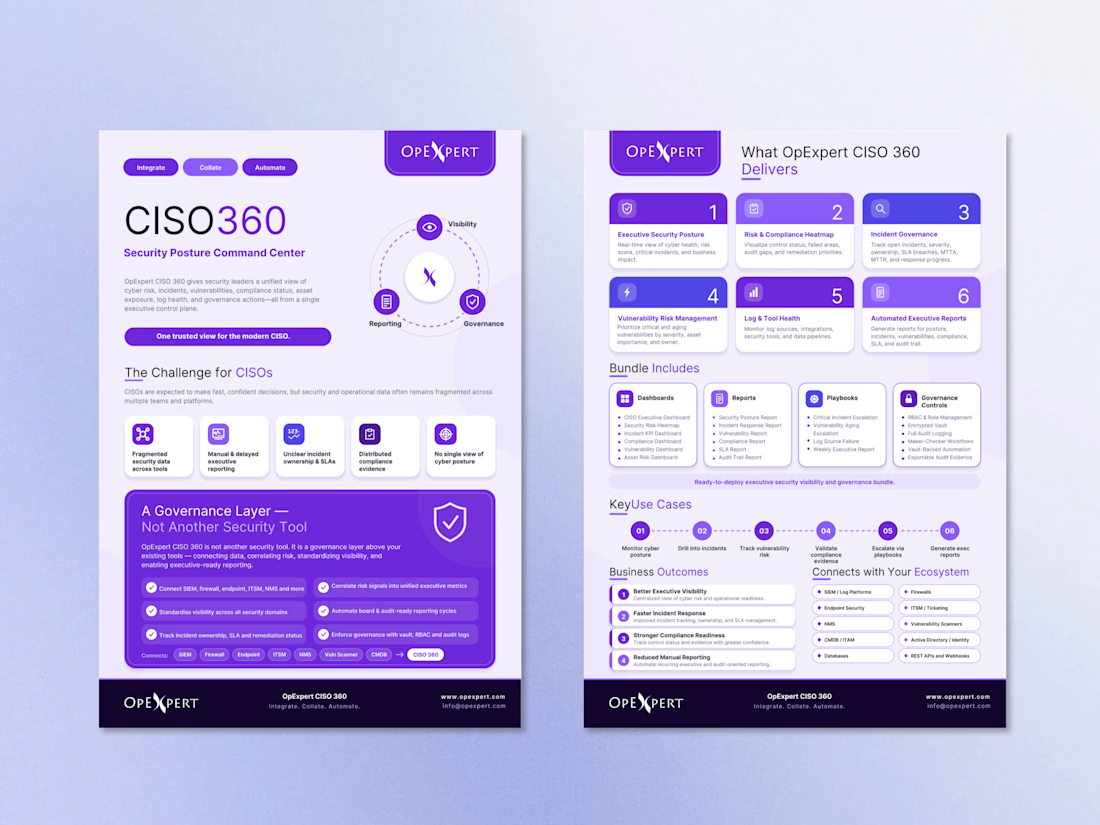
I have designed a modern, professional two-page corporate flyer for OpExpert CISO 360, showcasing its Security Posture Command Center through a clean, structured, and visually engaging layout.
The design combines a bold purple color palette, clear typography, intuitive icons, and well-organized infographics to communicate complex cybersecurity solutions in an easy-to-understand format.
✨ Design highlights:
Modern corporate layout with strong visual hierarchy
Custom icons and infographic elements
Clearly presented features, benefits, and use cases
Consistent branding and professional typography
Information-rich design that remains easy to navigate
Need a professional brochure or business document for your brand? Let’s connect!
#CorporateDesign #BrochureDesign #FlyerDesign #CanvaDesigner #GraphicDesign #Cybersecurity #B2BMarketing #InfographicDesign #BrandIdentity #ContraDesigner



Hard to make a cybersecurity flyer this easy to read. The purple works well.

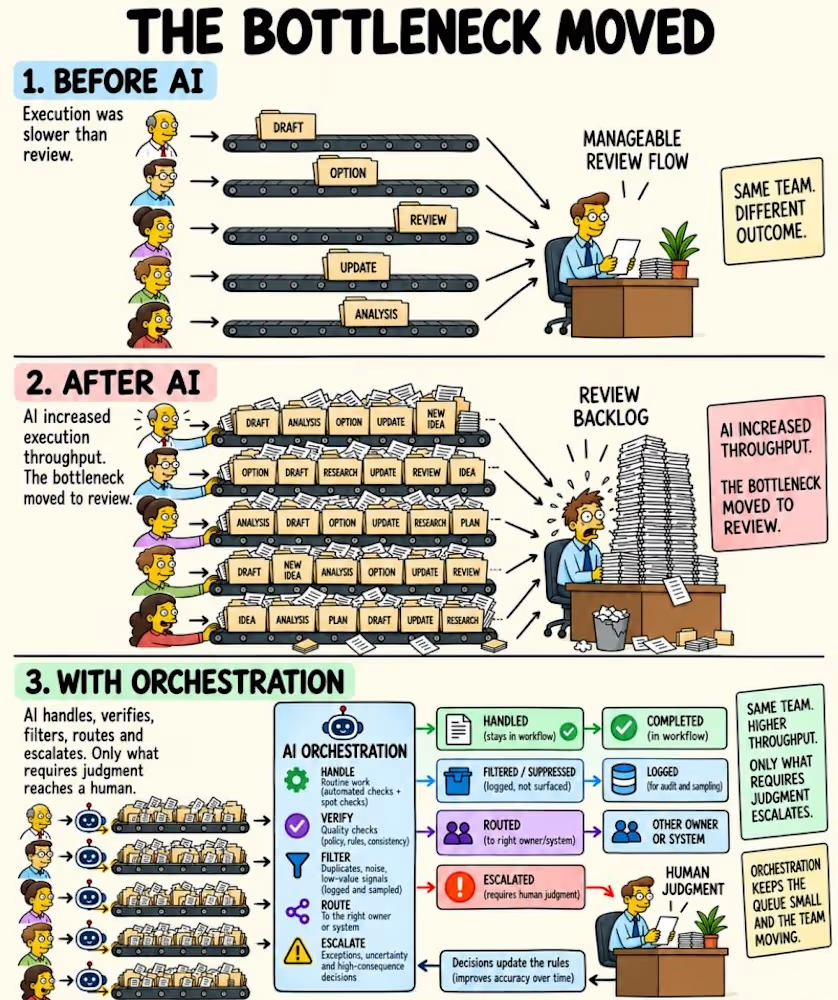
AI made the work faster.
But it all still flowed into the same human review queue.
More drafts. More alerts. More recommendations.
Same people deciding what happens next.
The answer isn’t faster review.
𝗜𝘁’𝘀 𝗱𝗲𝗰𝗶𝗱𝗶𝗻𝗴 𝘄𝗵𝗮𝘁 𝗻𝗲𝘃𝗲𝗿 𝗻𝗲𝗲𝗱𝗲𝗱 𝗿𝗲𝘃𝗶𝗲𝘄 𝗶𝗻 𝘁𝗵𝗲 𝗳𝗶𝗿𝘀𝘁 𝗽𝗹𝗮𝗰𝗲.
That’s what orchestration is for.
A well-designed system knows what to:
→ 𝗛𝗔𝗡𝗗𝗟𝗘 routine work within clear limits.
→ 𝗩𝗘𝗥𝗜𝗙𝗬 against policy, rules, and expected outcomes.
→ 𝗙𝗜𝗟𝗧𝗘𝗥 duplicates, noise, and low-value signals.
→ 𝗥𝗢𝗨𝗧𝗘 work to the right owner or system.
→ 𝗘𝗦𝗖𝗔𝗟𝗔𝗧𝗘 uncertainty and high-consequence decisions.
Humans handle the judgment calls.
Sampling and audits check what did not escalate.
Those findings improve the rules, not just clear today’s queue.
It is how I run my own agent fleets.
Because if your dashboard counts AI output but ignores the human hours needed to review it, it isn’t measuring productivity.
𝗜𝘁’𝘀 𝗺𝗲𝗮𝘀𝘂𝗿𝗶𝗻𝗴 𝗽𝗿𝗼𝗱𝘂𝗰𝘁𝗶𝗼𝗻.
The goal isn’t to remove humans.
It’s to stop making human attention the tollbooth every piece of work must pass through.
AI makes output abundant.
𝗛𝘂𝗺𝗮𝗻 𝗷𝘂𝗱𝗴𝗺𝗲𝗻𝘁 𝘀𝘁𝗮𝘆𝘀 𝘀𝗰𝗮𝗿𝗰𝗲.
The winning systems won’t generate the most.
They’ll know 𝘄𝗵𝗮𝘁 𝗻𝗲𝘃𝗲𝗿 𝗻𝗲𝗲𝗱𝗲𝗱 𝘁𝗼 𝗿𝗲𝗮𝗰𝗵 𝗮 𝗵𝘂𝗺𝗮𝗻 𝗶𝗻 𝘁𝗵𝗲 𝗳𝗶𝗿𝘀𝘁 𝗽𝗹𝗮𝗰𝗲.
If you’re building this into your workflows
DM me for the escalation scorecard we use:
five metrics, how to measure them, and what we check before expanding autonomy.
From Pilots to Platforms