The network for creativity
Join 1.25M professional creatives like you
Connect with clients, get discovered, and run your business 100% commission-free
Creatives on Contra have earned over $150M and we are just getting started
Back to feedPost

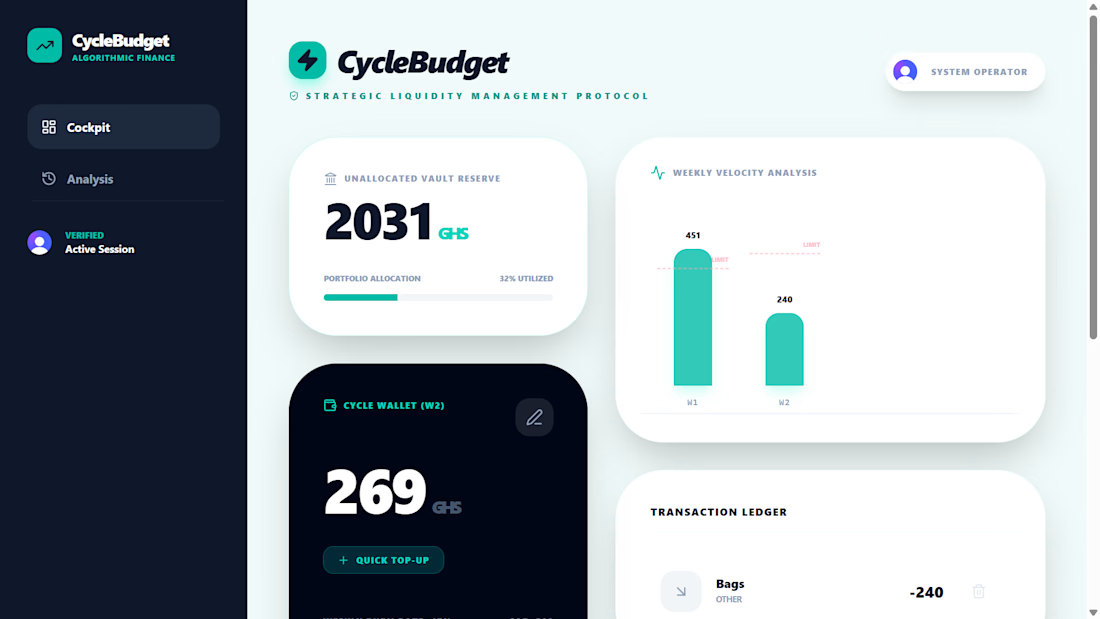
CycleBudget is a full-stack personal finance platform designed to help households manage monthly budgets through structured weekly spending cycles.
I designed and developed the application from the ground up, implementing a responsive dashboard, secure authentication, budget allocation, weekly spending management, transaction tracking, rollover logic, and historical spending analysis.
The application uses Next.js, TypeScript, Tailwind CSS, Prisma, PostgreSQL/Supabase, and Clerk authentication. It is deployed as a production-ready web application and demonstrates my ability to take a real-world problem from concept and economic reasoning through to a functional full-stack solution.


The network for creativity
Join 1.25M professional creatives like you
Connect with clients, get discovered, and run your business 100% commission-free
Creatives on Contra have earned over $150M and we are just getting started








Related posts

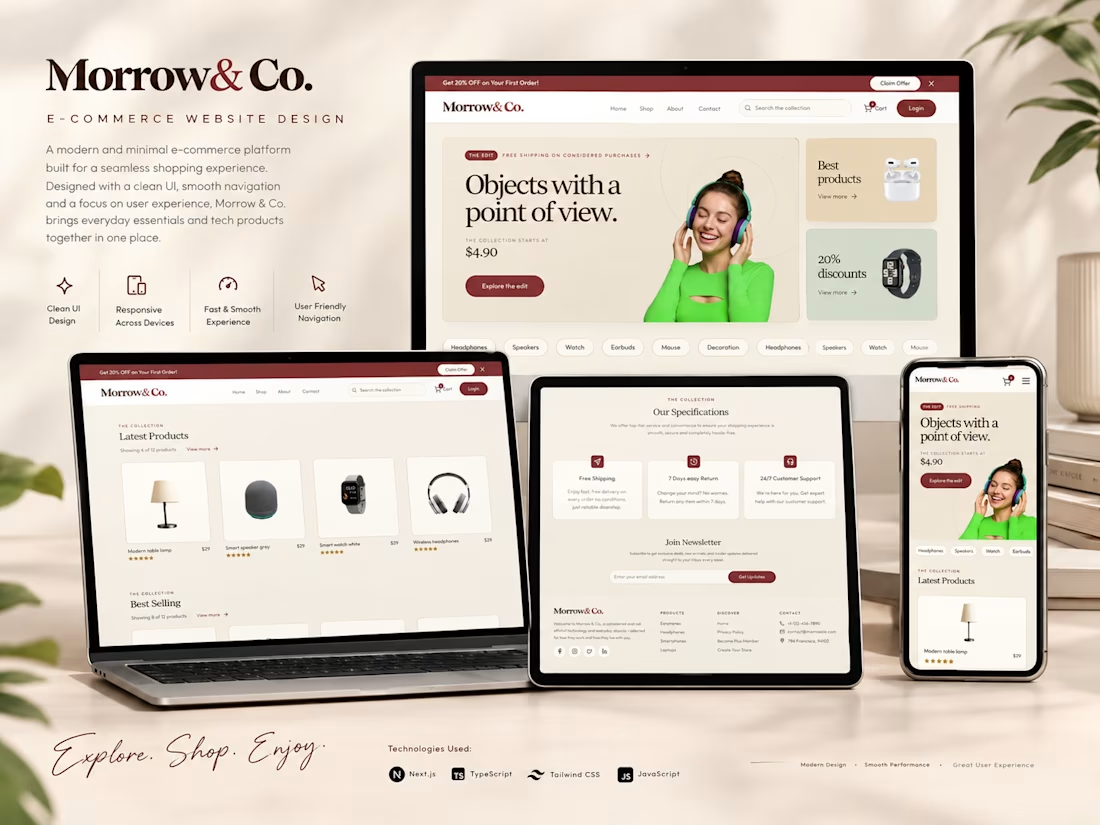
Morrow — Modern Digital Experience
A modern, polished web experience built with a strong emphasis on visual identity, clean composition, and a seamless user journey.
I focused on transforming the design concept into a refined, responsive digital experience with carefully crafted layouts, typography, spacing, and interaction details. Every section was structured to feel intentional while maintaining a smooth and consistent experience across screen sizes.
What I worked on
Developed the complete responsive frontend experience
Translated the visual direction into a polished web interface
Built reusable and maintainable UI components
Focused on typography, spacing, composition, and visual hierarchy
Created responsive layouts for desktop and mobile
Refined interactions and UI details for a more premium experience
Optimized the overall interface for usability and consistency
Outcome: A clean, modern, and visually refined web experience designed to give the brand a strong digital presence and a memorable first impression.




QR Menu: Contactless Restaurant Ordering System
A full-stack web app for restaurants where customers open the menu through a table link (shared as a QR code), browse dishes on their phone, place an order and pay online, with no app download needed. Orders appear instantly on a kitchen dashboard, where staff update the status from new to preparing to ready. Customers can also call a waiter with one tap.
The app includes a digital menu with dish photos, a cart and checkout, online payment with secure verification, an owner login, multi-language support, and secure table links with rate limiting to stop spam orders.
This was my first full-stack project combining Next.js, TypeScript, Supabase and a payment gateway. I handled the database setup, API routes, authentication, environment variable security, and publishing the finished project to GitHub.
GitHub repo: https://github.com/deeps432004/QR-Menu

OVI – Premium Perfume Brand Experience
OVI is a concept website created to capture the elegance and identity of a luxury perfume brand. The goal was to build an immersive digital experience where visuals, typography, and motion work together to create a premium first impression.
Instead of relying on heavy content, the website emphasizes product presentation through clean layouts, cinematic animations, and thoughtful interactions that encourage users to explore the brand naturally.
What I Built
Crafted a premium landing page with a luxury aesthetic
Designed engaging scroll-based animations and micro-interactions
Built a fully responsive experience across all screen sizes
Focused on smooth navigation and intuitive user experience
Optimized the website for speed and modern web standards
Technologies Used
Next.js
TypeScript
Tailwind CSS
GSAP
Project Highlights
Elegant visual design inspired by luxury brands Smooth interactive animations Mobile-first responsive development Optimized performance and accessibility Component-based architecture for scalability
This project demonstrates my approach to building high-end brand websites where design, motion, and performance come together to create an engaging user experience.


Wowwwwwww