The network for creativity
Join 1.25M professional creatives like you
Connect with clients, get discovered, and run your business 100% commission-free
Creatives on Contra have earned over $150M and we are just getting started
Back to feedPost

🚀 10 JavaScript Tricks Every Web Developer Should Know
JavaScript is more than just a programming language—it’s a toolbox full of clever shortcuts and powerful techniques. Whether you're a beginner or an experienced developer, mastering these tricks can make your code cleaner, faster, and more efficient.
Let’s dive into 10 must-know JavaScript tricks 👇
🔄 Destructuring Assignment
Extract values from arrays or objects easily.
const user = { name: "John", age: 25 };
const { name, age } = user;
console.log(name); // John
✅ Cleaner and reduces repetitive code.
⚡ Default Function Parameters
Avoid undefined errors by setting default values.
function greet(name = "Guest") {
return Hello, ${name};
}
greet(); // Hello, Guest
✅ Makes your functions more robust.
🧠 Optional Chaining (?.)
Safely access nested properties without crashing.
const user = {};
console.log(user?.profile?.name); // undefined
✅ Prevents annoying runtime errors.
🔗 Nullish Coalescing (??)
Set fallback values only for null or undefined.
const value = null ?? "Default";
console.log(value); // Default
👉 Better than || when 0 or false are valid values.
📦 Spread Operator (...)
Clone or merge arrays/objects easily.
const arr1 = [1, 2];
const arr2 = [...arr1, 3, 4];
console.log(arr2); // [1, 2, 3, 4]
✅ Super useful for immutability.
🎯 Short-Circuit Evaluation
Write cleaner conditional logic.
const isLoggedIn = true;
isLoggedIn && console.log("Welcome!");
✅ Replace simple if statements.
🔁 Array Methods Power (map, filter, reduce)
Write functional and concise code.
const numbers = [1, 2, 3];
const doubled = numbers.map(n => n * 2);
console.log(doubled); // [2, 4, 6]
✅ Cleaner than traditional loops.
⏱ Debouncing Function
Control how often a function runs (great for search inputs).
function debounce(fn, delay) {
let timeout;
return (...args) => {
clearTimeout(timeout);
timeout = setTimeout(() => fn(...args), delay);
};
}
✅ Improves performance in real apps.
🧩 Dynamic Object Keys
Use variables as object keys.
const key = "name";
const obj = {
[key]: "John"
};
console.log(obj.name); // John
✅ Powerful for dynamic data handling.
🔍 Console Tricks for Debugging
Make debugging easier and smarter.
console.table([{ name: "John", age: 25 }]);
✅ Better visualization than plain logs.
💡 Final Thoughts
These JavaScript tricks may seem small, but they can significantly boost your productivity and code quality. The difference between a good developer and a great one often lies in mastering these little details.
🔥 Pro Tip:
Don’t just read—start using these tricks in your projects today.


The network for creativity
Join 1.25M professional creatives like you
Connect with clients, get discovered, and run your business 100% commission-free
Creatives on Contra have earned over $150M and we are just getting started








Related posts


Gorgeous 😍

And yet more particles. This time we have a particles morphing effect. Reminds me of the blip in Avengers.
And made with WebGL and GLSL of course.
Wha do you think
Part of Three.js Journey. 🙌


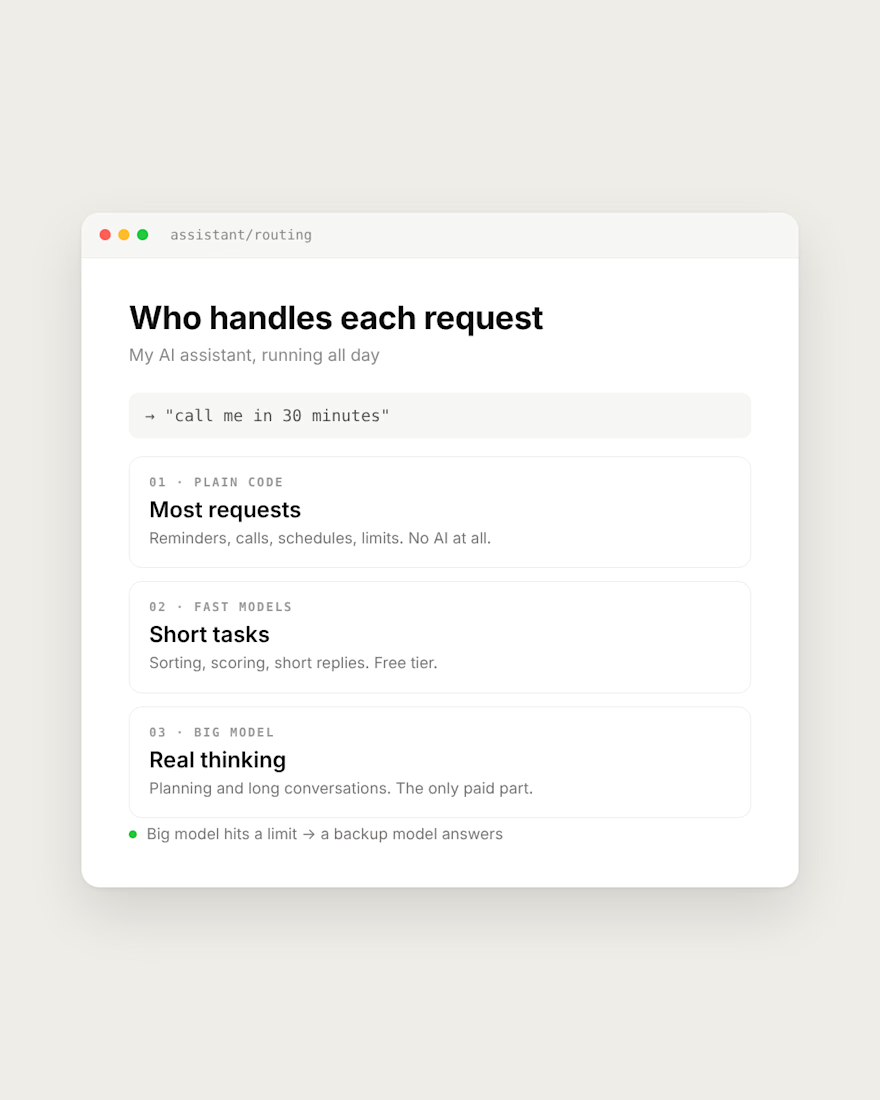
My AI assistant runs all day. The expensive model only does the thinking.
Most requests need no AI at all. "Call me in 30 minutes" is handled by plain code. Reminders, schedules and limits are code too.
Short tasks like sorting and scoring go to fast models on a free tier.
The big model only gets planning and long conversations, where it actually has to think.
If it hits a limit, a backup model answers instead of the app going silent.
If your AI app's bill keeps growing, check what really needs the big model.
What does your app send to the most expensive model?



Same pattern holds in outbound tooling. Filtering, dedupe and enrichment lookups are plain code. The model only writes the first line once the row is already verified. Cuts cost and the weird outputs.