The network for creativity
Join 1.25M professional creatives like you
Connect with clients, get discovered, and run your business 100% commission-free
Creatives on Contra have earned over $150M and we are just getting started
Back to feedPost

A Webflow form should not end with a “New submission” email.
On many websites, the process looks the same:
A visitor fills out a form. The team receives a notification. Then someone manually copies the data into a CRM, reviews the request, looks for additional context, chooses the right owner, and prepares a response.
Technically, the website has done its job.
But for the team, the real work has only begun.
I am more interested in using Webflow not just as a website builder, but as the user-facing layer of a complete workflow.
Imagine a potential client describing a project and submitting a brief through a Webflow site.
From there, the system can:
- validate and normalize the submitted data;
- identify the request type and extract key requirements;
- enrich the inquiry with company information;
- create a structured record in the CRM;
- route it to the right specialist;
- prepare a personalized response draft;
- escalate an unclear case to a person.
For the client, it is still a simple, familiar website form.
For the team, it is already an active process with context, a clear next step, and a defined review point.
This is where Webflow becomes more than a website-building tool.
It becomes the external interface of a system connecting content, forms, business logic, AI, and the team's internal tools.
Not every step needs to be handled by AI.
Webflow provides the interaction layer. The backend handles logic, integrations, and security. AI helps interpret unstructured requests or prepare drafts. People step in where context, accountability, and the cost of error matter.
The value does not come from simply adding AI.
It comes from turning an action on the website into useful work beyond it.
Does your Webflow site only collect information, or does it already start the work?
I help founders and teams turn AI ideas into reliable full-stack products, automations, and Webflow-powered workflows.


The network for creativity
Join 1.25M professional creatives like you
Connect with clients, get discovered, and run your business 100% commission-free
Creatives on Contra have earned over $150M and we are just getting started



Related posts


Video-led hero for me. The big script Presence over the field sells a feeling in one glance, which is what wellness needs. The expanding gallery would work well as the second section.


Photographer Portfolio Website
"Capturing light, emotion, and the moments you never want to forget." That line set the tone, and the layout follows it.
The hero is one motion-blurred portrait washed in red. The photographer's name runs across the bottom in a condensed white face, so large the screen cuts it off. The photo keeps its soft focus, and the name still reads first.
Thin grid lines split the page into narrow columns, and the small copy sits justified inside them. The loose photo gets a strict structure to lean on.
A single round red button with an arrow sits right on the letters and marks where to go next.
Designed by the Hue & Machine team.
#WebDesign #Photography #PortfolioWebsite #EditorialDesign #Typography #UIDesign #ProductDesign #CreativeDirection #ResponsiveDesign #FigmaDesign

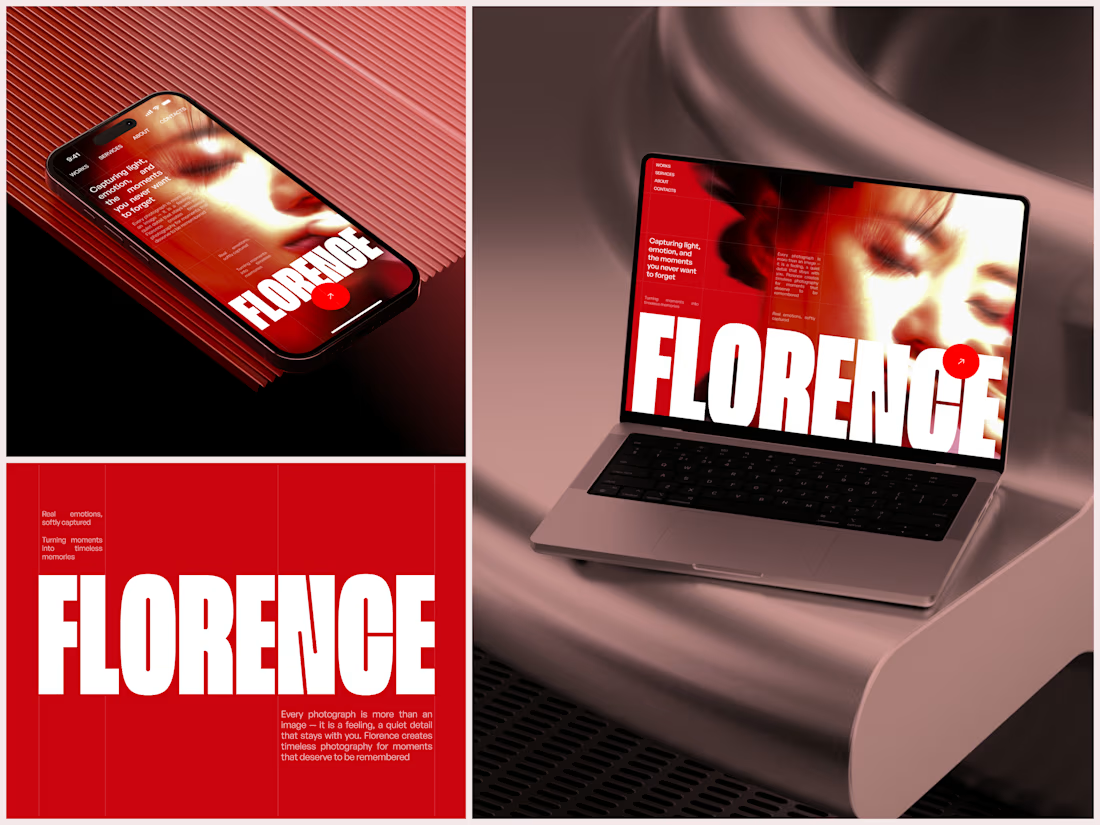
The heavy condensed white FLORENCE over the red portrait is bold, and keeping the same red across phone, laptop and type tile makes the case study read as one system. Did the red come from the photographer's own work, or was it your call?