The network for creativity
Join 1.25M professional creatives like you
Connect with clients, get discovered, and run your business 100% commission-free
Creatives on Contra have earned over $150M and we are just getting started
Back to feedPost
Read-Along: a story player where the words are the timeline
Based on a true story.
My daughter is in 4th grade, and reading is hard work for her. She focuses so hard on getting each word right that by the end of a paragraph she can't tell you what it said. Her teacher's fix was to listen to the audiobook while she reads along, a little slower than normal. So that's how she reads now. Some nights I find the book on Hoopla, some nights it's someone reading it on YouTube, and she follows along in her copy. It works, but nothing on the screen helps her keep her place.
Read-Along is the player she actually needs. It's an open book, bound in tooled leather. The picture is one page and the story is the other. Every word lights up as it's read, so her eyes never lose the spot. The words are the timeline: tap any line and the story jumps there.
It reads like a book, not a web page. The story is cut into real pages, and the page turns itself when the reader gets to the bottom. Swipe or use the arrows to flip ahead, and one tap brings you back to where she's reading.
Because the player knows every word, the usual audiobook buttons get smarter. "Say that again" goes back to the start of the sentence, not a random 15 seconds. Speed is shown in words a minute, with a couple of "a little slower" settings, so you can find a pace that fits the reader. Save a line and it's kept as the actual quote. The sleep timer always finishes the sentence, then the picture and the voice fade out together.
It keeps your place like a real book too. Tap the red ribbon to leave a bookmark on any page, as many as you want. Close the book and next time it opens right where you stopped, with your bookmarks waiting. Book view shows how much of the book is done and how much time each chapter has left.
The demo is two of Kipling's Just So Stories with his own drawings from the 1902 first edition, read by Betsy Walker for LibriVox. Every one of the 2,100 words is timed to the recording.
It all works from the keyboard: up and down move line to line, Enter jumps there, left is "say that again", right is the next line, and Page Up and Page Down turn the page. Focus is always visible, menus close with Escape, buttons are thumb sized, and the page turn becomes a plain swap when reduced motion is on. On a phone the picture sits on top with the words below, and turned sideways it becomes picture left, words right.
Built for one kid. It should work for a lot of them.
Live: https://readalong-tau.vercel.app
On my site: https://gavinblackman.vercel.app/readalong/
Mux playback ID: nSK7cXYziv01FXHOyi9bk3E01eS24ZRYrqLLwuvuP901VM
Story: "How the Whale Got His Throat" and "How the Camel Got His Hump" from Just So Stories (1902) by Rudyard Kipling, pictures by the author (New York Public Library copy, Internet Archive). Read by Betsy Walker for LibriVox. Text from Project Gutenberg. All public domain.

Building this for your daughter makes it so much better. Words as the timeline is a lovely idea.

Yea her teacher suggested her to listen to an audiobook version of the assigned book and read along. It really helps her comprehend. Before that, she would read a whole paragraph and was so focused on reading the words that she didn't register/retain any of it.
The network for creativity
Join 1.25M professional creatives like you
Connect with clients, get discovered, and run your business 100% commission-free
Creatives on Contra have earned over $150M and we are just getting started



Related posts

Storytime, the Pop-Up Edition: a picture book you can play
My first entry dressed the player as a picture book. This one makes the book do the work, so every part of the metaphor is a real control or real player state.
Chapters are pages. Each chapter becomes a numbered tab on the crayon trail, the scrub preview names the page you are pointing at, and the folded corner of the picture is a button: tap it to turn to the next page (N and P on a keyboard). No chapters in your video? No tabs and no corner.
The star is the player's state. She walks the trail while the story plays, walks faster or slower with the reading speed, and falls asleep when you pause. Reading speed itself is a snail, a pair of footsteps or a rabbit. In bedtime mode the paper turns midnight blue, the picture dims and the star becomes a moon. The last page is "The End".
The book folds to fit. On small players the two-row strip closes into a one-row bookmark that still carries play, time, the trail, mute and fullscreen, and takes about 30% of the picture instead of 45%. Speed, captions and bedtime tuck into a pop-up page that closes with Esc.
It works on any video (try the "Any plain video" switch on the demo), recolours with --media-accent-color, and keeps every control at 44px or more with visible two-tone focus rings, captions lifted above the controls, and a calm mode under reduced motion.
The demo film, The Little Star Walks Home, is my own paper-cut animation that runs from bright day to dark night to test contrast. It streams from Mux, and the same player is live on my own site. Plain HTML and CSS on Video.js v10 components, no build step.

This is such a magical concept! A picture book you can actually play is such a beautiful idea. I love how every part of the metaphor is a real control, chapters as pages, the corner turns them, and a star walks the story home. So playful, so clever, and so thoughtfully designed. Good luck with the challenge!

Who wants to come to a picnic with an outdoor movie? I'll bring the video player 🧺🎬
Picnic Cinema is my new Video.js skin: a 3D garden cinema where the controls hang as tags from festoon bulbs. The lights glow when you pause and dim when the film starts.
Too comfy to reach the bulbs? Grab the remote on the picnic table.
You can still use the keyboard like a normal player: Space to play, arrows to seek and change the volume, F for fullscreen.


this is such a fun concept!

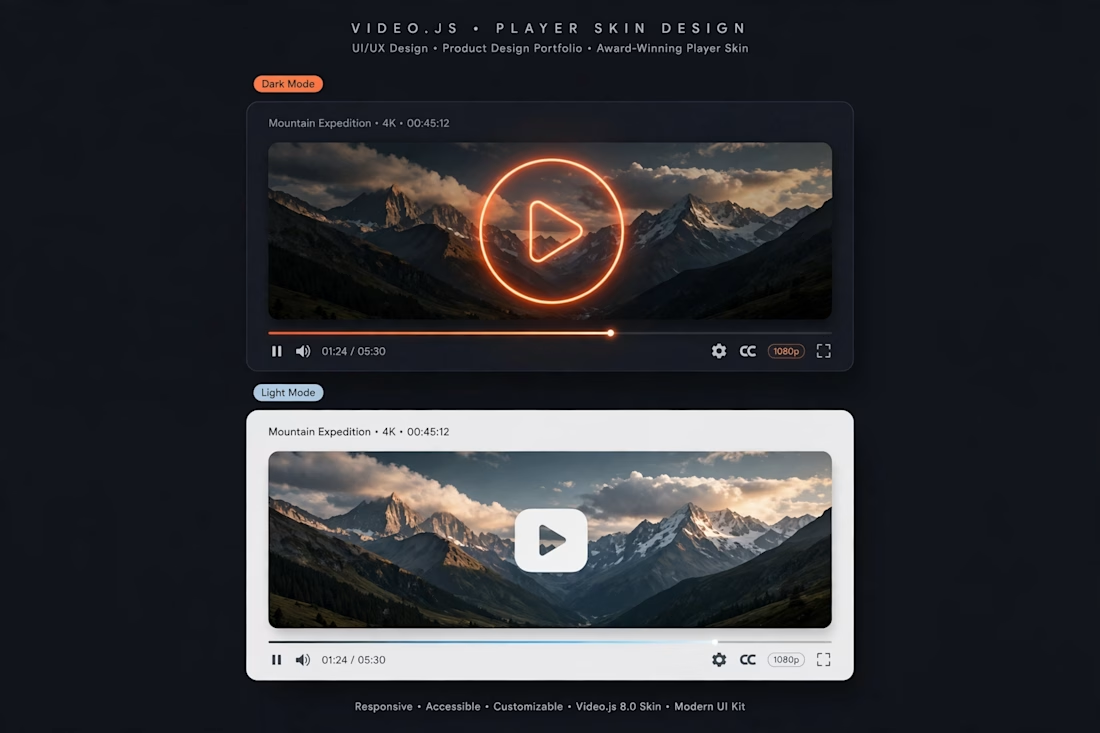
GlowFlow - Premium http://Video.js Skin. I designed a modern player with both Dark Mode and Light Mode. It has a glowing play button, clean progress bar, and easy controls for volume, captions, quality, and fullscreen. It is responsive, accessible, and easy to use on phone and computer.