The network for creativity
Join 1.25M professional creatives like you
Connect with clients, get discovered, and run your business 100% commission-free
Creatives on Contra have earned over $150M and we are just getting started
Back to feedPost

Track User Activity with the TrackPress Activity Monitor Plugin
How do you monitor user activity on your WordPress website?
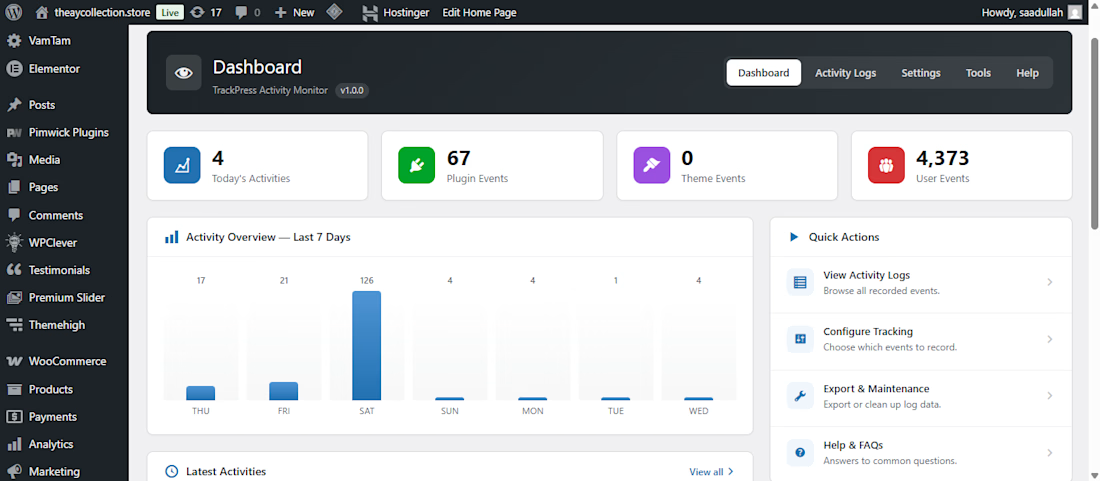
Using an activity monitoring plugin like TrackPress, you can track user actions, login activity, content changes, and admin updates in one dashboard helping to improve security and manage your WordPress website more efficiently.
🚀 Custom WordPress Plugin Dashboard Transformation
I recently customized the TrackPress Activity Monitor plugin to create a cleaner, more modern, and user-friendly admin experience.
✨ What I improved:
✅ Redesigned dashboard layout
✅ Clean and professional admin UI
✅ Better activity overview with visual statistics
✅ Improved card design and spacing
✅ Enhanced navigation and quick actions
✅ Responsive and intuitive WordPress admin experience
✅ Performance-focused customization
A great admin dashboard isn't just about looks it's about helping users find important information faster and making daily website management more efficient.
If you need custom WordPress plugin development, plugin customization, or a modern WordPress admin dashboard, I did like to help.
💬 What feature would you add to an activity monitoring dashboard?
#WordPress #WordPressDeveloper #PluginDevelopment #PluginCustomization #WordPressAdmin #DashboardDesign #UIUX #Elementor #WooCommerce #WebDevelopment #CustomDevelopment

Really recommend this plugin! It’s great for tackling WordPress malware and security issues.
The network for creativity
Join 1.25M professional creatives like you
Connect with clients, get discovered, and run your business 100% commission-free
Creatives on Contra have earned over $150M and we are just getting started
Related posts




Awesome dude
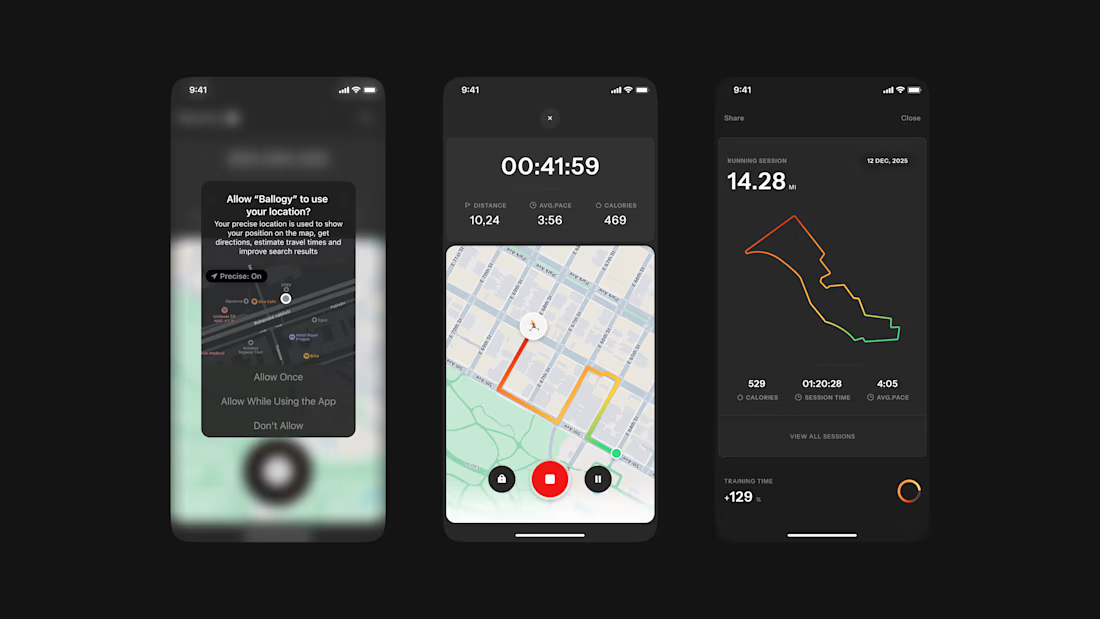
Ballogy app screens pt.2: live workout tracking, from location setup to the route map and session stats.

Business data often lives across payment, analytics, CRM, advertising, and inventory platforms. Metrik brings those signals together in one dashboard built for startups and small businesses.
See revenue, orders, customers, and business health at a glance. Compare advertising spend and ROAS across channels, explore visual KPI cards, and use smart alerts to spot unusual changes and potential risks.
The interface pairs a clean layout and rounded components with soft gradients, colorful analytics, and clear visual hierarchy, helping make business performance easier to follow.
