The network for creativity
Join 1.25M professional creatives like you
Connect with clients, get discovered, and run your business 100% commission-free
Creatives on Contra have earned over $150M and we are just getting started
Back to feedPost
𝗔𝗜 𝘀𝘆𝘀𝘁𝗲𝗺𝘀 𝗱𝗼𝗻'𝘁 𝗷𝘂𝘀𝘁 𝗿𝗲𝗮𝗱 𝘆𝗼𝘂𝗿 𝘄𝗲𝗯𝘀𝗶𝘁𝗲 — 𝘁𝗵𝗲𝘆 𝗿𝗲𝗮𝗱 𝘄𝗵𝗮𝘁 𝘁𝗵𝗲 𝗶𝗻𝘁𝗲𝗿𝗻𝗲𝘁 𝘀𝗮𝘆𝘀 𝗮𝗯𝗼𝘂𝘁 𝘆𝗼𝘂. 🤓
But if you're wondering where to start with your Webflow website specifically, that's a narrower, more solvable problem.
So I wrote a guide.
It covers:
→ How to measure if you're even showing up in AI answers
→ How to structure content so AI systems can extract it
→ Where nested schema markup actually belongs in Webflow (head code vs. on-element)
→ Why FAQ sections alone won't get you cited
→ What matters for Google AI Overviews vs. ChatGPT/Perplexity — and why they're not the same playbook
Disclaimer: AEO is changing fast. This guide won't be complete in 3 months. But it's a solid starting point today.
Link: https://uebersaxsamuel.ch/en/webflow/webflow-geo-ki-sichtbarkeit-optimieren

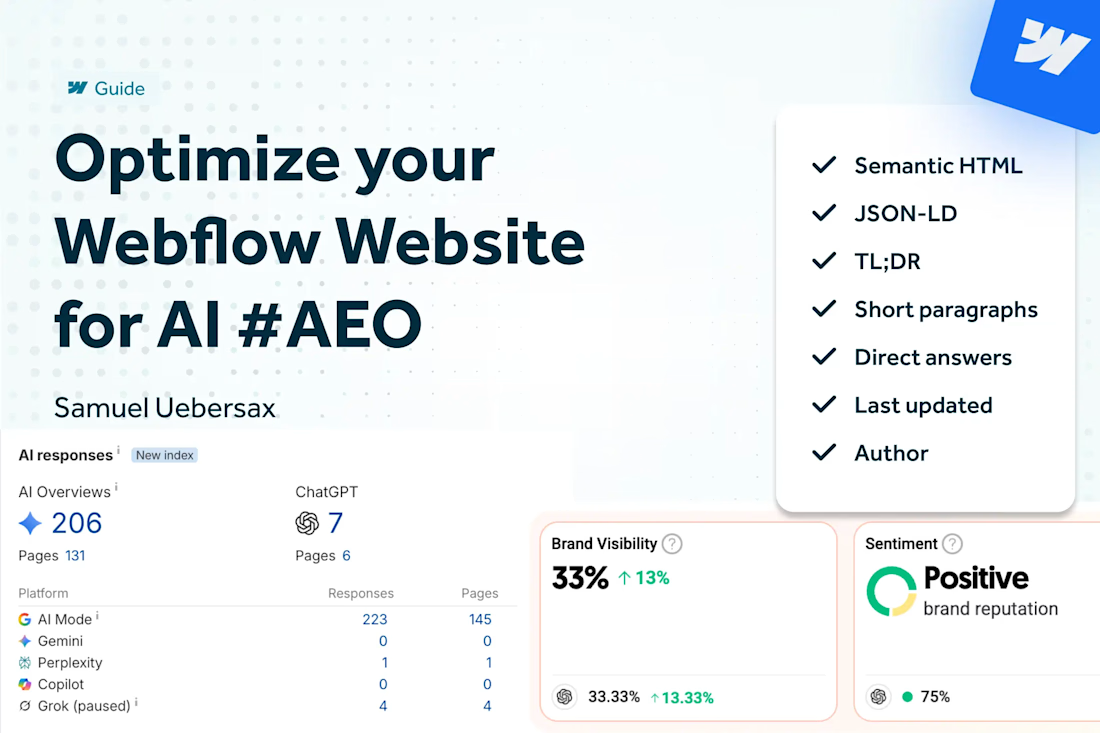

The point about AI reading the wider internet, not just the site, is easy to overlook. Which off-site signal would you audit first for a Webflow brand?


I'd always start with the question what are your customers looking for? prompt it and check where the answers do come from. it might be a forum, blog, competition …
The network for creativity
Join 1.25M professional creatives like you
Connect with clients, get discovered, and run your business 100% commission-free
Creatives on Contra have earned over $150M and we are just getting started



Related posts




𝗠𝗼𝘀𝘁 𝗔𝗜 𝗱𝗲𝗺𝗼𝘀 𝘀𝘁𝗼𝗽 𝗮𝘁 “𝗚𝗲𝗻𝗲𝗿𝗮𝘁𝗲.”
𝗢𝘂𝗿𝘀 𝗲𝗻𝗱𝘀 𝘄𝗶𝘁𝗵 𝗮 𝗽𝗮𝘁𝗶𝗲𝗻𝘁’𝘀 𝘀𝗶𝗴𝗻𝗮𝘁𝘂𝗿𝗲.
Meet Denty — a real AI-powered dental platform built with Base44.
And this is my entry for the Base44 × Contra Challenge. 🚀
𝗧𝗛𝗘 𝗣𝗥𝗢𝗕𝗟𝗘𝗠
Dentists spend hours on clinical notes, treatment documentation, consent forms, and paperwork.
We wanted to change that.
𝗛𝗢𝗪 𝗗𝗘𝗡𝗧𝗬 𝗪𝗢𝗥𝗞𝗦
→ A consultation transcript goes in.
→ AI extracts patient information, medical history, treatment risks, and costs.
→ The dentist reviews and edits everything.
→ Treatment documents and consent forms are generated.
→ Patients receive secure signature requests.
→ A completed, signed document is ready to download.
𝗢𝗻𝗲 𝗰𝗼𝗻𝗻𝗲𝗰𝘁𝗲𝗱 𝘄𝗼𝗿𝗸𝗳𝗹𝗼𝘄. 𝗙𝗿𝗼𝗺 𝗰𝗼𝗻𝘀𝘂𝗹𝘁𝗮𝘁𝗶𝗼𝗻 𝘁𝗼 𝘀𝗶𝗴𝗻𝗮𝘁𝘂𝗿𝗲.
Not a Figma concept.
Not a one-prompt prototype.
𝗔𝗻 𝗮𝗰𝘁𝘂𝗮𝗹 𝘄𝗼𝗿𝗸𝗶𝗻𝗴 𝗽𝗿𝗼𝗱𝘂𝗰𝘁.
Base44 helped us move faster, but getting here took real design decisions, testing, iterations, and plenty of problem-solving.
𝗪𝗛𝗬 𝗔 𝟲-𝗠𝗜𝗡𝗨𝗧𝗘 𝗗𝗘𝗠𝗢?
30 seconds might be enough to show a beautiful interface.
𝗕𝘂𝘁 𝗶𝘀 𝗶𝘁 𝗲𝗻𝗼𝘂𝗴𝗵 𝘁𝗼 𝗽𝗿𝗼𝘃𝗲 𝗮 𝗿𝗲𝗮𝗹 𝗽𝗿𝗼𝗱𝘂𝗰𝘁 𝗮𝗰𝘁𝘂𝗮𝗹𝗹𝘆 𝘄𝗼𝗿𝗸𝘀?
I don't think so.
So I recorded a complete 6-minute walkthrough.
No fancy promises. No static mockups.
Just a real product solving a real problem.
𝗪𝗮𝘁𝗰𝗵 𝘂𝗻𝘁𝗶𝗹 𝘁𝗵𝗲 𝘀𝗶𝗴𝗻𝗮𝘁𝘂𝗿𝗲 𝘄𝗼𝗿𝗸𝗳𝗹𝗼𝘄 𝗻𝗲𝗮𝗿 𝘁𝗵𝗲 𝗲𝗻𝗱. That's where everything comes together.
We're launching Denty on Monday, and I'm sharing this project with my client's approval.
𝗠𝘆 𝗼𝗳𝗳𝗶𝗰𝗶𝗮𝗹 #Base44Challenge 𝘀𝘂𝗯𝗺𝗶𝘀𝘀𝗶𝗼𝗻. 🏆
I'd genuinely love your feedback.
If you were building this for a real dental practice, what would you improve?
🎥 𝗪𝗔𝗧𝗖𝗛 𝗧𝗛𝗘 𝗙𝗨𝗟𝗟 𝗣𝗥𝗢𝗗𝗨𝗖𝗧 𝗗𝗘𝗠𝗢:
https://www.tella.tv/video/startup-design-and-development-project-fo5h9gwr
@Base44 @Contra
#Base44Challenge #BuildInPublic #HealthTech


That's really great 🔥🔥🔥

Teleported to an advanced alien world where peaceful tall beings welcome me and show their technology, before returning home. Created with AI using Seedance and CapCut.
