The network for creativity
Join 1.25M professional creatives like you
Connect with clients, get discovered, and run your business 100% commission-free
Creatives on Contra have earned over $150M and we are just getting started
Back to feedPost

Electrical & Instrumentation QA/QC: 7 Essential Checks Before Raising an Inspection Request (IR)
In industrial projects, raising an Inspection Request (IR) is not simply an administrative task. It is a formal step in the inspection workflow that should be supported by the required preparation, documentation, and verification.
An incomplete or premature IR can lead to inspection delays, rework, and unnecessary coordination between construction, QA/QC, and client or consultant teams.
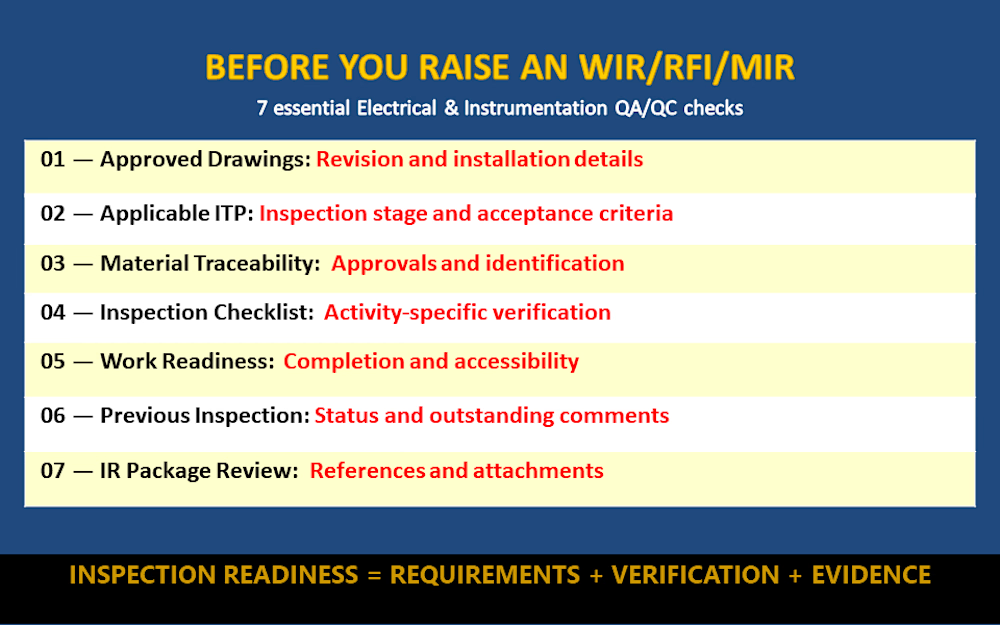
Here are 7 practical checks every Electrical & Instrumentation QA/QC professional should consider before requesting an inspection.
1. Verify the Approved Drawings
Confirm that the installation complies with the latest approved drawings and applicable revisions. Check cable routes, equipment locations, termination details, and instrument installation details as relevant to the activity.
2. Review the Applicable ITP
Identify the relevant Inspection and Test Plan (ITP), inspection stage, acceptance criteria, and required inspection notification period.
Remember: the approved ITP determines the applicable inspection requirements for the project.
3. Check Material Approval and Traceability
Verify that the installed materials are consistent with approved submittals and applicable project requirements. Check identification, relevant certificates, and traceability records where required.
4. Complete the Applicable Inspection Checklist
Use the approved checklist for the specific activity, such as cable tray installation, cable termination, earthing, instrument mounting, or tubing installation.
Record actual observations rather than marking items compliant without verification.
5. Confirm Inspection Readiness
Check that the work is complete to the required inspection stage, accessible for inspection, and supported by the necessary documents and test equipment, where applicable.
6. Verify Previous Inspection Status
Confirm that relevant previous inspection stages have been completed and that outstanding comments affecting the current activity have been addressed.
7. Review the IR Package Before Submission
Check the document references, equipment or cable identification, location, inspection activity, checklist attachments, and requested inspection date.
Ensure the submission follows the project's approved IR procedure.
Practical Site Example:
Activity: Electrical cable glanding and termination inspection.
Before raising the IR (RFI or WIR), the QA/QC professional may need to verify:
Approved cable schedule and termination drawings
Correct cable identification and routing
Suitable gland and termination accessories
Required earthing and bonding arrangements
Applicable termination checklist
Required inspection records and supporting evidence
The exact checks and acceptance criteria depend on the approved project documents, applicable standards, and inspection stage.
NOTE:
An Inspection Request should communicate inspection readiness—not replace inspection preparation.
Effective QA/QC documentation connects the physical work, approved technical requirements, inspection evidence, and traceable quality records.
Discussion question: In your project, what is the most common reason for an IR being returned or an inspection being delayed: incomplete documentation, installation deficiencies, drawing revisions, or coordination issues?
Share your experience in the comments.
The network for creativity
Join 1.25M professional creatives like you
Connect with clients, get discovered, and run your business 100% commission-free
Creatives on Contra have earned over $150M and we are just getting started



Related posts


:
Have a look at this and apply if it’s a fit. Thank you. 100% remote.

Safe Recovery in AI Workflows | Product Walkthrough ⚙️
Built a product walkthrough demonstrating how an AI assistant handles failures across connected operational systems.
📦 A coordinator approves a split shipment. The warehouse reserves the stock, but the carrier pickup request times out.
Instead of creating another pickup, the workflow:
✅ Checks whether the original request succeeded
✅ Recovers the existing pickup
✅ Completes the order update
✅ Keeps the user informed throughout
The focus: Building reliable operational workflows with intuitive interfaces that make progress, failures and recovery visible.
Because automation should reduce operational uncertainty, not create more of it.

SaaS MVP Scope & Cost Estimator | Lead Qualification & Intake System
The Challenge: Early-stage SaaS founders and product agencies often waste weeks navigating manual inquiry cycles and discovery calls just to map out MVP requirements and sprint budgets.
The Solution: I designed and built an interactive MVP Scoping Engine. This system enables founders to select required platform features—such as multi-tenant authentication, recurring subscription billing, AI API integrations, and admin role permissions—and receive real-time cost and timeline estimates instantly.
Key Features:
Dynamic real-time pricing and sprint timeline calculator
Categorized feature selector (Auth, Core Plumbing, AI, Admin Ops)
Automated MVP Production Brief generation for instant lead qualification


A live price and sprint estimate inside a WordPress page is a smart use of the platform. I am curious whether the timeline math runs in custom JavaScript or through a plugin.


