The network for creativity
Join 1.25M professional creatives like you
Connect with clients, get discovered, and run your business 100% commission-free
Creatives on Contra have earned over $150M and we are just getting started
Back to feedPost

Project Title:
Automated AI Document & Data Extraction Pipeline (PDF & Image Processing)
Project Description:
I build end-to-end automated pipelines that extract, parse, score, and structure data from complex PDF documents and images using AI (OpenAI/ChatGPT) and workflow automation tools (Make / n8n). This solution replaces manual data entry with fast, accurate, and structured database exports.
Workflow Architecture:
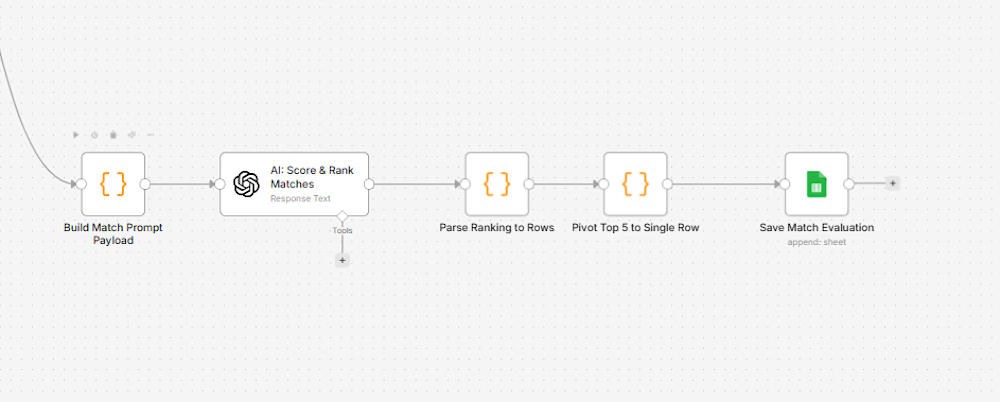
Payload Preparation (Build Match Prompt): Structure raw input data, image files, or PDF documents into clean JSON payloads for AI processing.
Intelligent AI Processing (Score & Rank Matches): Leverage OpenAI to analyze, score, extract, and rank critical information from unstructured files with high accuracy.
Data Transformation & Parsing: Automatically parse AI output responses into individual rows and pivot key data points (e.g., Top 5 Matches/Results) into clean structured rows.
Database & Spreadsheet Export: Seamlessly save and append finalized match evaluations and extracted data directly into Google Sheets or custom CRMs.
Technologies Used: OpenAI API, Make / n8n Automation, JSON Parsing, Google Sheets, Python/Webhooks.


The network for creativity
Join 1.25M professional creatives like you
Connect with clients, get discovered, and run your business 100% commission-free
Creatives on Contra have earned over $150M and we are just getting started



Related posts


TOP!!

I’ve been working on a small skill called Manual Orchestrator to make longer projects with AI agents easier to manage.
The problem started with a familiar situation: one chat would accumulate plans, implementation details, corrections, and test results. By the time I was ready for the next phase, I wanted a fresh conversation without losing the decisions we’d already made.
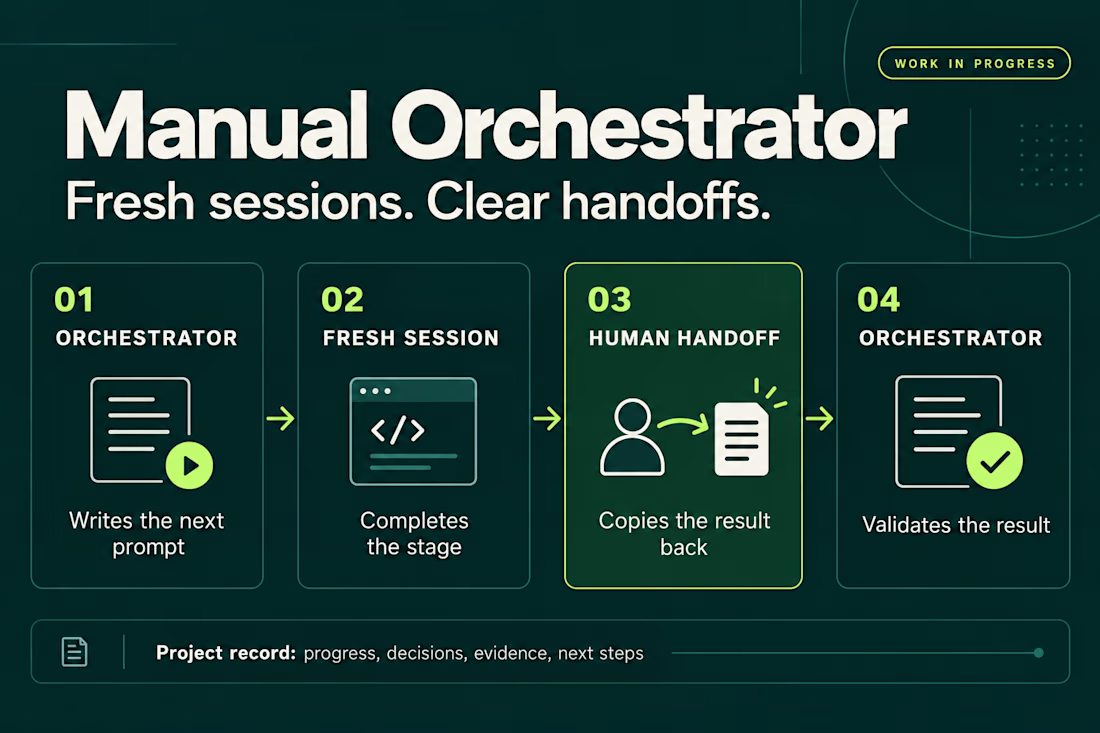
Manual Orchestrator gives that process some structure. One chat acts as the orchestrator: it breaks the work into stages and writes a prompt for the next one. I run that prompt in a new session, then bring the result back. The orchestrator reviews it against the stage’s criteria before preparing the next prompt. If something needs fixing, I go back to the same worker session.
The skill also keeps a record in the project with the current stage, decisions, evidence, and next steps. That makes it easier to pause, resume, or hand the work to another session.
The handoff is manual. I choose when to open a session and carry the result back. The orchestrator and worker sessions can also use different agent CLIs, with the prompt adapted to the capabilities available.
It’s open source and still a work in progress. I’m using it to learn what helps in practice and where the workflow needs to improve. Installation has been checked for Codex, Claude Code, and Gemini CLI, but the full workflow hasn’t been tested across every CLI or version.
If you try it, I’d be interested in hearing what works and where it gets in your way.


✨ New Year, on loop — literally.
This seamless sparkler-celebration character loop is built to run endlessly for New Year campaigns on TikTok, Reels and Meta — no cut, no restart, just continuous celebration.
Want a looping character video for your brand's next campaign? I create AI UGC product video ads from $50, first drafts in 48–72 hours, 2 revisions included.
https://contra.com/s/gXq6FWFe-ai-ugc-product-video-ad-for-tik-tok-reels-and-meta
