The network for creativity
Join 1.25M professional creatives like you
Connect with clients, get discovered, and run your business 100% commission-free
Creatives on Contra have earned over $150M and we are just getting started
Back to feedPost


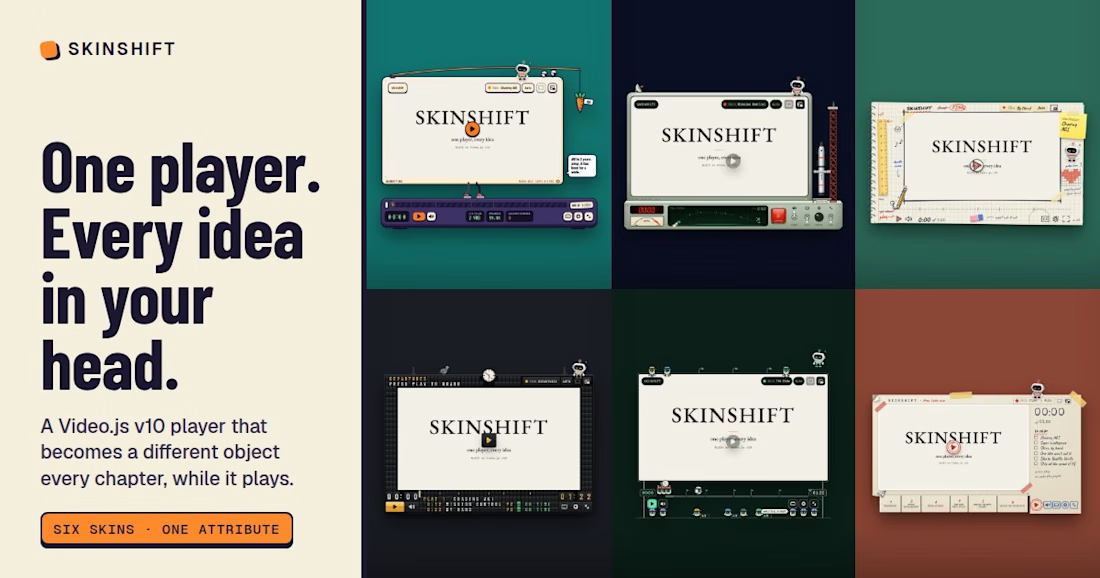
SKINSHIFT: one Video.js player, every idea in your head
Live: https://videojs.ta9in.com (press "Play the pitch", sound on)
In 1999 people drew media player skins by hand, pixel by pixel, for weeks. There were thousands of them.
Now everyone is racing toward AGI (sorry, "super intelligence"), and agents can sketch, check and build a skin faster than you can watch a trailer. One skin felt like the wrong answer.
So SKINSHIFT is one Video.js v10 player that turns into a different object every chapter, live, while the video keeps playing. The whole page changes with it.
🥕 Chasing AGI: a machine on a treadmill, chasing a carrot tied to its own back. Grab the carrot and stretch it. The goalposts move. ETA: always 2 years.
🚀 Mission Control: a CRT on a launch console. Lift the safety cover, press the big red button, and the rocket lifts off. Pause and the booster lands back in the tower's arms.
✏️ By Hand: a sketchbook page with the player drawn on it. A tiny guy pushes a pencil along the timeline. Doodle in the margins, use the eraser, set the volume with a ruler.
🚉 Departures: a wall of split flaps that riffle under your hand, a station clock and a pigeon. Don't feed the pigeon. AGI Setup is always DELAYED.
👷 The Crew: a billboard run by tiny worker bots. They carry the playhead (a lightbulb, the idea), nap when you pause and complain when you scrub. You can pick one up and throw it.
📄 Flyer: a flyer taped to a wall. Peel the corner, pause to crumple it, and at the end it folds into a paper plane and gets stamped SHIPPED.
And Shifty, a small robot who sits on top of the player. Poke him and he rides a paint roller across it and repaints it with the next skin. He dozes when you pause, cups an ear when you mute and sweats while it buffers.
Under every costume it's stock Video.js v10: time slider, buttons, menus, hotkeys, gestures, captions, status announcer and error dialog. One attribute picks the skin (data-skin="mission"), and another lets the chapters pick it (data-shift="auto"). Shifting never pauses or seeks the video. Every skin was checked for😍 - keyboard order and visible focus
- reduced motion
- forced colors
- a 390px phone
- a 320×180 box
Built the way the pitch says: ideate, qualify, verify, ship. Six skins and the room around them were built in parallel by Claude agents, each one checked against the brief before it made the wardrobe.
The network for creativity
Join 1.25M professional creatives like you
Connect with clients, get discovered, and run your business 100% commission-free
Creatives on Contra have earned over $150M and we are just getting started


Related posts

Geiger ☢ The world ended. The show didn't.
Most video players try to disappear. Geiger does the opposite: it turns the Video.js v10 player into a survivor's wrist terminal, a green-phosphor CRT in a rusted gunmetal housing, inspired by the Pip-Boy from Fallout. And the device isn't decoration. Every part of it is a working control.
📟 It boots. The poster greets you with "Welcome back, Survivor." Press play and the tube powers on from a single bright line, runs a self-check, and hands over to the picture with a little power-up chirp.
🎛 Real knobs. The VOLUME knob turns through 270°, from silent to full. The TUNING knob is an endless dial that winds the tape 5 seconds per click. Drag them, scroll over them, or focus them and use the arrow keys. To screen readers they're proper sliders.
🟧 The amber side plate. PLAY, AUDIO, CAPTIONS, SETTINGS, EJECT (picture-in-picture) and SCREEN (fullscreen) are the device's main keys, with a lit marker beside whichever is on.
📼 Holotapes are chapters. Pause and the chapters appear as a holotape list of real buttons. Pick one to wind there and play. The header always names the chapter you're in, and PREV / NEXT skip between them.
📈 Vitals you can use. VOL is the volume slider. SPD steps the speed. SIG shows how much tape is buffered ahead. A heartbeat runs while the tape plays: it races at 2×, slows at 0.5× and flatlines on pause. The rad gauge reads the volume.
💬 It talks back. "Sit back. The world can wait." At 1.5× it asks "In a hurry, Survivor?". Outrun the buffer and it reads SEARCHING with a radar sweep, seeking crackles like a Geiger counter, and the end of the tape reads "Signal lost".
Made for everyone: every control works from the keyboard in visual order, with an amber focus ring. Panels are dark and near-opaque so the glow stays readable. On small players the grip and side column fold away and the panel's own buttons take over, down to 340px phones. Reduced motion skips the boot, heartbeat and needle tremble. Sounds are quiet, and silent when muted. Forced-colours mode falls back to system colours.
It streams from Mux. The demo plays "Selected Works", a film of the Framer templates I designed, with a chapter for each one, so the skin is shown doing a real job.
Built with the Video.js skin CLI as HTML + CSS, plus small custom elements that read the player store (knobs, meters, status, chapters, sounds). All artwork and code are original. It's a fan tribute, not affiliated with Bethesda. Open source under Apache-2.0.
It's also live on my real site: my Framer portfolio opens with the film playing in Geiger, and I rethemed the whole site to match the device (green-phosphor colours, condensed uppercase headings and a terminal monospace for labels), so the player and the page feel like one product.

A Pip-Boy wrist terminal as a player, what a pick. The world ended, the show didn't, great line.

Orbit: a Video.js 10 skin you steer with one thumb
Every player puts its controls in a bar along the bottom. I wanted to see what happens if you drop the bar and use a click wheel instead.
One round control floating over the video, inspired by the iPod and game controllers. Play and pause sit in the middle, with the time under it. Around it are four separate buttons: options on top, skip back and forward on the sides, volume at the bottom. The seek bar wraps around the whole thing, flush with the buttons.
Three things to try
→ Drag your finger around the ring to scrub. A preview frame from the Mux storyboard follows you around the circle.
→ Press and hold the volume button, then circle clockwise. It turns up like an iPod wheel.
→ Hold the skip button. It keeps jumping 10 seconds at a time, faster the longer you hold, and shows the running total (+30s, +60s).
What else it does
• Tap the top button and five options fan out above the control: subtitles, settings, cast, picture in picture and full screen. Each opens its own panel upwards, and the control slides down to make room.
• Settings lets you change speed and quality, loop the video, pick the control's size, position (centre, bottom, corner) and colour (six colours, white by default). It remembers your choices.
• Four films sit on a wheel. Spin the semicircle dial at the bottom of the page and they swing round with it, then the player picks up the one where the wheel stops.
• Light, dark or match-your-system theme for the page. The player stays dark over video in both.
Built for everyone
• Every control works from the keyboard, with a visible focus ring (Space, J/L, arrows, M, C, F, P, 0–9, Esc).
• Screen readers hear real labels. The seek ring reads as a slider ("1:04 of 14:48"), and holding skip announces one summary: "Skipped forward 30 seconds".
• States never rely on colour alone: icons change shape and get a dot when something is on.
• Reduced-motion settings switch off the springs, fan-out and wheel animations.
• Large touch targets, plus tap and double-tap gestures on phones.
How it was built
Orbit is a custom element built on Video.js 10 (@videojs/html 10.3.0). It reads the player store through PlayerController and uses Video.js's own buttons, sliders, gestures, hotkeys and thumbnails wherever they exist, so labels, keyboard support and state come for free. The video streams from Mux through the Mux video element, which brings adaptive HLS, Mux posters and thumbnails, and storyboard seek previews. The page itself is built with Vite, Bun and Tailwind.
The films are Blender open movies (Sintel, Tears of Steel, Big Buck Bunny, Elephants Dream), CC BY.
Mux public playback IDs
Sintel: 31iOy9KXbfCKMwObqF6pWRnFzzCWQ4CquJTuGn02rJFo
Tears of Steel: TjHvp7heA4GNlk9nQ0202yFE0052XKl5y015HANsmTWwn600
Big Buck Bunny: duBClVrzbiqDEv00X6UWW3cGy02vF9C02vwPHstZ6dV9v00
Elephants Dream: s6aWm001zQwJIq91cOjnDCo8fMQeHVSRteD5ylWk5RcQ

Pressing and holding volume, then circling clockwise like an iPod wheel, is the kind of gesture that makes the whole click-wheel idea click — it turns a control into something your thumb already knows how to do. The seek ring wrapping around the control, with the preview frame...

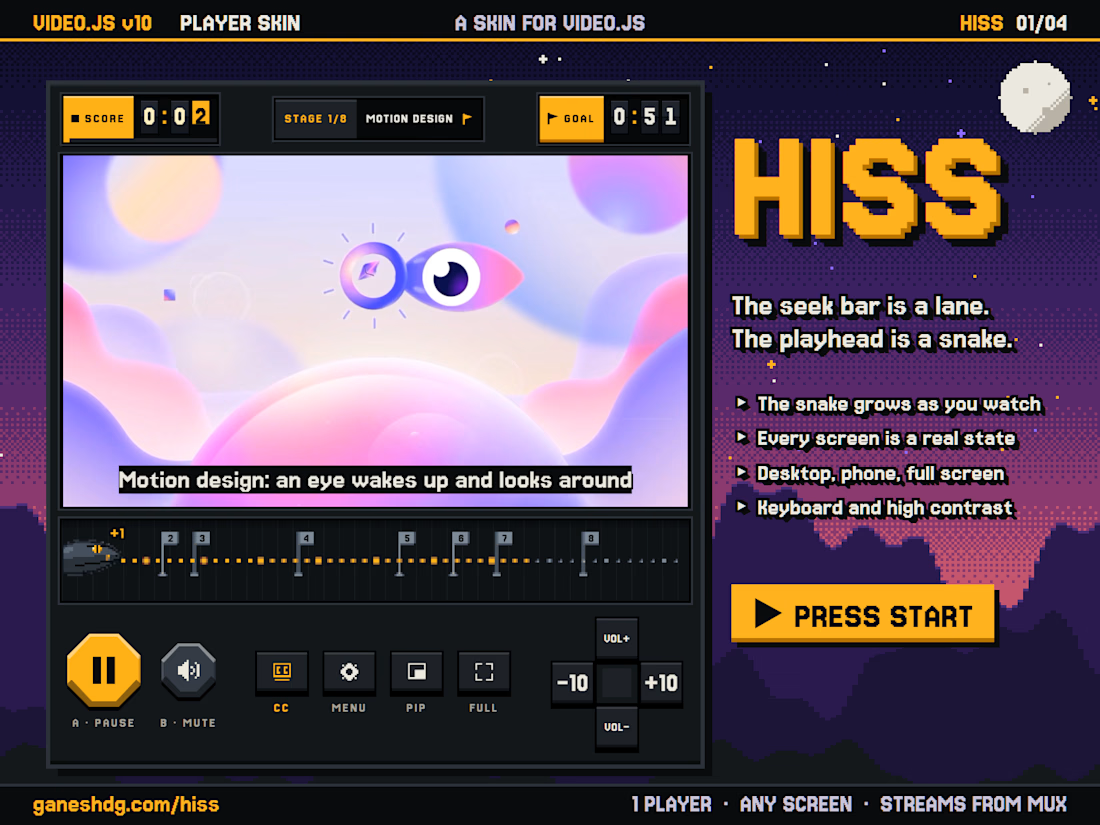
HISS is a skin for the Video.js 10 player that turns it into a handheld game console.
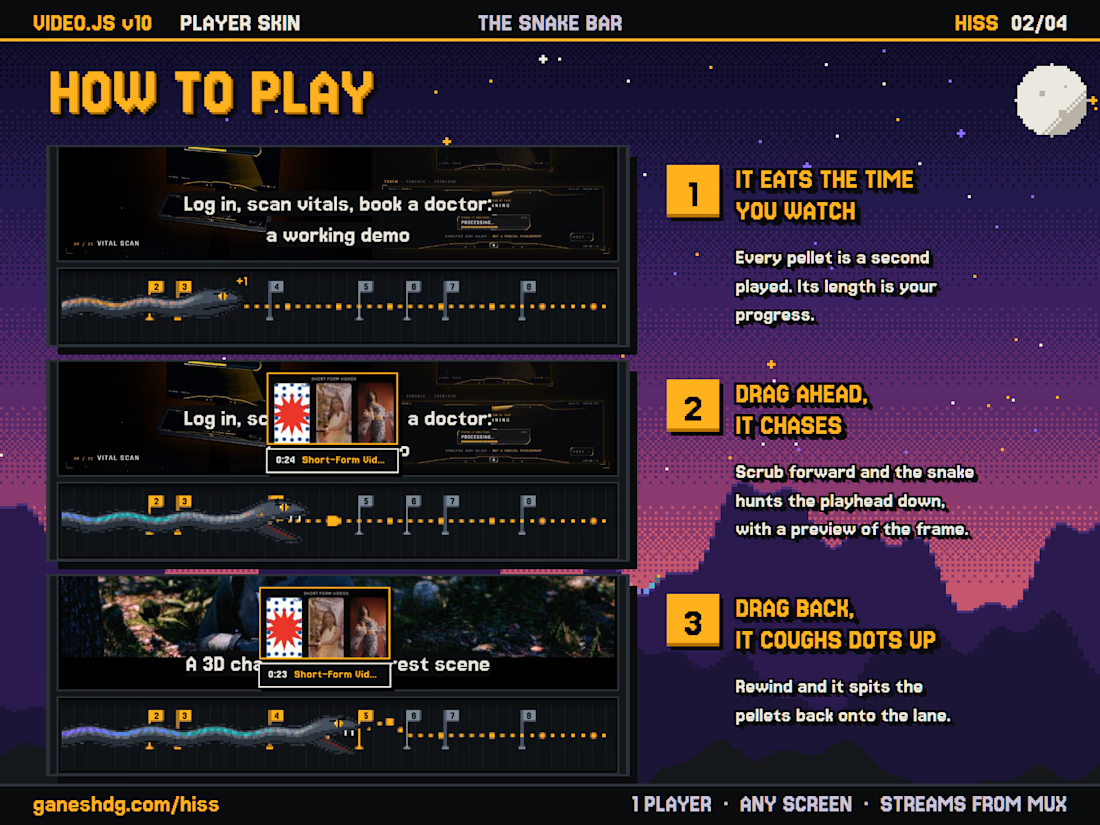
The idea started with the seek bar. It already works like a progress bar in a game, so I made it a lane and put a snake on it. The snake eats pellets as the video plays, and its length is how much you have watched.
Drag the playhead ahead and the snake chases it, with a preview of the frame you are heading to. Drag it back and the snake coughs the pellets up again. Chapters are stages marked with flags, the clock on the left is your SCORE, and the length of the video is the GOAL.
I gave myself one rule: anything that looks like a game has to be a real player state. PRESS START is the poster. While it buffers, the snake circles on the LOADING screen. When you pause, it gets stuck in a knot and keeps trying to pull free. A failed stream shows GAME OVER with CONTINUE?, which retries, and the end of the video is STAGE CLEAR with PLAY AGAIN.
The buttons are a game pad. A plays and pauses, B mutes, the D-pad skips 10 seconds or changes the volume, and one menu holds quality, speed and captions.
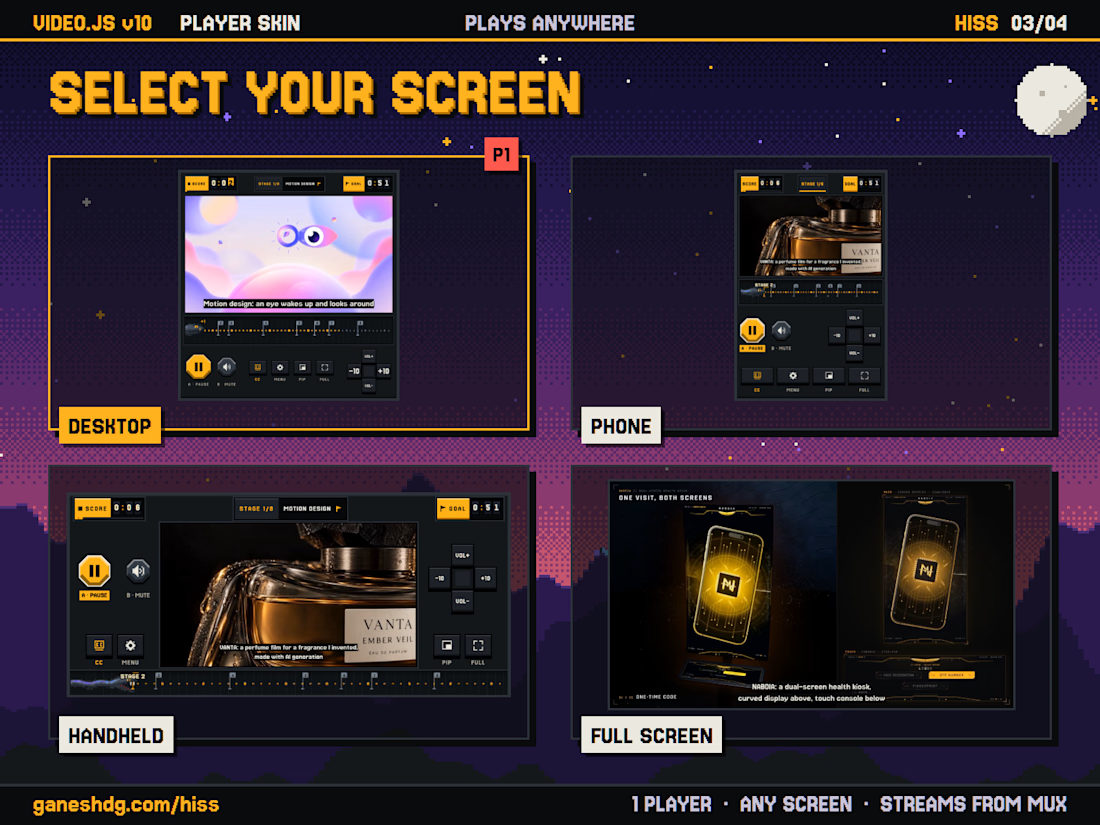
The console changes shape with the screen. On a desktop it sits under the picture. On a phone the keys scale down. Turn the phone sideways and it becomes a handheld, with the picture in the middle and the controls on either side. In fullscreen the console steps aside while the video plays and comes back when you move the mouse or tap.
Every control is a stock Video.js component under the styling, so the player still works for everyone. Each control is a tab stop with a visible focus ring, it holds up in high-contrast mode, motion stops for people who turn it off, and captions sit on a dark plate so they stay readable over bright and dark footage.
The player streams my 2026 showreel from Mux, with chapters and a caption track that describes each piece of work.
Turning the clock into SCORE and the video length into GOAL, with chapters as stages marked by flags, makes the whole player feel like a game in progress. The game-pad layout — A to play, B to mute, D-pad to skip or change volume — is a lovely way to keep the console idea...