The network for creativity
Join 1.25M professional creatives like you
Connect with clients, get discovered, and run your business 100% commission-free
Creatives on Contra have earned over $150M and we are just getting started
Back to feedPost

Your Webflow CMS decides how easily your site can grow.
Common CMS mistakes that make a site hard to grow:
→ Content that belongs in the CMS is hardcoded. Team, case studies, FAQs: every update becomes a developer task.
→ Categories stored as plain text instead of a reference. Now you can't filter, sort or build category pages.
→ No SEO fields in the collection. Every blog post ends up with the same meta title.
→ One big rich text field for everything. No control over layout, and design drifts with every new item.
→ URL structure decided on the fly. Changing it later means redirects and lost rankings.
That's why I plan the CMS structure before building a single page. It's part of the audit step on every project.
Planning a blog, catalog or case studies section? Here's how I work: https://www.bohdan-tsiupka.com/
What's the one thing you wish you'd put in the CMS from day one? 👇


bohdan-tsiupka.com
Webflow Developer & Premium Partner | Bohdan Tsiupka
Certified Webflow Premium Partner. Figma to Webflow builds, template customization, migrations and ongoing support for teams in the US and Europe.

Same lesson on the WordPress side with custom post types and fields. The one I'd add from day one: a short summary or excerpt field on every collection item. Cards, meta descriptions, related-item blocks and search results all end up needing it, and adding it later means going back through every item by hand.
The network for creativity
Join 1.25M professional creatives like you
Connect with clients, get discovered, and run your business 100% commission-free
Creatives on Contra have earned over $150M and we are just getting started



Related posts
Your Webflow site looks great but loads slowly? It's almost never Webflow's fault.
Here are the usual suspects:
→ Huge images. A 4 MB hero photo uploaded straight from the design folder.
→ Too many font weights. Every extra weight is another file the browser has to download.
→ Third-party scripts. Chat widgets, trackers and pop-ups loading before the content does.
→ Heavy animations on page load. Everything fades in, so nothing shows up fast.
→ Leftover classes and interactions from old versions of the site.
Fixing these rarely needs a redesign. Often it's a focused cleanup that makes the site feel noticeably faster.
That's why speed is on my launch checklist for every site, together with meta tags, sitemap and cross-browser testing.
Need a faster Webflow site? Here's how I work: https://www.bohdan-tsiupka.com/
What's the slowest thing on your site right now? 👇
bohdan-tsiupka.com
Webflow Developer & Premium Partner | Bohdan Tsiupka
Certified Webflow Premium Partner. Figma to Webflow builds, template customization, migrations and ongoing support for teams in the US and Europe.


Designed and built the Webflow site for a residential recording studio in Tyrol, Austria: a 3D homepage, a live terrain map, a CMS-driven availability calendar,


A live terrain map? So cool!


PD Paul: a website template for architecture studios.
Oversized type splits right through the hero photo for instant impact.
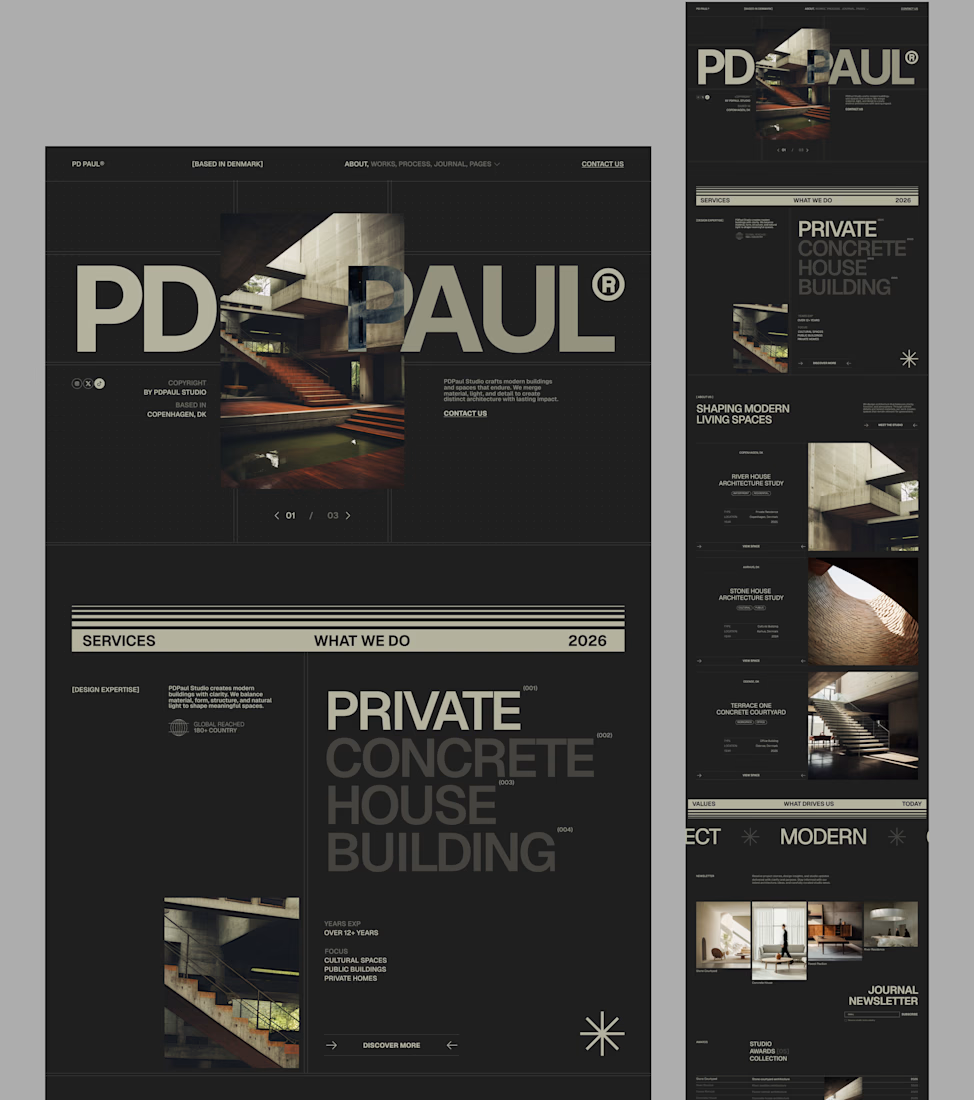
Built for architecture and design studios who want the work to speak for itself.
Need it customised for your business? Message me here.
pentaclay.com
PD Paul - Residential Architecture Firm Framer Template | Pentaclay
PD Paul is a Framer template for architecture firms, interior studios and design practices that create modern buildings and spaces. Large visuals, calm.


