The network for creativity
Join 1.25M professional creatives like you
Connect with clients, get discovered, and run your business 100% commission-free
Creatives on Contra have earned over $150M and we are just getting started
Back to feedPost

"Why your pixel art looks blurry (and your wall art too)"Scaling ruins more art than bad drawing does. Two rules that apply whether you're exporting game sprites or printable wall art:1. Pixel art: scale with NEAREST-NEIGHBOR, never bilinear/bicubic. Bilinear averages neighboring pixels — that's the mushy edge. Nearest-neighbor duplicates them, so a 16×16 sprite stays crisp at 160×160. Every game engine and image editor has the toggle; it's usually on "smooth" by default, which is the wrong default for pixel art.2. Print: design at final size, 300 DPI. A 5×7" print needs 1500×2100 px minimum. Upscaling a 72-DPI screen image to print size is the same mush problem — pixels were never there to invent.The discipline is identical: pixels don't get invented at export time. Decide the output first, then make the art fit it.If you want wall art designed right from the start — sized, bled, and print-tested — my wall art service starts at $150: contra.com/devon_sack_ozaa31xl — and the finished pieces live in my Etsy shop (DesignClarityShop).
The network for creativity
Join 1.25M professional creatives like you
Connect with clients, get discovered, and run your business 100% commission-free
Creatives on Contra have earned over $150M and we are just getting started



Related posts



Stunning!


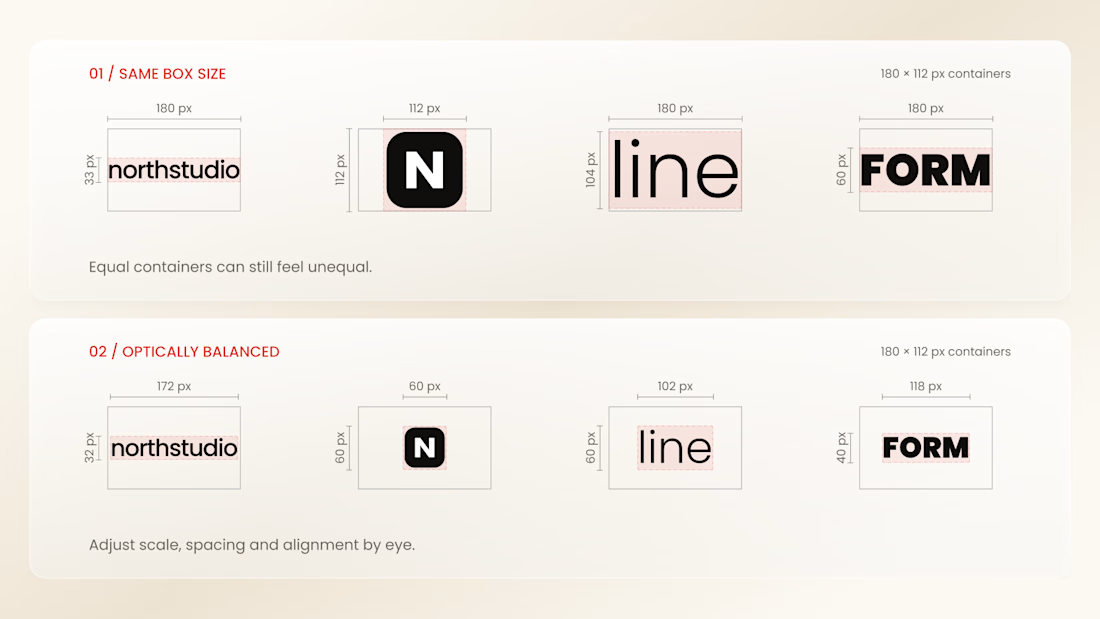
Why do logos look uneven even when they have the same size?
Every logo has a different shape, proportion, and visual weight. A wide wordmark can appear smaller than a compact symbol, while a bold logo may dominate a thinner one - even when their dimensions are technically identical.
That’s why logo sections shouldn’t be aligned by numbers alone.
Adjusting each logo optically, using a consistent visual area, balanced spacing, and a shared baseline helps every brand feel equally represented.
The goal isn’t to make every logo exactly the same size.
It’s to make them feel equally important.
Because visual consistency is based on perception, not just pixels.


Thanks for the information you shared


Meet MUXSCAPE, my entry for the Video.js Skins Design Challenge.
I wanted to explore a different approach to video playback, something that feels more like a cinematic experience than a traditional video player.
Built on the Video.js v10 Scaffold skin, MUXSCAPE features adaptive ambient lighting inspired by movie posters, floating frosted glass controls, contextual menus, and a responsive layout.
It supports both YouTube trailers and Mux hosted movies, with accessibility and performance being an important part of the experience.
This was a fun opportunity to experiment with spatial UI, glassmorphism, and cinematic interactions while pushing the possibilities of Video.js.
Hope you enjoy exploring it!