The network for creativity
Join 1.25M professional creatives like you
Connect with clients, get discovered, and run your business 100% commission-free
Creatives on Contra have earned over $150M and we are just getting started
Back to feedPost
FRAME INDEX — Every Frame Has a Story
A cinematic contact-sheet skin for Video.js v10. Archivists navigate a film by its contact sheet — every frame laid out, numbered and filed. FRAME INDEX gives a streaming player the same instrument: the film is indexed into 28 real frames on a persistent film strip under the picture, so navigation stops being a guess along a blank line and becomes reading the film itself.
Contact-Sheet Timeline. A film strip of 28 real frames extracted from the demo film, each numbered (F-001 … F-028) with its timecode. Click any frame to seek; the strip follows playback, highlights the current frame in Signal Orange and keeps it in view. Scene-start frames carry a SCENE badge.
Scene Explorer. The film's own chapter track rendered as an archivist's index cards — thumbnail, scene number, title and timecode range. One click files you into the scene; the active scene is marked as playback moves.
The look. Matte editorial archive: Deep Ink Black, Graphite, Warm Ivory, Muted Silver and a restrained Signal Orange. Flat 1px-ruled bands, a slate header with a live timecode readout, an "index rule" timeline whose chapter layer is printed with frame ticks, and a full custom-drawn icon set. No glass, no gradients, no glow — print, not neon.
Precision feedback. Seek, skip and speed actions surface as bordered index indicators; the slate timecode and the control-bar clock stay in tabular mono so the position is always readable at a glance.
Everything works: play/pause with a centre play, seek by timeline, contact sheet or scene list, volume and mute, a quality menu with the stream's real renditions (Auto/270p/480p/720p), playback speed, captions in English and Japanese, fullscreen, picture-in-picture, full keyboard control with a visible orange focus outline, auto-hiding controls, loading and ended states, an error dialog when the stream fails, and calming under reduced-motion. Tested with an automated browser suite — 28 of 28 checks passed, zero accessibility violations (axe) on both the player and the demo page, zero console errors.
Live Demo: https://liyansdigital.github.io/frame-index/
Player-only page: https://liyansdigital.github.io/frame-index/preview.html
Technology: Video.js v10 (@videojs/html 10.4.0, @videojs/mux-video 10.4.0), React, Vite, Tailwind CSS, TypeScript. Demo film: NASA's "Cosmic Dawn" trailer (public domain), streamed from my own Mux account; contact-sheet frames extracted locally with ffmpeg.
Source code: https://github.com/liyansdigital/frame-index (Apache License 2.0)
Mux playback ID: 2U9qL96dDKsN1LcT6017gXvAbdnWs6jowGR3wiwCq4mg
Known limitations, stated honestly: the contact sheet and scene thumbnails are prepared for this demo film (a production version would generate them per-asset, e.g. from Mux storyboard data); a full screen-reader pass has not been run — keyboard operation, focus visibility and automated accessibility checks have; picture-in-picture depends on browser support.
— Vikas Kumar Meena, LIYANS DIGITAL (github.com/liyansdigital)
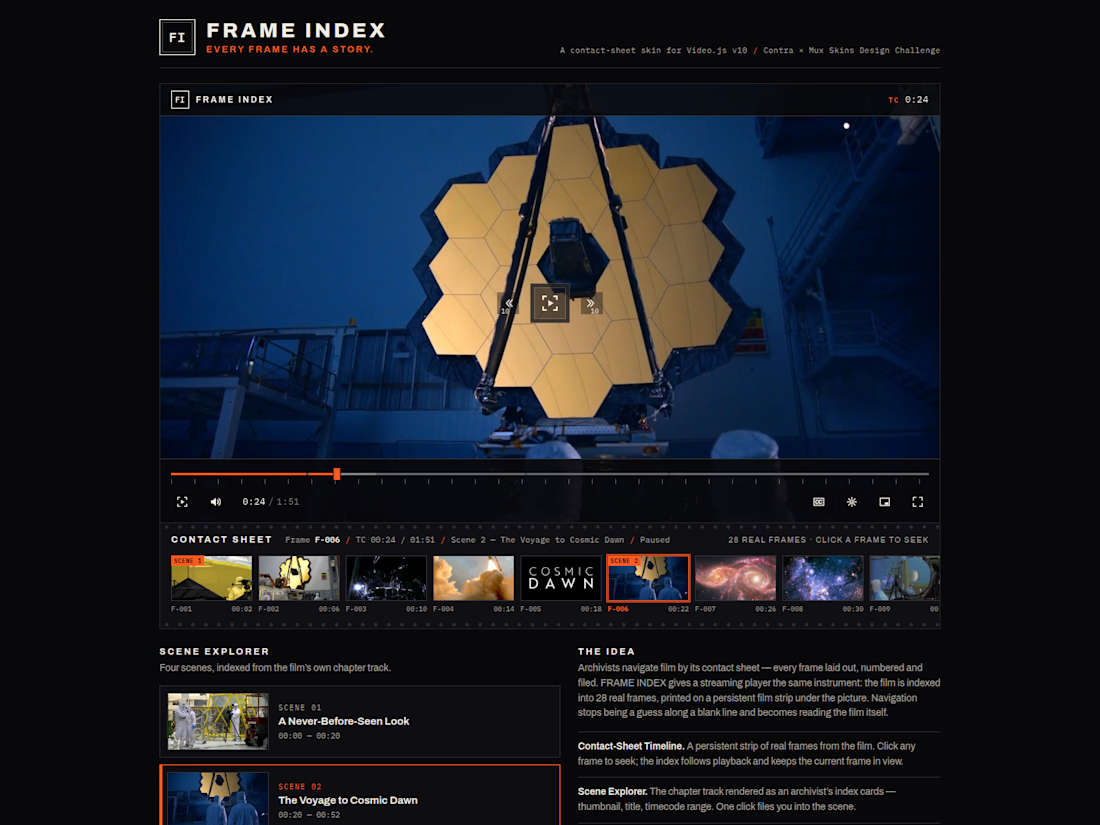

28 real frames on a persistent filmstrip, like an archivist's contact sheet. Great instrument.

Thanks so much, Denis — I love that you called it an archivist's contact sheet, because that's exactly how I think of it: all 28 frames are real, pulled from the demo film, so the strip works as a genuine index you can navigate by. Keeping it persistent was a deliberate choice...
The network for creativity
Join 1.25M professional creatives like you
Connect with clients, get discovered, and run your business 100% commission-free
Creatives on Contra have earned over $150M and we are just getting started


Related posts
TRBN VHS — a Video.js v10 skin built as a 90s television with a tape deck.
The left screen is a shelf of tapes, the big screen plays the film, and the deck below is the remote: REW, PLAY, FF, EJECT, a volume knob and a jog knob.
Pick a tape and Skully, the little LED skull who lives in the display, brings it over in his bony hand and pushes it into the front-loading slot. Sometimes he misses the slot. Sometimes the flap sticks and he has to shove it in. Then he watches the film with you and comments on what is on screen.
Nothing jumps: clicking the timeline, pressing J/L or the arrows winds the tape to that spot, with snow bands, tracking wobble and motor sound, like a real VCR. Full screen keeps the curved glass, scan lines and deck instead of showing a bare video.
What is inside:
— built on Video.js v10 custom elements: play, time slider, time, mute, volume, fullscreen, hotkeys, gestures, status announcer, buffering and error states
— 8 public-domain films from the 1920s–60s, starting with Disney's The Skeleton Dance (1929)
— a 3D cassette and hand made in CSS, with deck sounds generated in the browser (no audio files)
— keyboard control for everything, visible focus, screen reader announcements, reduced-motion and high-contrast modes
— a separate phone layout: picture on top, slot and keys under it, shelf below
— all 30 languages of my site, including right-to-left


Built FOLIO // LOUPE, a custom Video.js v10 skin and editorial screening room for Solheath Studio inspired by inspecting 35mm film strips on an analog light table with a physical glass loupe.
Instead of a flat dark overlay bar, the player sits inside a tactile cotton-paper folio. Hovering the seek bar brings up an optical glass loupe with spherical refraction, subtle chromatic rim dispersion, frame-accurate readouts, and an audio-loudness tick ruler.
Flipping the brass switch shifts the room from warm daylight paper into Darkroom mode with real-time four-edge ambient video glow. Pausing unfolds an angled paper slip for comma and period single-frame stepping and exact frame link sharing, while pressing C opens a seven-strip 35mm contact sheet streaming all seven studio films via Mux HLS and Mux storyboards. CSS container queries refit every control cleanly down to 390px touch screens alongside full keyboard navigation and reduced-motion support.
Inspecting 35mm strips with a glass loupe on a light table, beautiful reference. Cotton paper instead of a dark bar, nice.


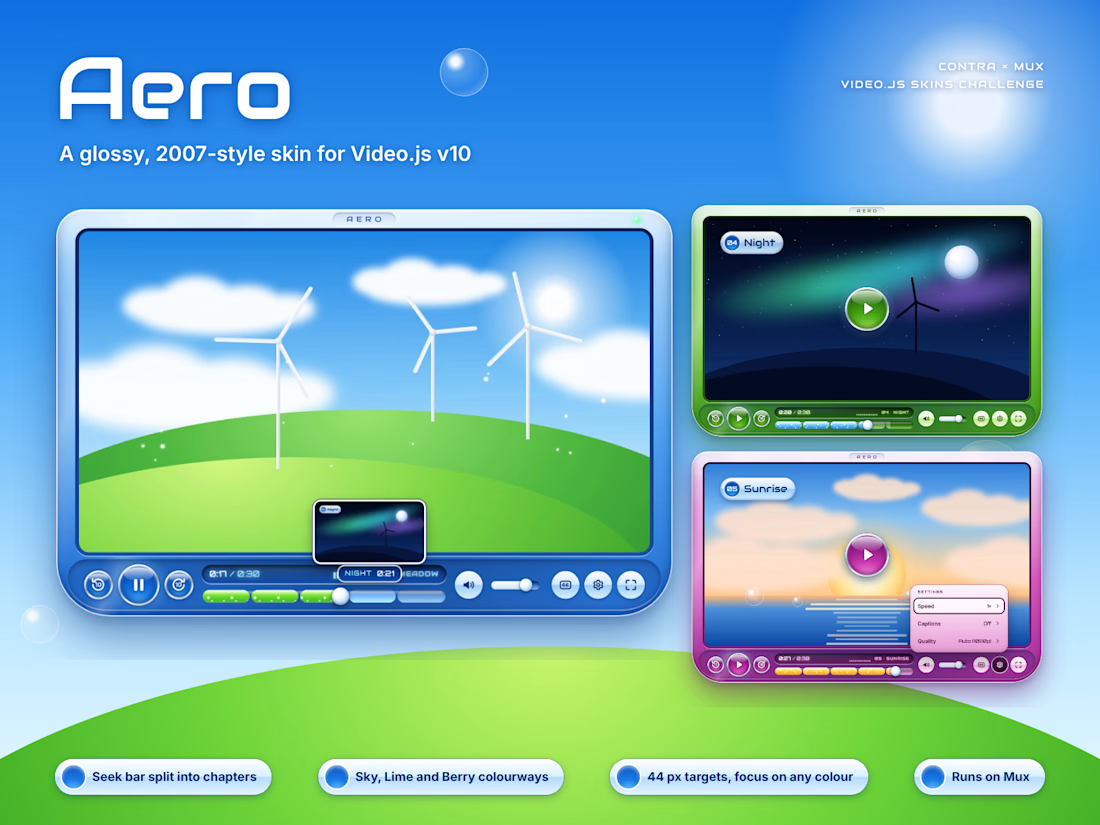
Aero, a Video.js skin that looks like a 2007 media player.
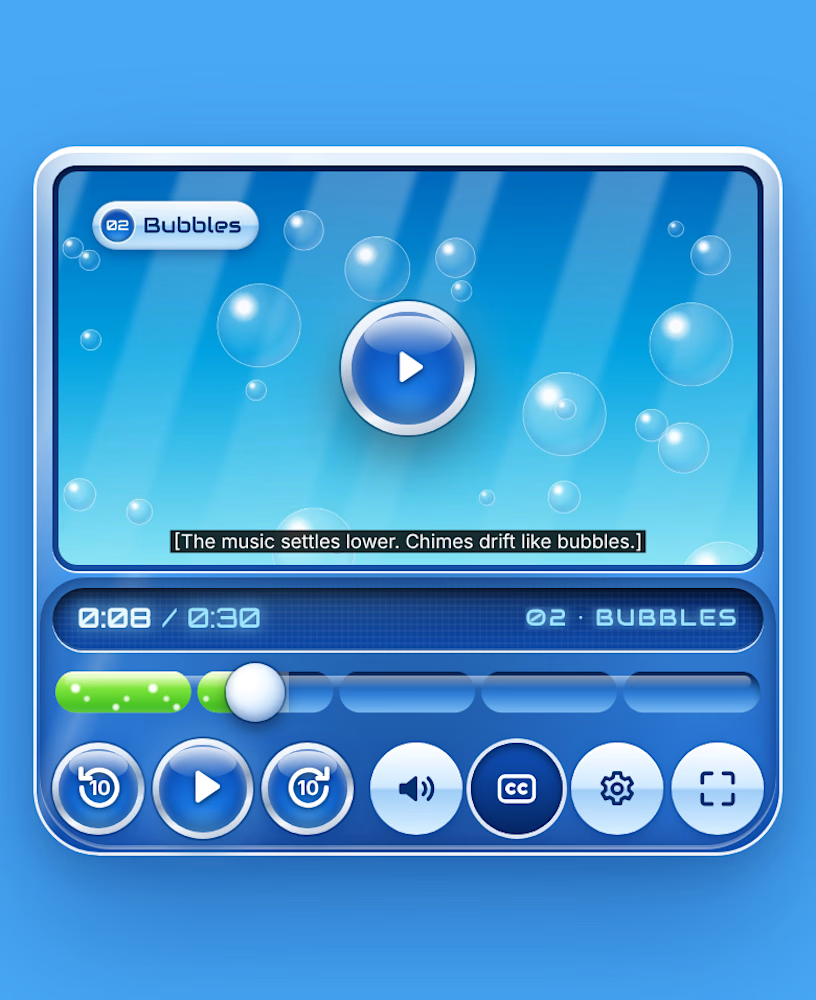
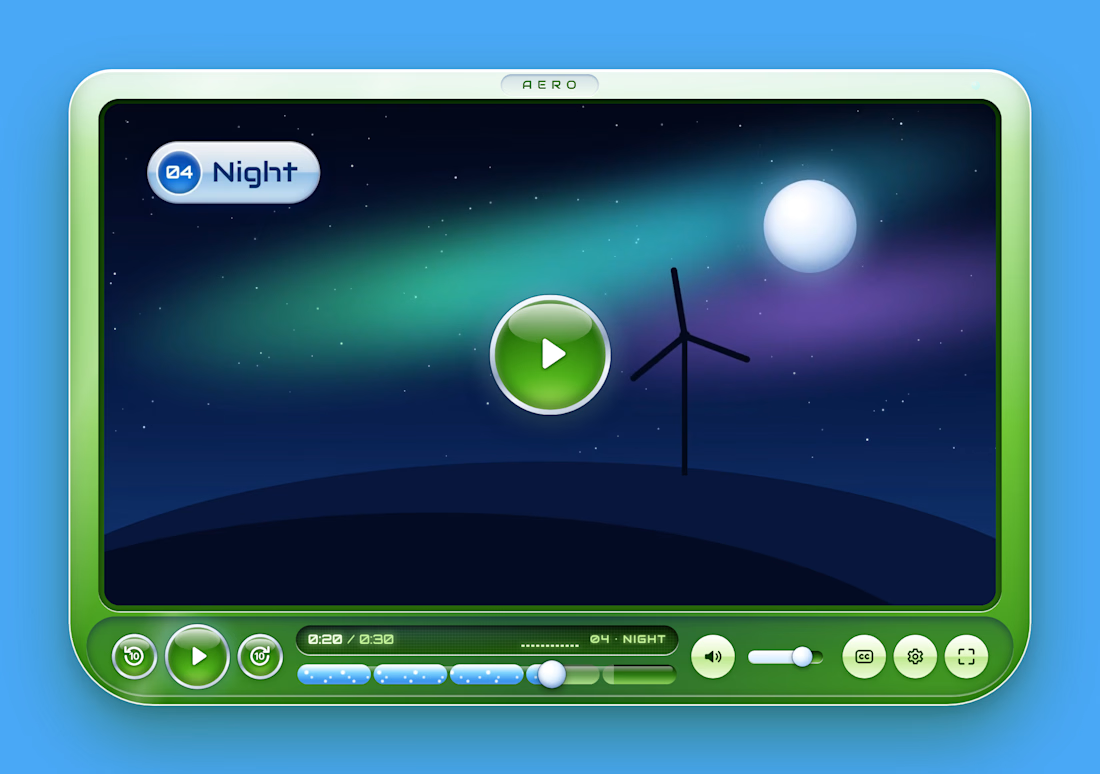
I grew up on that era of glossy, bubbly software and wanted to see if it could work as a modern player without the bad parts. The shell is glass, the buttons are orbs, and the seek bar fills up like a tube of liquid, bubbles and all. It’s split into the video’s chapters.
The gloss stays on the frame. Time and chapter sit on a dark LCD strip so you can always read them, whatever’s playing. There are three colors: Sky, Lime and Berry.
It works on phones, does a floating dock in full screen, and you can run the whole thing from the keyboard.
I made the demo video for it too.

The orb buttons and the glossy shell took me straight back to Vista. Love that the seek bar fills like liquid, we both went for water in our skins 🙂