The network for creativity
Join 1.25M professional creatives like you
Connect with clients, get discovered, and run your business 100% commission-free
Creatives on Contra have earned over $150M and we are just getting started
Back to feedPost

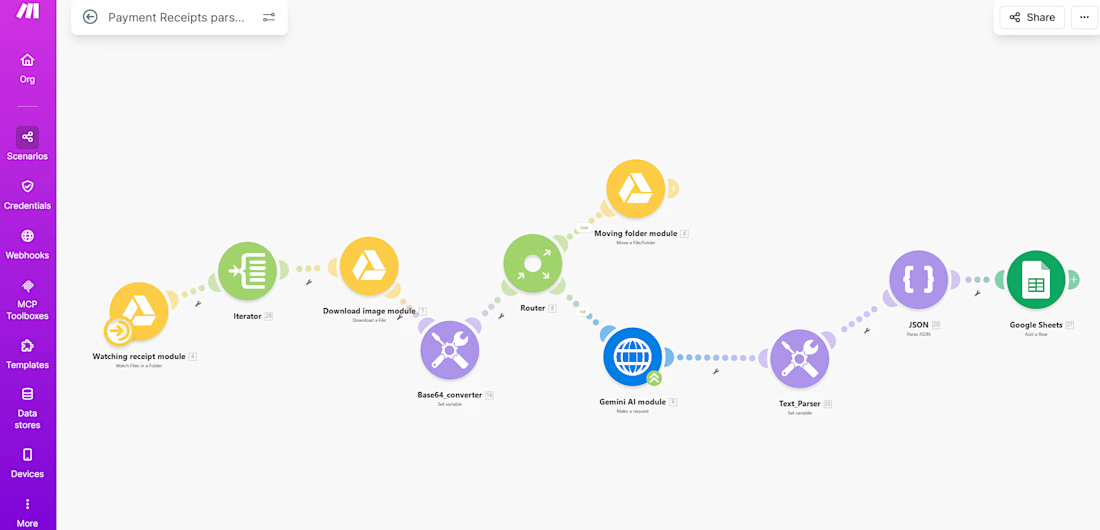
Ai assisted workflow for Reciept data logging


The network for creativity
Join 1.25M professional creatives like you
Connect with clients, get discovered, and run your business 100% commission-free
Creatives on Contra have earned over $150M and we are just getting started
Related posts

FirstReply — reply first, win the booking
Description
Event venues lose bookings because they reply a day late. By then the client has booked somewhere else. FirstReply answers every inquiry with a priced proposal and a held date in seconds.
The automation
1. An inquiry arrives from the venue page, or staff paste in an email.
2. AI extracts event type, date, guests, budget and requests, each with a confidence level and the exact words it came from.
3. Missing date or guest count? It writes a clarifying reply instead.
4. It matches the smallest free space that fits (or the two nearest free dates when it's booked), prices the right package and holds the date for 5 days.
5. The client gets their own proposal page and books with one tap. The hold becomes a confirmed booking.
6. Unsure details, over-budget totals or Review mode send it to a review queue first. Humans step in only when needed.
7. Views, acceptances and expiring holds update the pipeline and alert the team live. Every step is logged to the second.
The design A full design system first (tokens, type scale, components), built as a clickable prototype, then rebuilt in Base44 from prompts. Client pages are mobile-first; the venue side is desktop-first.
Try it Client side: firstreply.base44.app · Venue side: firstreply.base44.app/dashboard


From a packing-slip PDF to a shipment your team can track.
This TechFoundry IMS demo matches boxes, parts, and weights from the vendor document and connects courier tracking to the shipment record. A practical example of the AI and automation workflows we build into business software.
Watch the vendor shipment demo:
https://www.youtube.com/watch?v=FmjdRRfUZh8
#AI #Automation #SoftwareDevelopment #SupplyChain

Small automations like these can save teams so much manual work and reduce errors.

Email Triage Automation
The Challenge
Growing companies often struggle with overflowing shared inboxes (sales@, support@, info@). Manual sorting, categorizing, and assigning emails to different departments causes response delays. Even worse, high-priority issues—such as urgent billing complaints or system failures—frequently get buried in the noise, leading to missed deadlines and unhappy clients.
The Solution & Architecture
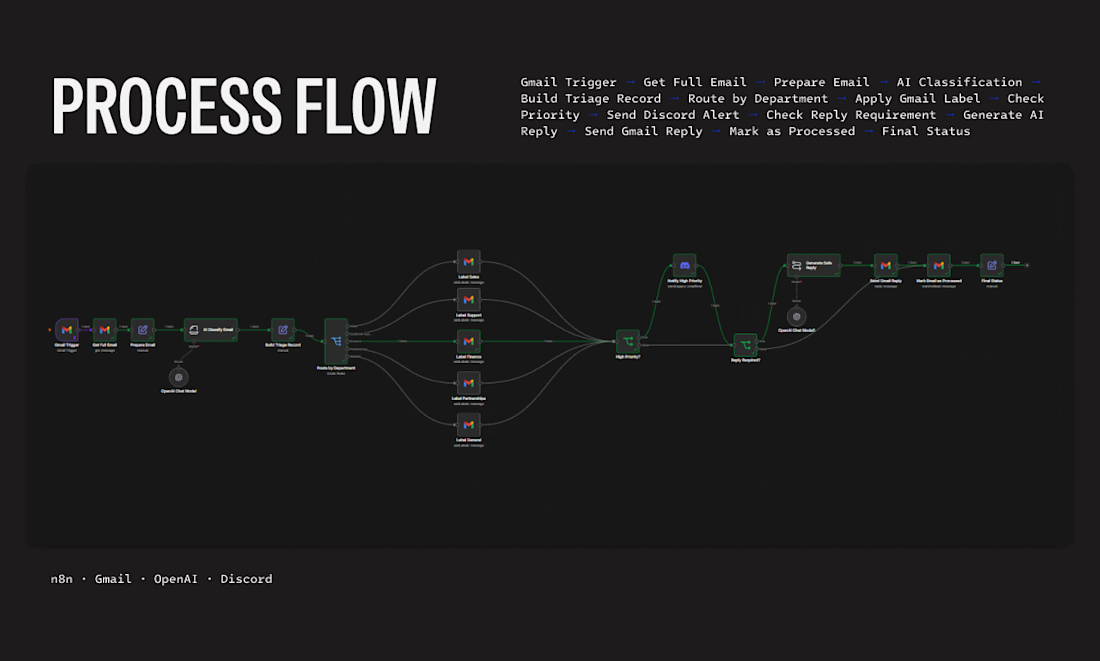
I engineered an enterprise-grade inbox management and automation architecture using n8n, Gmail API, and OpenAI.
The system workflow functions as follows:
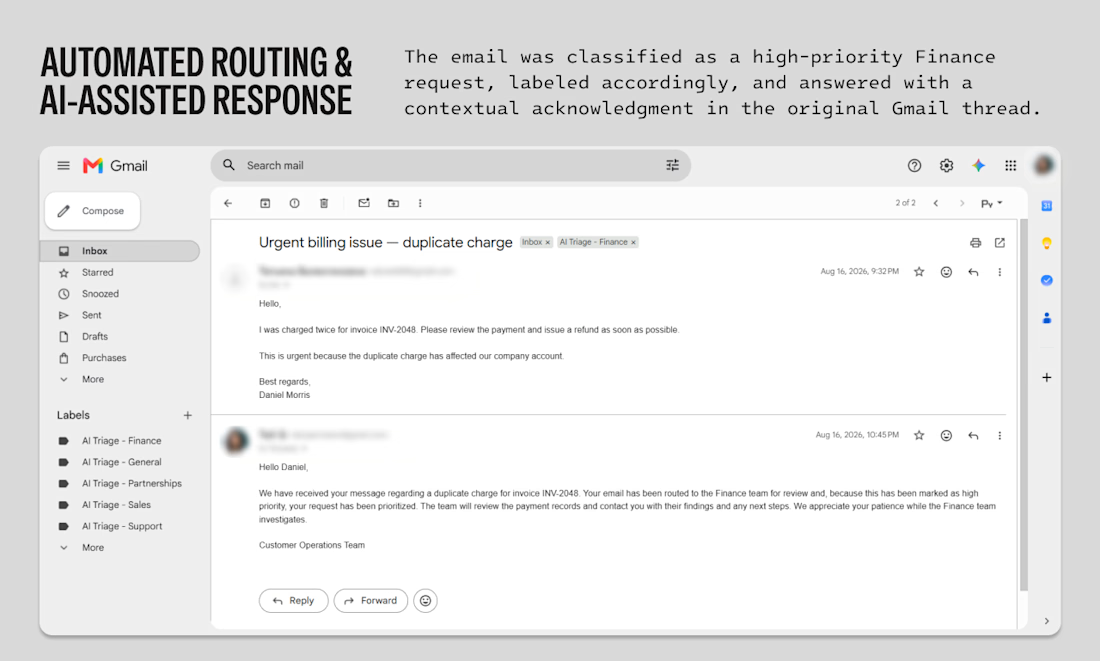
Ingestion & AI Classification: The workflow triggers instantly upon receiving a new message (Gmail Trigger), sanitizes the payload, and passes the text to an OpenAI Chat Model for sentiment analysis and intent classification.
Smart Categorization & Labeling: Based on the AI's output, a routing node assigns the email to the correct department (Finance, Sales, Technical Support, Partnerships) and automatically applies matching Gmail labels in real time.
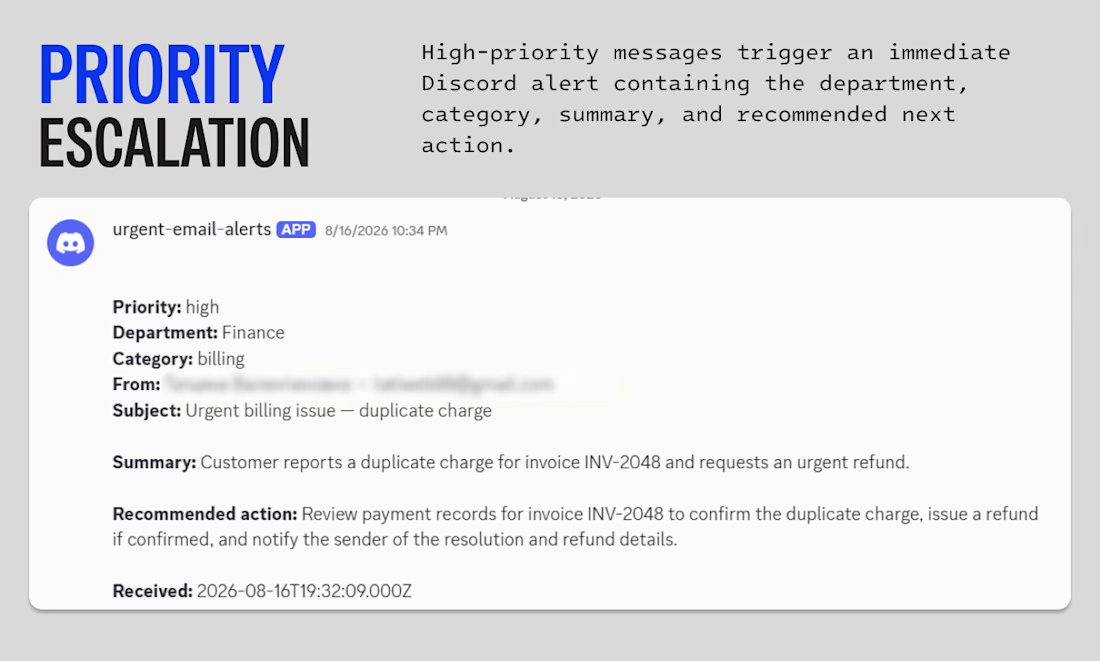
Priority Escalation Routing: If the system flags an email as high-priority, it immediately triggers a secondary logic line. This packages the case details and shoots an urgent alert card directly into a dedicated Discord channel, complete with a summary and recommended actions.
AI-Assisted Contextual Response: Simultaneously, the system evaluates if an instant acknowledgement is needed, generates a contextual, brand-aligned draft reply using LLMs, and sends it directly within the original Gmail thread to reassure the client.
Business Results
Zero Sorting Overhead: Fully eliminated the manual labor required to filter, read, and forward inbound corporate emails.
Accelerated Escalation: Critical, high-priority issues (like duplicate billing charges) are delivered to managers' chat screens within seconds.
Improved Client Retention: Automated contextual auto-replies ensure clients receive an immediate confirmation that their issue is prioritized and routed to the correct desk.



I'd test calm messages about a service outage alongside angry messages about a routine request, so sentiment doesn't become a proxy for urgency. When the model is unsure of the department or priority, does the email go to a human review queue rather than being silently assigned?