
Beautiful Websites Built for GrowthAkash Jana
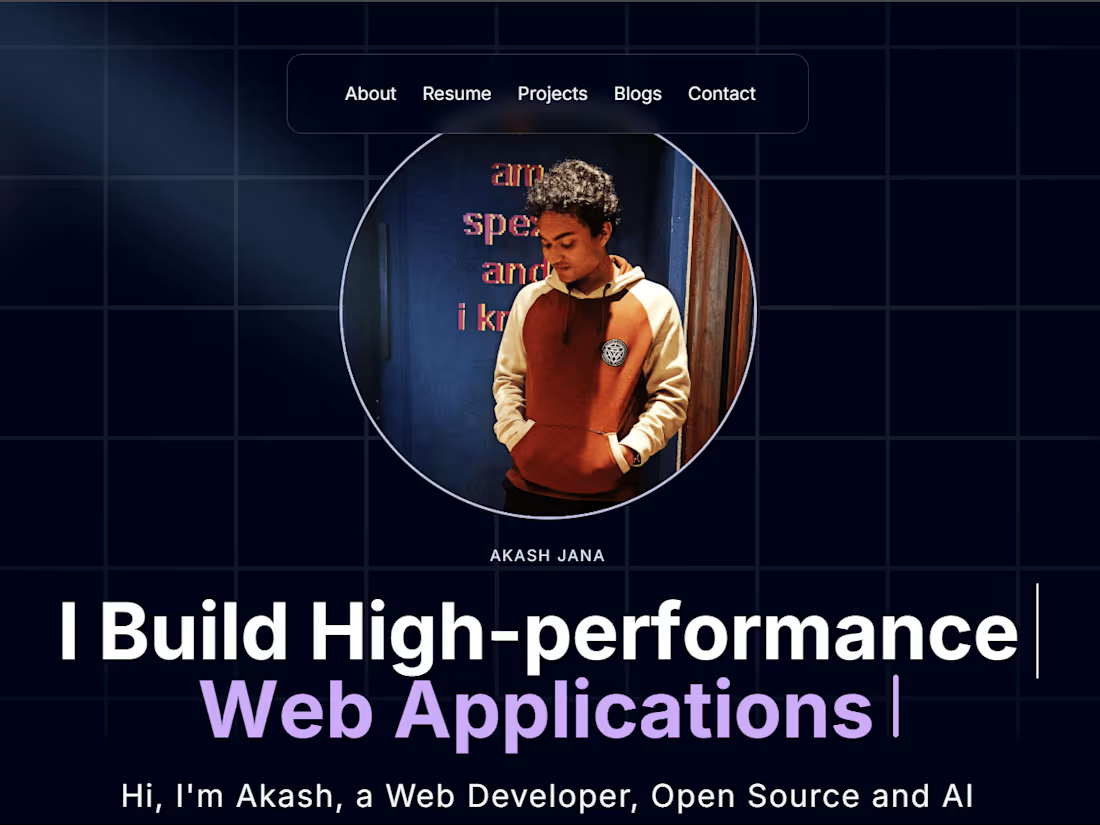
Design and develop modern, responsive websites and landing pages using Next.js and TailwindCSS, with a focus on performance, clean design, and scalability. What sets me apart is my ability to combine sleek frontend experiences with optimized, production-ready code—ensuring your site not only looks great but works flawlessly across devices
What's included
Fully Developed Responsive Website
A custom-built, responsive website developed using Next.js and TailwindCSS. This includes all core pages (e.g., Home, About, Contact, etc.) optimized for desktop, tablet, and mobile.
Format: Live website + source code (GitHub or ZIP file)
Quantity: 1 complete website
Revisions: Up to 2 rounds of revisions included
Clean, Maintainable Codebase
You’ll receive a well-organized, production-ready codebase using best practices in modern web development. This ensures long-term maintainability and easy future updates.
Format: GitHub repo access or ZIP export
Tech Stack: Next.js, TailwindCSS, TypeScript (optional), other libraries as needed
Documentation: Basic README with setup instructions
Deployment & Hosting Setup
I’ll deploy your site to a reliable platform like Vercel or Netlify, ensuring it’s live and accessible. Hosting, domain configuration, and performance optimization are included.
Format: Live deployment + DNS setup (optional)
Deliverable: 1 live production-ready website
Support: Post-launch support for 7 days to resolve any bugs or tweaks
Admin Guide / Website Usage Instructions
A clear and easy-to-follow guide tailored to help you manage, update, and maintain your website — especially useful if your project includes admin panels, content management, or editable sections.
Included in the Guide (based on your site features):
Logging into the Admin Panel: Step-by-step instructions to access your admin dashboard (if applicable).
Managing Content: How to add, edit, or delete sections like blog posts, FAQs, portfolio items, etc.
Updating Images & Text: A visual walkthrough of how to update images or copy through a CMS (if used) or by editing files directly.
Deployment Tips (if self-hosted): How to push changes live if the client is updating code themselves.
Technical Details: Stack used, links to relevant documentation, and credentials (shared securely).
Troubleshooting: Common issues and how to fix them (e.g., broken layout, slow load).
Support Window: Details on how long post-launch support is included (e.g., 7 days for small fixes or questions).
Format: PDF guide or Notion doc (client preference)
Delivery: Shared via link or included in final ZIP
Bonus: Video walkthrough (optional for premium packages)
FAQs

Akash's other services
Starting at$500
Duration1 week
Tags
Framer

MongoDB

Next.js

Node.js

Tailwind CSS

Frontend Engineer
UX Engineer
Web Developer
Service provided by
Akash Jana Mumbai, India
- 4
- Followers
Beautiful Websites Built for GrowthAkash Jana
Starting at$500
Duration1 week
Tags
Framer
MongoDB
Next.js
Node.js
Tailwind CSS
Frontend Engineer
UX Engineer
Web Developer
Design and develop modern, responsive websites and landing pages using Next.js and TailwindCSS, with a focus on performance, clean design, and scalability. What sets me apart is my ability to combine sleek frontend experiences with optimized, production-ready code—ensuring your site not only looks great but works flawlessly across devices
What's included
Fully Developed Responsive Website
A custom-built, responsive website developed using Next.js and TailwindCSS. This includes all core pages (e.g., Home, About, Contact, etc.) optimized for desktop, tablet, and mobile.
Format: Live website + source code (GitHub or ZIP file)
Quantity: 1 complete website
Revisions: Up to 2 rounds of revisions included
Clean, Maintainable Codebase
You’ll receive a well-organized, production-ready codebase using best practices in modern web development. This ensures long-term maintainability and easy future updates.
Format: GitHub repo access or ZIP export
Tech Stack: Next.js, TailwindCSS, TypeScript (optional), other libraries as needed
Documentation: Basic README with setup instructions
Deployment & Hosting Setup
I’ll deploy your site to a reliable platform like Vercel or Netlify, ensuring it’s live and accessible. Hosting, domain configuration, and performance optimization are included.
Format: Live deployment + DNS setup (optional)
Deliverable: 1 live production-ready website
Support: Post-launch support for 7 days to resolve any bugs or tweaks
Admin Guide / Website Usage Instructions
A clear and easy-to-follow guide tailored to help you manage, update, and maintain your website — especially useful if your project includes admin panels, content management, or editable sections.
Included in the Guide (based on your site features):
Logging into the Admin Panel: Step-by-step instructions to access your admin dashboard (if applicable).
Managing Content: How to add, edit, or delete sections like blog posts, FAQs, portfolio items, etc.
Updating Images & Text: A visual walkthrough of how to update images or copy through a CMS (if used) or by editing files directly.
Deployment Tips (if self-hosted): How to push changes live if the client is updating code themselves.
Technical Details: Stack used, links to relevant documentation, and credentials (shared securely).
Troubleshooting: Common issues and how to fix them (e.g., broken layout, slow load).
Support Window: Details on how long post-launch support is included (e.g., 7 days for small fixes or questions).
Format: PDF guide or Notion doc (client preference)
Delivery: Shared via link or included in final ZIP
Bonus: Video walkthrough (optional for premium packages)
FAQs
Akash's other services
$500