
UI/UX intuitive saas dashboard design in FigmaSimona Meleca
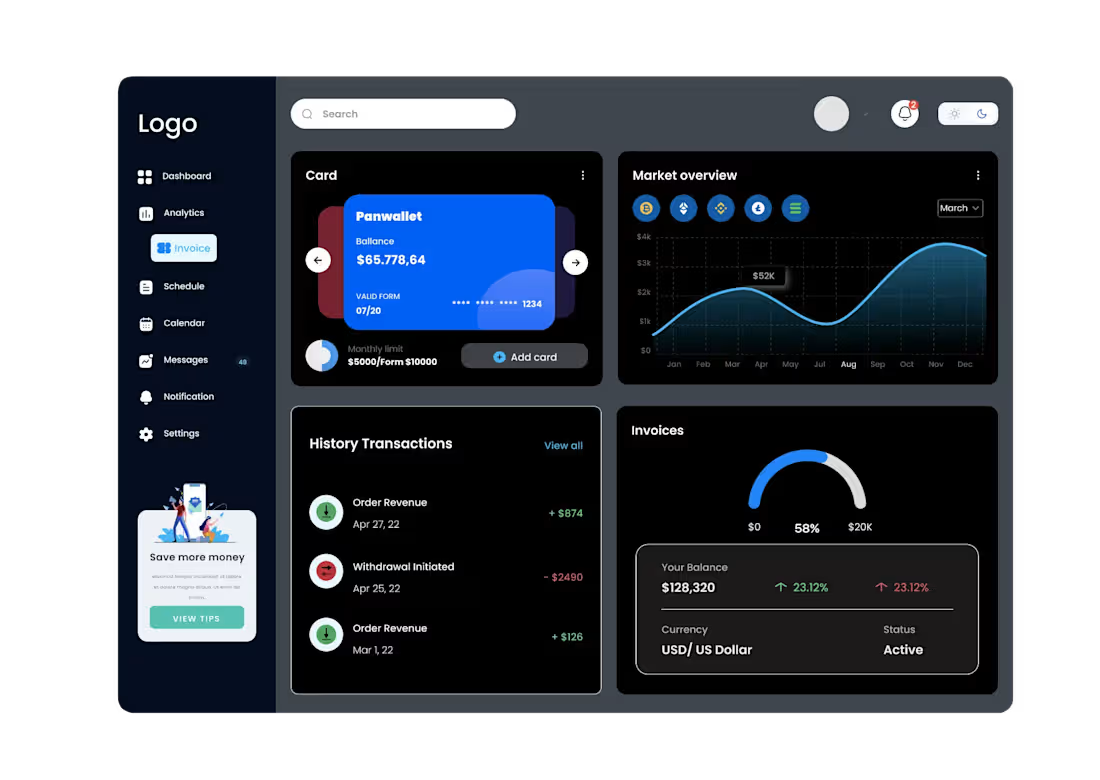
I offer professional SaaS Dashboard UI/UX design services in Figma, creating clean, intuitive, and scalable interfaces for web applications, SaaS platforms, and digital products. From structuring complex information and user flows to designing polished, developer-ready interfaces, I focus on creating products that are both visually refined and easy to use.
My approach combines strategic UX thinking with modern UI design, ensuring that every screen has a clear purpose, consistent visual language, and seamless user experience.
What's included
UX Structure & User Flows
A clear structure for your SaaS product, including user flows, navigation, information hierarchy, and the organization of key dashboard sections. This helps simplify complex features and create a logical experience for users.
Dashboard Wireframes
Low-fidelity wireframes for the main dashboard and key product screens. These layouts define the structure, content hierarchy, navigation, and functionality before moving into the final visual design.
Modern SaaS UI Design
High-fidelity, pixel-perfect interface designs created in Figma for your dashboard or SaaS product. This can include dashboards, analytics, tables, charts, settings, user management, onboarding, notifications, and other essential product screens.
Design System & Components
A consistent UI system with typography, colors, spacing, buttons, forms, cards, tables, navigation elements, icons, and reusable components. Components are structured in Figma to make the product scalable and maintainable.
Interactive Prototype
A clickable Figma prototype demonstrating key user flows and interactions, allowing you to experience the product before development and identify potential UX improvements.
Developer-Ready Figma File
A clean and organized Figma file prepared for development, including reusable components, styles, variants, interaction states, and properly organized layers and assets for a smooth developer handoff.


Starting at$1,200
Duration4 weeks
Tags
Figma

Jitter

UI Designer
UX Designer
Service provided by
Simona Meleca pro89048 Siderno, Italy
- 5.00
- Rating
- 120
- Followers
UI/UX intuitive saas dashboard design in FigmaSimona Meleca
Starting at$1,200
Duration4 weeks
Tags
Figma
Jitter
UI Designer
UX Designer
I offer professional SaaS Dashboard UI/UX design services in Figma, creating clean, intuitive, and scalable interfaces for web applications, SaaS platforms, and digital products. From structuring complex information and user flows to designing polished, developer-ready interfaces, I focus on creating products that are both visually refined and easy to use.
My approach combines strategic UX thinking with modern UI design, ensuring that every screen has a clear purpose, consistent visual language, and seamless user experience.
What's included
UX Structure & User Flows
A clear structure for your SaaS product, including user flows, navigation, information hierarchy, and the organization of key dashboard sections. This helps simplify complex features and create a logical experience for users.
Dashboard Wireframes
Low-fidelity wireframes for the main dashboard and key product screens. These layouts define the structure, content hierarchy, navigation, and functionality before moving into the final visual design.
Modern SaaS UI Design
High-fidelity, pixel-perfect interface designs created in Figma for your dashboard or SaaS product. This can include dashboards, analytics, tables, charts, settings, user management, onboarding, notifications, and other essential product screens.
Design System & Components
A consistent UI system with typography, colors, spacing, buttons, forms, cards, tables, navigation elements, icons, and reusable components. Components are structured in Figma to make the product scalable and maintainable.
Interactive Prototype
A clickable Figma prototype demonstrating key user flows and interactions, allowing you to experience the product before development and identify potential UX improvements.
Developer-Ready Figma File
A clean and organized Figma file prepared for development, including reusable components, styles, variants, interaction states, and properly organized layers and assets for a smooth developer handoff.
$1,200