
Mobile App UI/UX Design (iOS/Android) 📱Rafee Alam
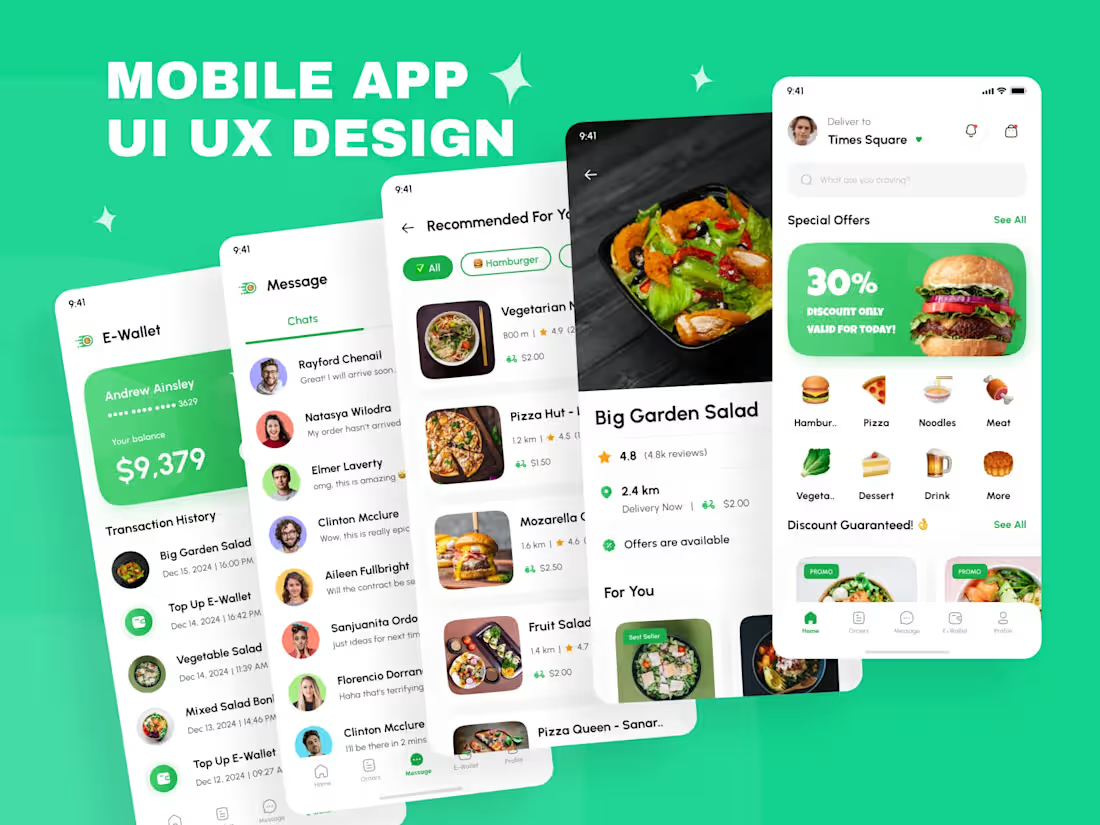
I design clean, intuitive mobile app interfaces for iOS and Android from MVP screen packs to full, product-ready app systems. Every project includes structured UX flows, a reusable component system, and a developer-ready Figma handoff, so your app looks polished and builds smoothly.
Best for: MVPs, startup apps, feature launches, and full-scale product apps that need a scalable design system.
Starter App Screen Pack — $250
Best for MVPs, landing screens, or a single feature flow.
Includes
3–4 screens (ex: onboarding + login + home)
Clean UI layout + hierarchy
Basic UX flow guidance
Light component consistency
Figma delivery (organized)
Timeline: 2–4 days
Growth Mobile App — $600 (Recommended)
Best for startups building a real usable app experience.
Includes
6–10 screens (core app flow)
UX flow mapping (simple + clear)
UI components (buttons, cards, inputs, lists)
Micro-interaction guidance (states & transitions)
Basic design system foundation
Handoff-ready Figma file
Timeline: 6–10 days
Full App System — $1200
For product-ready apps with multiple features and a scalable UI system.
Includes
12–20 screens (full experience)
Full component library + design system
User journeys + key flows mapped
Responsive guidance (small/large devices)
Loading/empty/error states
Developer-friendly handoff + style guide
Timeline: 14–21 days
✅ Payment Structure
For Starter / Growth packages
50% upfront to start
50% upon final delivery
For Full App System
40% upfront
30% after the mid-review milestone
30% at final handoff
Note: Prices are indicative and can be adjusted based on specific client needs, number of screens, app complexity, feature requirements, and project scope.
After a quick brief, I’ll confirm the final quote + timeline.
What's included
UX + Structure
-User flow / journey mapping
-Information architecture (screen structure)
-Wireframes (if needed)
UI Design
-High-fidelity UI screens
-Modern typography + spacing system
-Visual consistency across screens
Components & System
-Buttons, inputs, cards, tabs, lists
-Navigation patterns (bottom tab, drawer, etc.)
-Color + type styles
-Reusable components for scalability
Key UX States
-Empty states
-Error states
-Loading states
-Success confirmations
Handoff
-Clean Figma file with naming + sections
-Prototype (if requested)
-Dev-friendly layout & assets guidance
FAQs
Rafee 's other services
Starting at$1,200
Duration3 weeks
Tags
Adobe XD

Autodesk Maya

Figma

Flutter

Sketch

Interaction Designer
Mobile Designer
Web Designer
Service provided by
Rafee Alam proDhaka, Bangladesh
- 5.00
- Rating
- 158
- Followers
Mobile App UI/UX Design (iOS/Android) 📱Rafee Alam
Starting at$1,200
Duration3 weeks
Tags
Adobe XD
Autodesk Maya
Figma
Flutter
Sketch
Interaction Designer
Mobile Designer
Web Designer
I design clean, intuitive mobile app interfaces for iOS and Android from MVP screen packs to full, product-ready app systems. Every project includes structured UX flows, a reusable component system, and a developer-ready Figma handoff, so your app looks polished and builds smoothly.
Best for: MVPs, startup apps, feature launches, and full-scale product apps that need a scalable design system.
Starter App Screen Pack — $250
Best for MVPs, landing screens, or a single feature flow.
Includes
3–4 screens (ex: onboarding + login + home)
Clean UI layout + hierarchy
Basic UX flow guidance
Light component consistency
Figma delivery (organized)
Timeline: 2–4 days
Growth Mobile App — $600 (Recommended)
Best for startups building a real usable app experience.
Includes
6–10 screens (core app flow)
UX flow mapping (simple + clear)
UI components (buttons, cards, inputs, lists)
Micro-interaction guidance (states & transitions)
Basic design system foundation
Handoff-ready Figma file
Timeline: 6–10 days
Full App System — $1200
For product-ready apps with multiple features and a scalable UI system.
Includes
12–20 screens (full experience)
Full component library + design system
User journeys + key flows mapped
Responsive guidance (small/large devices)
Loading/empty/error states
Developer-friendly handoff + style guide
Timeline: 14–21 days
✅ Payment Structure
For Starter / Growth packages
50% upfront to start
50% upon final delivery
For Full App System
40% upfront
30% after the mid-review milestone
30% at final handoff
Note: Prices are indicative and can be adjusted based on specific client needs, number of screens, app complexity, feature requirements, and project scope.
After a quick brief, I’ll confirm the final quote + timeline.
What's included
UX + Structure
-User flow / journey mapping
-Information architecture (screen structure)
-Wireframes (if needed)
UI Design
-High-fidelity UI screens
-Modern typography + spacing system
-Visual consistency across screens
Components & System
-Buttons, inputs, cards, tabs, lists
-Navigation patterns (bottom tab, drawer, etc.)
-Color + type styles
-Reusable components for scalability
Key UX States
-Empty states
-Error states
-Loading states
-Success confirmations
Handoff
-Clean Figma file with naming + sections
-Prototype (if requested)
-Dev-friendly layout & assets guidance
FAQs
Rafee 's other services
$1,200