
Car Sell Website DesignMd Jahid Hassan
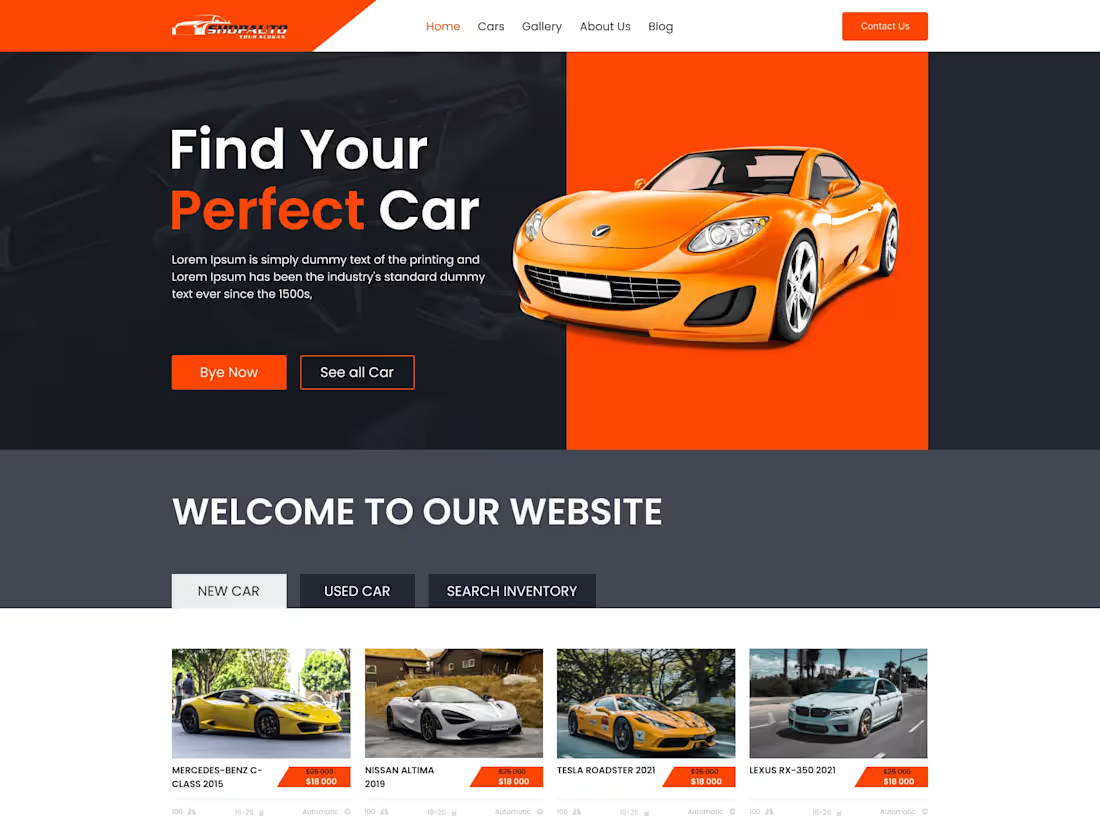
I offer user-focused UI/UX design services to create intuitive, visually engaging, and responsive websites tailored to your business goals. With extensive design experience and a proven approach combining creativity, usability, and strategy, I deliver solutions that not only look stunning but also drive meaningful user engagement. My commitment to thorough research, seamless collaboration, and attention to detail ensures every project exceeds expectations.
What's included
Car sell Delivery
1. Research and Strategy Documentation
User Personas: Profiles of potential users, such as car buyers, sellers, or dealers.
User Journey Map: Visual representation of how users navigate through the website, from searching for a car to completing a purchase or inquiry.
Competitor Analysis: Insights into design strengths and weaknesses of competing platforms.
Site Map: A detailed structure of the website's pages and hierarchy.
2. Wireframes
Low-Fidelity Wireframes: Simple layouts showing the structure of key pages.
High-Fidelity Wireframes: Detailed layouts to demonstrate the placement of content, forms, and features.
3. Visual Design
UI Mockups: Fully designed, high-fidelity pages, including:
Home Page: Highlighting key features, promotions, and navigation.
Search and Listings Page: Displaying car listings with filters (e.g., price, brand, mileage, year).
Car Details Page: Showcasing car specifications, images, pricing, and seller contact options.
Sell a Car Page: Intuitive form for users to list their cars for sale.
Comparison Page: Allowing users to compare multiple cars side by side.
About Us and Contact Pages: Highlighting company information and providing contact forms or details.
Design System: A complete guide for developers to maintain consistency, including:
Typography (font families, sizes, and usage).
Color palette (primary, secondary, and neutral tones).
Button styles and states (hover, active, disabled).
Iconography and illustrations.
Grid systems and spacing guidelines.
4. Interactive Prototype
Clickable Prototype: Interactive design simulating user flows such as:
Searching and filtering cars.
Viewing car details and photos.
Submitting inquiries or offers.
5. Responsive Design
Mobile-Friendly Designs: Optimized layouts for seamless use on smartphones and tablets.
Desktop Layouts: Full-featured designs for larger screens.
6. Developer Handoff Assets
Exported Assets: Ready-to-use icons, images, and other design elements in appropriate formats (SVG, PNG).
Annotated UI Files: Developer-friendly files with detailed specifications for spacing, font sizes, and colors (via tools like Figma
Design Documentation: Clear guidelines for developers to implement the designs accurately.
7. Additional Features (If Applicable)
Favorites Functionality UI: Allowing users to save their favorite cars for later.
Chat or Inquiry System UI: For users to communicate with sellers.
Payment Gateway UI: Mockups for secure online payments (if applicable).
Dealer Dashboard UI: Interface for dealers to manage their car listings.
8. Post-Delivery Support
Review Sessions: Assistance during the development phase to address design-related queries.
Minor Adjustments: Refinements based on feedback after implementation.
Md Jahid's other services
Contact for pricing
Tags
Adobe XD

Elementor

Figma

Framer

Webflow

UX Designer
Web Designer
Web Developer
Service provided by
Md Jahid Hassan Dhaka, Bangladesh
Car Sell Website DesignMd Jahid Hassan
Contact for pricing
Tags
Adobe XD
Elementor
Figma
Framer
Webflow
UX Designer
Web Designer
Web Developer
I offer user-focused UI/UX design services to create intuitive, visually engaging, and responsive websites tailored to your business goals. With extensive design experience and a proven approach combining creativity, usability, and strategy, I deliver solutions that not only look stunning but also drive meaningful user engagement. My commitment to thorough research, seamless collaboration, and attention to detail ensures every project exceeds expectations.
What's included
Car sell Delivery
1. Research and Strategy Documentation
User Personas: Profiles of potential users, such as car buyers, sellers, or dealers.
User Journey Map: Visual representation of how users navigate through the website, from searching for a car to completing a purchase or inquiry.
Competitor Analysis: Insights into design strengths and weaknesses of competing platforms.
Site Map: A detailed structure of the website's pages and hierarchy.
2. Wireframes
Low-Fidelity Wireframes: Simple layouts showing the structure of key pages.
High-Fidelity Wireframes: Detailed layouts to demonstrate the placement of content, forms, and features.
3. Visual Design
UI Mockups: Fully designed, high-fidelity pages, including:
Home Page: Highlighting key features, promotions, and navigation.
Search and Listings Page: Displaying car listings with filters (e.g., price, brand, mileage, year).
Car Details Page: Showcasing car specifications, images, pricing, and seller contact options.
Sell a Car Page: Intuitive form for users to list their cars for sale.
Comparison Page: Allowing users to compare multiple cars side by side.
About Us and Contact Pages: Highlighting company information and providing contact forms or details.
Design System: A complete guide for developers to maintain consistency, including:
Typography (font families, sizes, and usage).
Color palette (primary, secondary, and neutral tones).
Button styles and states (hover, active, disabled).
Iconography and illustrations.
Grid systems and spacing guidelines.
4. Interactive Prototype
Clickable Prototype: Interactive design simulating user flows such as:
Searching and filtering cars.
Viewing car details and photos.
Submitting inquiries or offers.
5. Responsive Design
Mobile-Friendly Designs: Optimized layouts for seamless use on smartphones and tablets.
Desktop Layouts: Full-featured designs for larger screens.
6. Developer Handoff Assets
Exported Assets: Ready-to-use icons, images, and other design elements in appropriate formats (SVG, PNG).
Annotated UI Files: Developer-friendly files with detailed specifications for spacing, font sizes, and colors (via tools like Figma
Design Documentation: Clear guidelines for developers to implement the designs accurately.
7. Additional Features (If Applicable)
Favorites Functionality UI: Allowing users to save their favorite cars for later.
Chat or Inquiry System UI: For users to communicate with sellers.
Payment Gateway UI: Mockups for secure online payments (if applicable).
Dealer Dashboard UI: Interface for dealers to manage their car listings.
8. Post-Delivery Support
Review Sessions: Assistance during the development phase to address design-related queries.
Minor Adjustments: Refinements based on feedback after implementation.
Md Jahid's other services
Contact for pricing