
AI Automation Workflows for Your BusinessAbeddou Soufiane
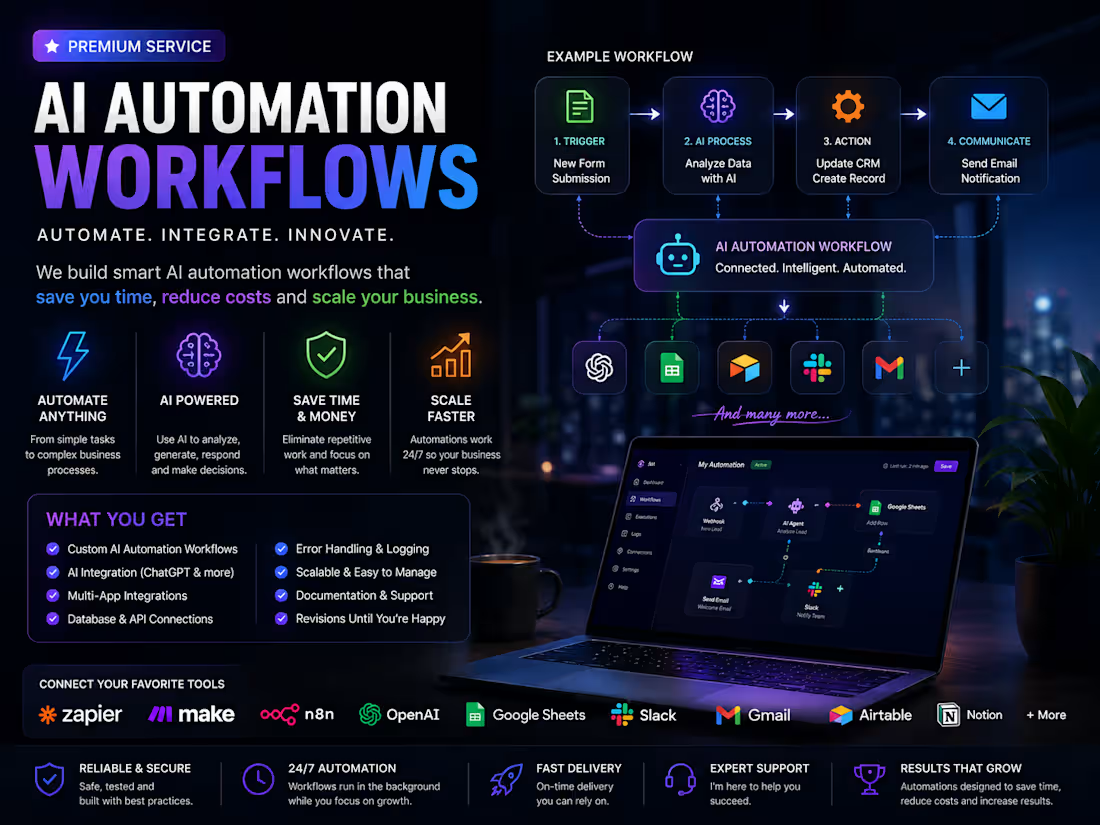
Are you spending too much time on repetitive tasks, manually moving data between apps, answering the same questions, processing leads, sending emails, or managing routine business operations?
I can build custom AI-powered automation workflows that connect your tools, handle repetitive work, and help your business run more efficiently with less manual effort.
The goal is simple: you tell me what takes too much time, and I design an automated workflow around it.
What I Can Automate
I can create workflows for many different business processes, including:
• Lead collection and lead management
• Automatic email responses and follow-ups
• AI customer support workflows
• Data entry and data processing
• Form submission automation
• Social media content workflows
• AI content generation
• Customer onboarding
• Notifications and internal alerts
• Document processing
• Database updates
• CRM automation
• Appointment and booking workflows
• Reporting and data organization
• Ecommerce and order workflows
• AI-powered business assistants
• Repetitive administrative tasks
AI-Powered Automation
Your workflows can use AI to do more than simply move information from one application to another.
I can integrate AI into your workflow to analyze information, classify data, generate content, summarize documents, process customer messages, extract important details, create responses, and make decisions based on predefined rules.
This allows your automation to handle more intelligent tasks while reducing repetitive human work.
Connect the Tools You Already Use
Your workflow can connect multiple platforms and services together through APIs, webhooks, and automation platforms.
Examples include:
• OpenAI / ChatGPT
• Google Sheets
• Gmail
• Slack
• Airtable
• Notion
• CRM systems
• Forms
• Databases
• Web applications
• APIs and webhooks
• Zapier
• Make
• n8n
The exact tools depend on your business and the workflow you want to build.
How It Works
1. Tell me what you want to automate
You can explain your current process in simple words, even if you are not technical.
2. I design the workflow
I map out the steps, triggers, actions, AI processing, integrations, and required logic.
3. I build the automation
The workflow is created and connected to the required tools and services.
4. I test everything
I test the workflow to make sure the information moves correctly and the automation behaves as expected.
5. You receive the finished workflow
You get a working automation designed around your business process, along with the necessary setup and documentation.
Examples
A few examples of what can be built:
New Lead Automation
New form submission → AI analyzes lead → saves information → sends personalized email → notifies sales team.
AI Customer Support
Customer message → AI understands request → generates response → sends reply → records conversation.
Content Automation
Topic entered → AI generates content → content is processed → saved to database → team receives notification.
Data Processing Automation
New document or form → information extracted → AI processes data → database updated → confirmation sent.
Who This Service Is For
This service is ideal for:
• Startups
• SaaS businesses
• Agencies
• Online businesses
• Ecommerce businesses
• Consultants
• Small businesses
• Entrepreneurs
• Teams handling repetitive processes
You do not need to know how automation works. Just explain the process you currently perform manually, and we can turn it into an automated workflow.
What You Get
Depending on your project, your automation can include:
• Custom workflow design
• AI integration
• Multiple app integrations
• API and webhook connections
• Triggers and conditional logic
• Data processing
• Error handling
• Testing and troubleshooting
• Workflow documentation
• Basic support after delivery
Every workflow is built around the specific requirements of your business rather than using a one-size-fits-all template.
Ready to Automate?
Tell me what task or business process you want to automate, which tools you currently use, and what you want the final workflow to accomplish.
I’ll turn the manual process into a practical AI-powered workflow that can work in the background while you focus on more important parts of your business.
FAQs
Abeddou's other services
Contact for pricing
Duration1 week
Tags
Make

N8N
OpenAI

Zapier

AI Automation
AI Integration
API Integration
Business Automation
Workflow Automation
Service provided by
Abeddou Soufiane Kouba, Algeria
AI Automation Workflows for Your BusinessAbeddou Soufiane
Contact for pricing
Duration1 week
Tags
Make
N8N
OpenAI
Zapier
AI Automation
AI Integration
API Integration
Business Automation
Workflow Automation
Are you spending too much time on repetitive tasks, manually moving data between apps, answering the same questions, processing leads, sending emails, or managing routine business operations?
I can build custom AI-powered automation workflows that connect your tools, handle repetitive work, and help your business run more efficiently with less manual effort.
The goal is simple: you tell me what takes too much time, and I design an automated workflow around it.
What I Can Automate
I can create workflows for many different business processes, including:
• Lead collection and lead management
• Automatic email responses and follow-ups
• AI customer support workflows
• Data entry and data processing
• Form submission automation
• Social media content workflows
• AI content generation
• Customer onboarding
• Notifications and internal alerts
• Document processing
• Database updates
• CRM automation
• Appointment and booking workflows
• Reporting and data organization
• Ecommerce and order workflows
• AI-powered business assistants
• Repetitive administrative tasks
AI-Powered Automation
Your workflows can use AI to do more than simply move information from one application to another.
I can integrate AI into your workflow to analyze information, classify data, generate content, summarize documents, process customer messages, extract important details, create responses, and make decisions based on predefined rules.
This allows your automation to handle more intelligent tasks while reducing repetitive human work.
Connect the Tools You Already Use
Your workflow can connect multiple platforms and services together through APIs, webhooks, and automation platforms.
Examples include:
• OpenAI / ChatGPT
• Google Sheets
• Gmail
• Slack
• Airtable
• Notion
• CRM systems
• Forms
• Databases
• Web applications
• APIs and webhooks
• Zapier
• Make
• n8n
The exact tools depend on your business and the workflow you want to build.
How It Works
1. Tell me what you want to automate
You can explain your current process in simple words, even if you are not technical.
2. I design the workflow
I map out the steps, triggers, actions, AI processing, integrations, and required logic.
3. I build the automation
The workflow is created and connected to the required tools and services.
4. I test everything
I test the workflow to make sure the information moves correctly and the automation behaves as expected.
5. You receive the finished workflow
You get a working automation designed around your business process, along with the necessary setup and documentation.
Examples
A few examples of what can be built:
New Lead Automation
New form submission → AI analyzes lead → saves information → sends personalized email → notifies sales team.
AI Customer Support
Customer message → AI understands request → generates response → sends reply → records conversation.
Content Automation
Topic entered → AI generates content → content is processed → saved to database → team receives notification.
Data Processing Automation
New document or form → information extracted → AI processes data → database updated → confirmation sent.
Who This Service Is For
This service is ideal for:
• Startups
• SaaS businesses
• Agencies
• Online businesses
• Ecommerce businesses
• Consultants
• Small businesses
• Entrepreneurs
• Teams handling repetitive processes
You do not need to know how automation works. Just explain the process you currently perform manually, and we can turn it into an automated workflow.
What You Get
Depending on your project, your automation can include:
• Custom workflow design
• AI integration
• Multiple app integrations
• API and webhook connections
• Triggers and conditional logic
• Data processing
• Error handling
• Testing and troubleshooting
• Workflow documentation
• Basic support after delivery
Every workflow is built around the specific requirements of your business rather than using a one-size-fits-all template.
Ready to Automate?
Tell me what task or business process you want to automate, which tools you currently use, and what you want the final workflow to accomplish.
I’ll turn the manual process into a practical AI-powered workflow that can work in the background while you focus on more important parts of your business.
FAQs
Abeddou's other services
Contact for pricing