
Website UI DesignNebrasse Alaimi
Consistency: Maintain consistency in design elements such as colors, typography, buttons, and icons throughout the website. Consistency helps users navigate and understand the interface more easily.
Visual Hierarchy: Use visual cues such as size, color, and contrast to establish a clear hierarchy of elements. This helps users understand the importance and relationships between different elements on the page.
Simplicity: Keep the UI design clean and uncluttered. Remove unnecessary elements and avoid overwhelming the user with too much information or too many options on a single screen.
Clear and Intuitive Navigation: Design an easily recognizable and easy-to-use navigation system. Use standard navigation patterns such as menus, breadcrumbs, and clickable icons to help users navigate through the website.
Responsive Design: Ensure the UI design is responsive and adapts to different screen sizes and devices. Elements should reflow and resize appropriately to provide a seamless experience across desktop, tablet, and mobile devices.
Use of Whitespace: Incorporate whitespace (empty space) strategically to provide visual breathing room between elements. Whitespace helps improve readability and enhances the overall aesthetic appeal.
Button and Call-to-Action Design: Use clear and visually distinguishable buttons for important actions. Make sure buttons are appropriately sized, have sufficient contrast, and use descriptive labels to guide user interactions.
What's included
User Interface (UI) Design
Creation of visually appealing and intuitive user interfaces for the website, ensuring a seamless and engaging user experience.
Example work
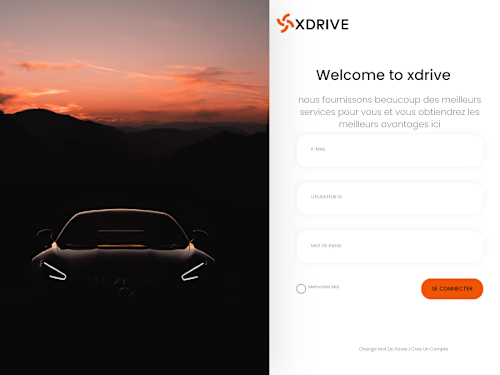
Nebrasse's other services


Starting at$25 /hr
Tags
Adobe Illustrator

Adobe Photoshop

Adobe XD

Graphic Designer
UI Designer
Web Designer
Service provided by
Nebrasse Alaimi Tunisia
Website UI DesignNebrasse Alaimi
Starting at$25 /hr
Tags
Adobe Illustrator
Adobe Photoshop
Adobe XD
Graphic Designer
UI Designer
Web Designer
Consistency: Maintain consistency in design elements such as colors, typography, buttons, and icons throughout the website. Consistency helps users navigate and understand the interface more easily.
Visual Hierarchy: Use visual cues such as size, color, and contrast to establish a clear hierarchy of elements. This helps users understand the importance and relationships between different elements on the page.
Simplicity: Keep the UI design clean and uncluttered. Remove unnecessary elements and avoid overwhelming the user with too much information or too many options on a single screen.
Clear and Intuitive Navigation: Design an easily recognizable and easy-to-use navigation system. Use standard navigation patterns such as menus, breadcrumbs, and clickable icons to help users navigate through the website.
Responsive Design: Ensure the UI design is responsive and adapts to different screen sizes and devices. Elements should reflow and resize appropriately to provide a seamless experience across desktop, tablet, and mobile devices.
Use of Whitespace: Incorporate whitespace (empty space) strategically to provide visual breathing room between elements. Whitespace helps improve readability and enhances the overall aesthetic appeal.
Button and Call-to-Action Design: Use clear and visually distinguishable buttons for important actions. Make sure buttons are appropriately sized, have sufficient contrast, and use descriptive labels to guide user interactions.
What's included
User Interface (UI) Design
Creation of visually appealing and intuitive user interfaces for the website, ensuring a seamless and engaging user experience.
Example work
Nebrasse's other services
$25 /hr