
Complete Landing page DesignViswanath R
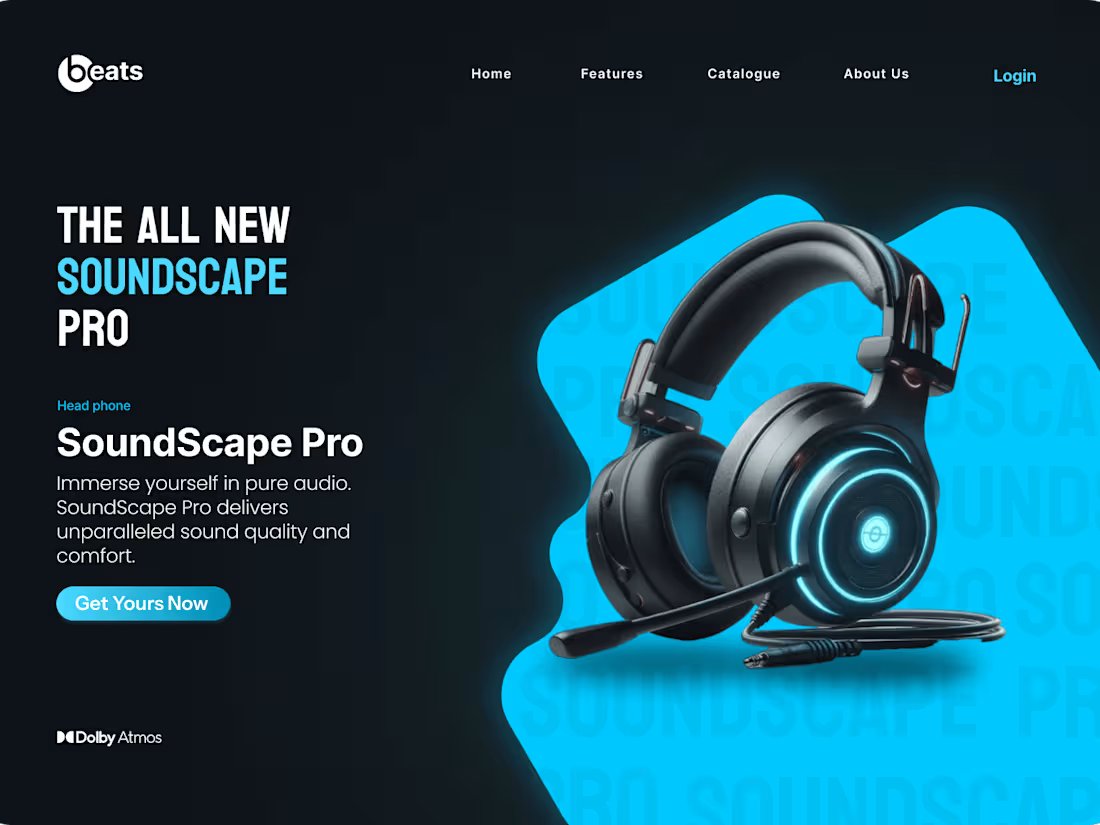
I offer tailored Landing Page UI Design services that focus on creating visually stunning, user-friendly, and responsive designs. With a keen eye for detail and a collaborative approach, I deliver high-quality mockups, interactive prototypes, and complete design assets. What sets me apart is my commitment to aligning the design with your brand vision while ensuring a seamless user experience across all devices.
What's included
Deliverables for Landing Page UI Design
1. High-Fidelity UI Mockups
Description: These are detailed visual designs of the landing page, created to give the client a clear idea of how the final product will look. The mockups will include all the visual elements such as buttons, text styles, images, and layout.
Format: PDF, PNG, or JPEG (high-resolution files) along with an editable source file (Figma).
Quantity: 1 main mockup for the landing page, with variations for different screen sizes (responsive design) such as desktop, tablet, and mobile views.
Revisions: Up to 3 rounds of revisions to the mockup, based on client feedback.
2. Interactive Prototype
Description: A clickable prototype that allows the client to interact with the design as if they were using the final product. This helps clients visualize user experience and flow.
Format: Figma, link for web-based prototypes.
Quantity: 1 fully interactive prototype showcasing the landing page functionality (buttons, links, hover effects, etc.).
Revisions: Up to 2 rounds of revisions to the prototype interactions.
3. Design Assets & Style Guide
Description: A collection of all the UI components and visual assets (icons, images, illustrations) used in the design, along with a style guide that outlines font choices, color palette, spacing, and button styles.
Format: Zip folder containing assets (SVG, PNG, JPEG) and a PDF or Figma file for the style guide.
Quantity: All assets used in the design, grouped and labeled for easy use by developers.
Revisions: 1 round of revisions for any requested updates or optimizations to the design assets.
Viswanath's other services
Starting at$1,500
Duration1 week
Tags
Adobe Illustrator

Adobe Photoshop

Figma

Framer

Graphic Designer
Logo Designer
Packaging Designer
Service provided by
Viswanath R Thiruvananthapuram, India
Complete Landing page DesignViswanath R
Starting at$1,500
Duration1 week
Tags
Adobe Illustrator
Adobe Photoshop
Figma
Framer
Graphic Designer
Logo Designer
Packaging Designer
I offer tailored Landing Page UI Design services that focus on creating visually stunning, user-friendly, and responsive designs. With a keen eye for detail and a collaborative approach, I deliver high-quality mockups, interactive prototypes, and complete design assets. What sets me apart is my commitment to aligning the design with your brand vision while ensuring a seamless user experience across all devices.
What's included
Deliverables for Landing Page UI Design
1. High-Fidelity UI Mockups
Description: These are detailed visual designs of the landing page, created to give the client a clear idea of how the final product will look. The mockups will include all the visual elements such as buttons, text styles, images, and layout.
Format: PDF, PNG, or JPEG (high-resolution files) along with an editable source file (Figma).
Quantity: 1 main mockup for the landing page, with variations for different screen sizes (responsive design) such as desktop, tablet, and mobile views.
Revisions: Up to 3 rounds of revisions to the mockup, based on client feedback.
2. Interactive Prototype
Description: A clickable prototype that allows the client to interact with the design as if they were using the final product. This helps clients visualize user experience and flow.
Format: Figma, link for web-based prototypes.
Quantity: 1 fully interactive prototype showcasing the landing page functionality (buttons, links, hover effects, etc.).
Revisions: Up to 2 rounds of revisions to the prototype interactions.
3. Design Assets & Style Guide
Description: A collection of all the UI components and visual assets (icons, images, illustrations) used in the design, along with a style guide that outlines font choices, color palette, spacing, and button styles.
Format: Zip folder containing assets (SVG, PNG, JPEG) and a PDF or Figma file for the style guide.
Quantity: All assets used in the design, grouped and labeled for easy use by developers.
Revisions: 1 round of revisions for any requested updates or optimizations to the design assets.
Viswanath's other services
$1,500